Remove eMudhra and Sectigo/Comodo AAA root certificates
Address several Linux potential skb vulnerabilites, including ZDI-CAN-33367
Improve reliability on networks with hundreds of VLANs
Improve client compatibility when using guest backup network
Captive portal: Allow user to optionally view typed password/voucher
Revert to original config after fallback-upon-failure is no longer necessary
Resolve issue with manual setting of 80 MHz channels
Deployment for this update has been paused for all AP6 devices (including AP6, AP6W, AP6-Pro, and AP6-Pro-Outdoor) This update is being rolled out now, for AP7-Pro. You can manually initiate the upgrade if you’d like, or it will automatically update overnight (if auto-updates are enabled). The complete, up-to-date change log is available here:
As always, if you have questions or encounter any issues, feel free to reply here or start a new topic. Please include details about the issue so we can assist you effectively.
I had 2 AP6s that did not come back after this upgrade. Had to hard power cycle to get them back online. However my 3 AP6 Pros did not have this issue and upgraded without issue.
Spoke too soon. The AP6 will not stay online, they enter into a reboot loop and keep crashing. Factory reset using the POR method to rollback the update. AP6s are now stable. Re-attempted the update to 3.0p, APs continually crash and reboot.
awesome update ! Is there any reason why it was released for the AP7 and paused for the rest of the lineup? I have the ap6 pro and just mostly curious .
new to the AltaLabs environment and want to say I am pleasantly surprised in this company , awesome products !
If the standard reset does not work or if you need to recover a stuck unit:
Unplug the Ethernet/PoE cable to power down the AP6.
Press and hold down the Reset Button.
While continuing to hold the reset button, plug the Ethernet/PoE cable back into the unit.
Keep holding the reset button for about 5 to 8 seconds (or until you see the front LED change/flash), then release it.
(Note: During a Power-on Reset, the AP may attempt to reach out to the internet to download and apply default firmware before finishing with a solid white LED). [1, 2, 3, 4]
Got an issue in few aps on the network, continuously restarts after this update. After switch if the PoE switch completely turned off for few minutes and the aps got boot up and find no issues after all.
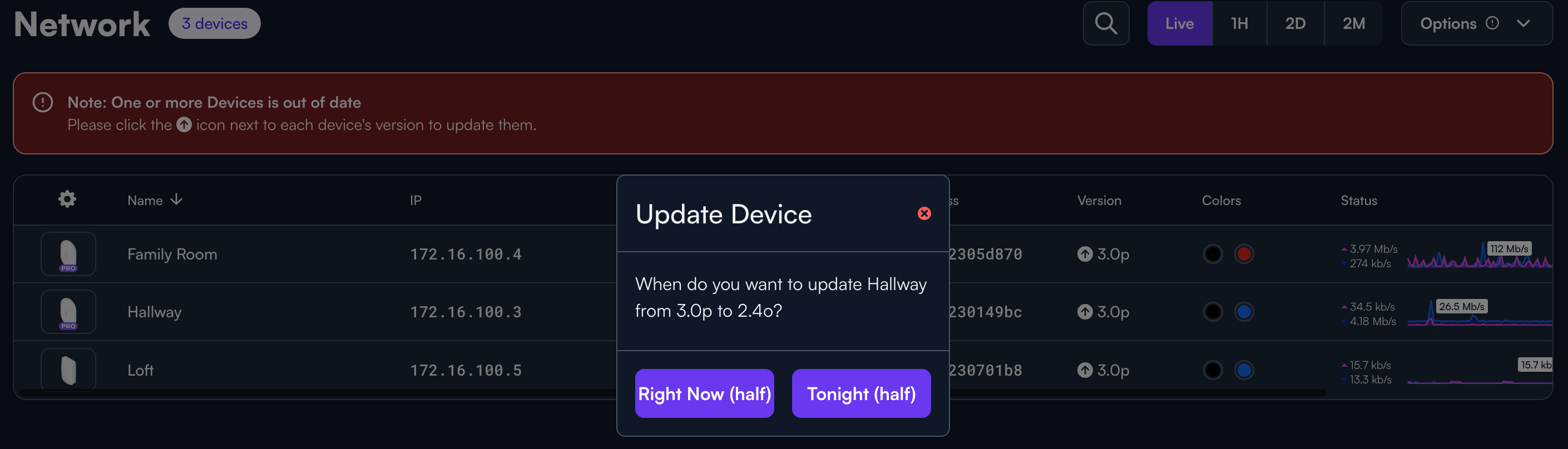
If your AP6 has gone disconnected due to the 3.0p update, please power cycle it. It should come back online, and you will have a few minutes (to a few hours, just depends on the activity of the site) to downgrade back to 2.4p.
We are extremely sorry for the inconvenience, but we have been actively working to remotely downgrade many devices, as well. If you need any assistance, please reach out.
You can also use the POR method above, thanks @tobycth3 !
I upgraded last night without any issues, but I just noticed all three access points are showing an available update for version 2.4o. I saw the message above stating that deployment of the update has been paused for all AP6 devices, including the AP6, AP6W, AP6-Pro, and AP6-Pro-Outdoor.
For those of us who updated to 3.0p without any issues, should we still downgrade?