Seems to have done it again overnight. Does an alta router do something that would break what this script does every night? This morning it’s not accessible again even though it worked all day yesterday.
Sorry to bother you again but could you help me figure out why it dies every night where it seemingly forgets the route or something? It works at first and will keep working as long as I keep an active connection to it. It shows in my router under devices and everything with a 192.168.11.1 IP but I cannot connect to it eventually.
Not a bother at all. Sorry for the delay in response, I took a few personal days last week, so I didn’t see your follow up messages until today.
For what it’s worth, this is the exact module I have, which is a WAS-110 equivalent (as I’m located in Canada): XGSPON SFP+ stick XGS-PON SFP+ ONT: 10G Burst Mode Transceiver with MAC Function
This is the firmware I’m currently running on it: Release v2.8.3 · djGrrr/8311-was-110-firmware-builder · GitHub
I just wanted to check in and say I’ve read this, but I won’t be able to actually dig in until later on. I need to review my own script again versus what I extracted from it and shared here just to make sure I didn’t miss anything obvious, then go from there. It literally just works for me, every day—I have one for this module, then I have another one for my cable modem so I can easily access both from my LAN.
Ok sorry to bother you on your vacation. That is the module I have and on the previous router it always let me connect to it but it is just weird it seems to drop out over a certain amount of time on the IP. I stay connected however. Also, thanks for the response and talk to you when you get back.
No worries; I appreciate the concern. You’re not being a bother or interrupting a vacation. I mentioned personal time so you knew why my response was delayed.
I compared this version with an earlier version (HERE), and the main difference is that instead of using the existing lan firewall zone, it creates a new zone. That’s one area where it might be more fragile than the original approach. I’m suspecting that there is a firewall or interface reload triggering a state drift which breaks this. That would explain why it works initially but later becomes unreachable.
Here is an updated version that returns to the original LAN-zone logic (it is a bit different as it adds detection in case we ever move it from [0]). It defaults to the simple, proven method (direct attachment to the LAN zone), and also includes an optional macvlan mode. The macvlan option doesn’t change routing or firewall behavior, but can be more robust on systems where interface or routing state changes might otherwise interrupt access.
There are some variables at the top if needed. Hope this helps but please let me know either way. I would recommend regular/plain mode to start, but if the issue persists, then I would suggest trying the macvlan mode next.
SCRIPT REMOVED.
I think this finally got it. It’s allowed me access all day but the real test will be tonight and if it survives overnight then I’d call it complete. Hoping it does well tonight and thanks again for the new script!
Spoke to soon I guess as the connection to the was broke again last night. It’s like there is a job running at night that erases what the script does.
What state is it in right now? Is it still broken, or did rerunning the script restore access?
A few quick checks that will help narrow this down:
- Did you leave it running in the default mode?
- Have you tried the alternate
macvlanmode yet? If not, this is the most important next step. - When it’s broken, can the Route10 itself ping the module (ping 192.168.11.1)? If so, what happens?
For reference, I’m running the same code you have, included inside a larger post-cfg.sh, and I can consistently access modem management on both WANs without needing to re-run the script.
You mentioned it feels like something is undoing the config overnight. There are no scripts that intentionally remove this. A post-cfg.sh only runs at provision time and on boot (at the end of both). Assuming there’s no internal network using 192.168.11.0/24, there are a few possible causes.
The one I still suspect most is WAN interface churn. If the WAN is repeatedly going up and down, it can eventually break this setup, even due to false positives. In my case, my ISP’s DNS did not respond reliably to the default ping target (ping.alta.inc), which caused noticeable false WAN events. Switching to IP-based DNS servers cleared this up completely, although in most cases the default target works fine.
If you want to confirm whether this is happening, you can check directly from the Route10 shell:
grep mwan3track /var/log/messages*
You can also filter for mwan3track in Control. Open the Events view (purple bell icon to the left of the site list, or Events under the Account menu on mobile), then go to Logs, enter mwan3track, and click the magnifying glass (or Start Streaming on mobile).
I’m not asking you to parse or interpret the logs, but I’m happy to review them if you want to send them directly. There may be related messages nearby that are also useful, but if we see WAN failures due to missed pings, changing the WAN health check target is an easy next step to test.
I’ll send you a small snapshot script shortly with instructions to capture state when the issue is present. If you’d rather have me help debug this directly, you’re welcome to invite me to the site. Whatever you’re most comfortable with.
I’m also running the latest script in non-macvlan mode and it survived the evening and continues to allow me access to the WAS-110.
I wanted to update that I ended up having to use MACVLAN and it survived the night.
@Jerky_san @jcolp and anyone else using the latest version of that script please replace it with this new version. In undoing some of the things I had on my own I inadvertently opened up the firewall. It won’t affect PPPoE WANs, but it absolutely will affected DHCP and static WANs.
Here’s a fixed version which defaults to the macvlan method. Technically it’s an extra layer to debug. but it seems to be more robust in general so I think that trade-off is fair.
Please let me know if you have any questions. IF your module is connected to the right SFP+ port, and at the default address then you don’t need to do anything but place this script.
For new users, unfamiliar with placing post-cfg.sh, please see the post HERE.
#!/bin/ash
# /cfg/post-cfg.sh — WAS-110 XGS-PON ONT management (Route10)
#
# Design:
#   - Creates a dedicated ONT management interface using a MACVLAN on the chosen parent port
#   - Assigns a static router-side IP in the ONT management subnet (typically 192.168.11.0/24)
#   - Places ONT management in its own firewall zone (ont_mgmt)
#   - Allows LAN -> ONT management access only
#   - Prevents ONT management from initiating or transiting traffic to LAN or WAN
#
# Rationale:
#   - Avoids shared-parent ambiguity when the ONT port is also used for WAN (DHCP or PPPoE)
#   - Prevents trust-boundary violations and accidental traffic leaks
#   - Ensures deterministic LAN client access to ONT management across all WAN types
#
# Notes:
#   - Avoid using 192.168.11.0/24 internally, as it collides with typical ONT management defaults
#   - Script is idempotent and safe to re-run
#

PATH=/sbin:/usr/sbin:/bin:/usr/bin
set -u

log()  { logger -t post-cfg -p user.notice  "$*"; }
warn() { logger -t post-cfg -p user.warning "$*"; }

# -------------------------
# Settings (edit these)
# -------------------------
ONT_PARENT_DEV="eth4"          # Port where the ONT module is connected (Route10 default SFP+ WAN is eth4)
ONT_IP="192.168.11.2"          # Router-side IP on the ONT mgmt subnet (choose any unused IP in 192.168.11.0/24)
ONT_NETMASK="255.255.255.0"
ONT_PEER="192.168.11.1"        # ONT mgmt IP (typical WAS-110 default)

# MACVLAN device name (kernel netdevice) used for ONT management
MACVLAN_DEV="ont_mgmt0"

# Firewall names
ONT_ZONE_NAME="ont_mgmt"
ONT_FWD_NAME="lan_to_ont_mgmt"
# -------------------------

log "ONT mgmt: mode=macvlan-only parent=$ONT_PARENT_DEV dev=$MACVLAN_DEV ip=$ONT_IP/$ONT_NETMASK peer=$ONT_PEER"

# -------------------------
# Sanity checks
# -------------------------
if ! ip link show "$ONT_PARENT_DEV" >/dev/null 2>&1; then
  warn "Parent device '$ONT_PARENT_DEV' not found (skipping config)"
  exit 0
fi

# -------------------------
# Network config (MACVLAN-only)
# -------------------------
# Device section for macvlan
uci -q delete network.ont_mgmt_dev
uci set network.ont_mgmt_dev='device'
uci set network.ont_mgmt_dev.name="$MACVLAN_DEV"
uci set network.ont_mgmt_dev.type='macvlan'
uci set network.ont_mgmt_dev.ifname="$ONT_PARENT_DEV"
uci set network.ont_mgmt_dev.mode='bridge'

# Interface section bound to macvlan device
uci -q delete network.ont_mgmt
uci set network.ont_mgmt='interface'
uci -q delete network.ont_mgmt.ifname
uci -q delete network.ont_mgmt.device
uci set network.ont_mgmt.device="$MACVLAN_DEV"
uci set network.ont_mgmt.proto='static'
uci set network.ont_mgmt.ipaddr="$ONT_IP"
uci set network.ont_mgmt.netmask="$ONT_NETMASK"
uci set network.ont_mgmt.defaultroute='0'
uci set network.ont_mgmt.peerdns='0'
uci set network.ont_mgmt.auto='1'
uci set network.ont_mgmt.metric='0'
uci set network.ont_mgmt.dns_metric='0'

# -------------------------
# Firewall config (Model A: dedicated zone + one-way forwarding)
# -------------------------
# Remove ont_mgmt from any existing zones (prevents dual-trust leaks)
# (idempotent: ok if not present)
for sec in $(uci show firewall 2>/dev/null | sed -n "s/^firewall\.\([^=]*\)\.name='[^']*'$/\1/p"); do
  uci -q del_list firewall."$sec".network='ont_mgmt'
done

# Create/update dedicated ont_mgmt zone
uci -q delete firewall.ont_mgmt
uci set firewall.ont_mgmt='zone'
uci set firewall.ont_mgmt.name="$ONT_ZONE_NAME"
uci -q delete firewall.ont_mgmt.network
uci add_list firewall.ont_mgmt.network='ont_mgmt'
uci set firewall.ont_mgmt.input='ACCEPT'
uci set firewall.ont_mgmt.output='ACCEPT'
uci set firewall.ont_mgmt.forward='REJECT'

# Create/update lan -> ont_mgmt forwarding only
uci -q delete firewall."$ONT_FWD_NAME"
uci set firewall."$ONT_FWD_NAME"='forwarding'
uci set firewall."$ONT_FWD_NAME".src='lan'
uci set firewall."$ONT_FWD_NAME".dest="$ONT_ZONE_NAME"

# -------------------------
# Apply changes
# -------------------------
uci commit network || warn "uci commit network failed"
uci commit firewall || warn "uci commit firewall failed"

# Bring up the interface
if ifup ont_mgmt >/dev/null 2>&1; then
  log "ifup ont_mgmt OK"
else
  warn "ifup ont_mgmt failed (exit $?)"
fi

# Reload firewall
if /etc/init.d/firewall reload >/dev/null 2>&1; then
  log "firewall reloaded"
else
  warn "firewall reload failed"
fi

# -------------------------
# Verify
# -------------------------
# Report link state of parent + macvlan existence
if ip link show "$ONT_PARENT_DEV" 2>/dev/null | grep -q "LOWER_UP"; then
  log "$ONT_PARENT_DEV carrier: up"
else
  warn "$ONT_PARENT_DEV carrier: down (ONT reachability may fail)"
fi

if ip link show "$MACVLAN_DEV" >/dev/null 2>&1; then
  log "macvlan device present: $MACVLAN_DEV"
else
  warn "macvlan device missing: $MACVLAN_DEV"
fi

# Quick reachability test from the router
if ping -c1 -W1 "$ONT_PEER" >/dev/null 2>&1; then
  log "ONT reachable ($ONT_PEER)"
else
  warn "ONT not reachable ($ONT_PEER)"
fi

log "post-cfg.sh complete"
exit 0
Changed out thanks
Switched out and rebooted for good measure, all good.
@Jerky_san @jcolp glad to hear, thanks for the quick action, and sorry that I didn’t catch that prior to sharing that earlier version.
I know that the Q&A says that SFP+ ONTs are not officially supported, but do you think that one day this will be the case?
Small businesses looking for alternative to isp’s ONT can’t even considere Alta Route10 product, when competitors are supporting it out of the box.
@gor3t3x Can you show where Q&A says they are not supported? We definitely work with many of them - ideally they just need to consume less than 2W of power.
Edit: Found where it says that, and we are updating the wording there.
Hi Jeff,
Thanks for having updated the article center.
Would be great to have a dedicated tag for those sfp ont on the sfp compatibility list. And have those that are working on that list too 
Thanks for your support.
Regards,
Gore
Just to ask for people who are using the WAS-110 on AT&T fiber in here with the route 10. When you cold boot(power removed and inserted) how long does it take for your route10 to get an IP from the WAS-110?
I’m using an XGS-PON with ATT and it takes no more than minute. On DHCP renews from ATT (every 14 days) it takes a little longer.
Thank you for this. I’ve been trying your updated script and no cigar for me  As always, if I change the port to standard from WAN, I can access it. But to revert it back, I need to stick my MiFI to WAN1 in order to change WAN2 back to WAN. A bit annoying.
- I’m using an XGS-PON ONT vs. WAS-110
- I’ve changed the ONT’s IP to 192.168.50.94
- Results after your script
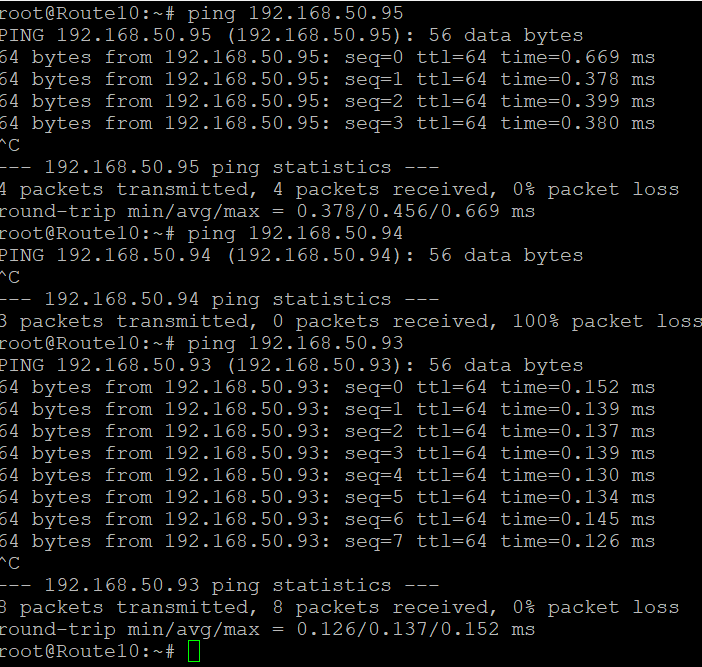
- I can’t ping 192.168.50.94
- I can ping 192.168.50.93
# -------------------------
# Settings (edit these)
# -------------------------
ONT_PARENT_DEV="eth4"          # Port where the ONT module is connected (Route10 default SFP+ WAN is eth4)
ONT_IP="192.168.50.93"          # Router-side IP on the ONT mgmt subnet (choose any unused IP in 192.168.11.0/24)
ONT_NETMASK="255.255.255.0"
ONT_PEER="192.168.50.94"        # ONT mgmt IP (typical WAS-110 default)