tfmm
August 15, 2025, 9:49pm
1
I’m probably missing something painfully obvious. I’ve got a completely new setup, route10, s8poe, 2x ap6pro on the public controller.
I’m attempting to create a VLAN for WiFi, and it works to access public internet, but I cannot figure out how to route it back so it has access to other VLANs as well. Right now I’m in the beginning stages of separating out my network, so most everything is on VLAN 1, but I will need to be able to route between VLANs as I work towards separating everything.
Generally it should just work if you’re using pretty default settings. Any chance you could post some screenshots of the WiFi and Network settings to help with troubleshooting a bit more? If it’s something pretty simple hopefully someone can spot the issue real quick
1 Like
tfmm
August 16, 2025, 1:20am
3
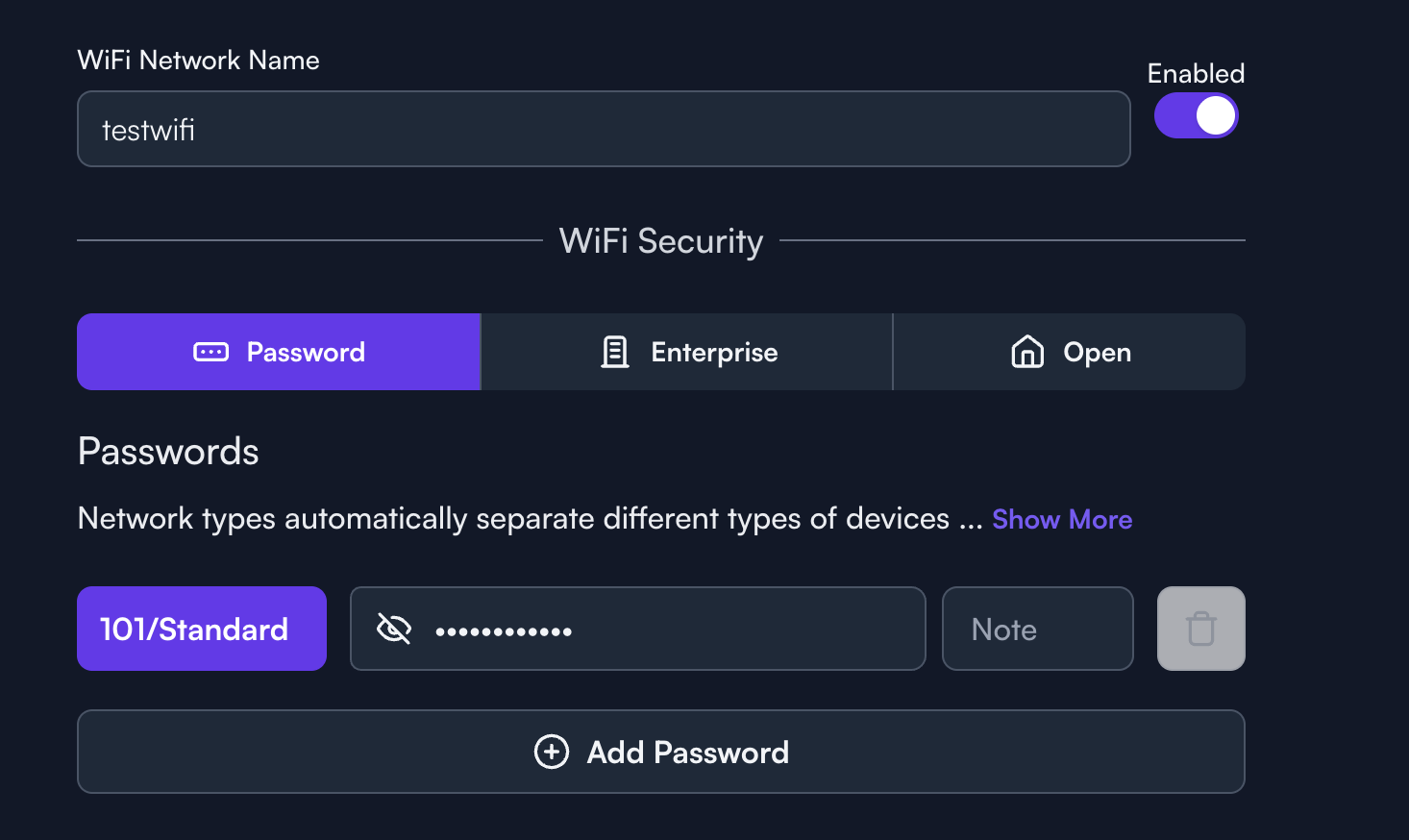
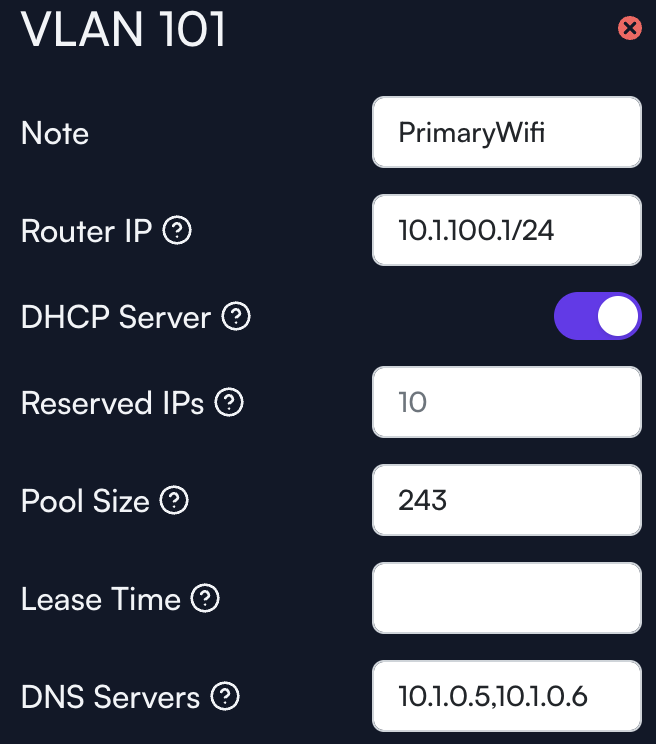
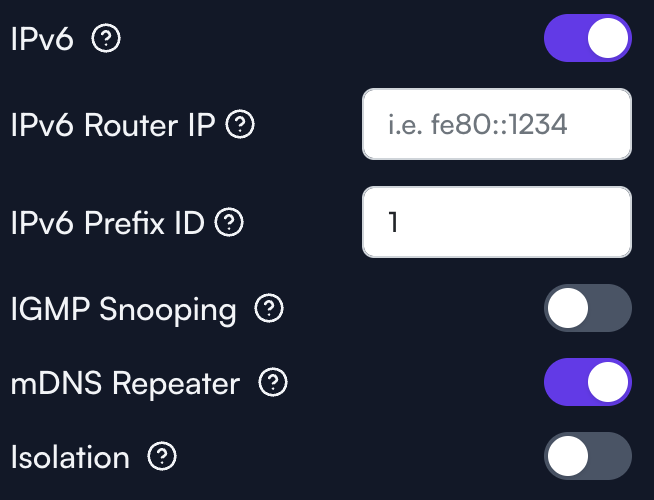
Here’s some screenshots:
Network:
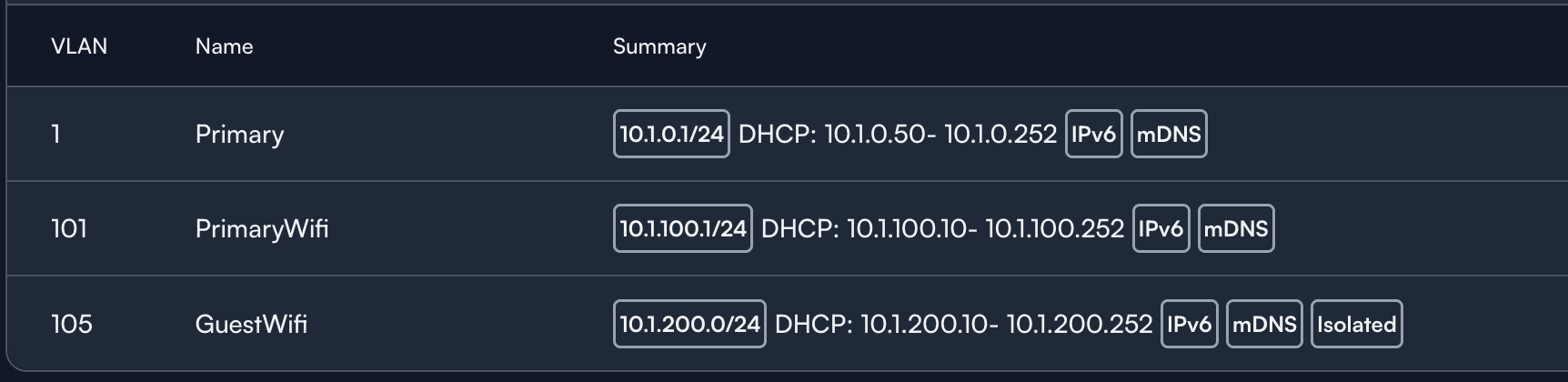
Networks:
I have no static routes, and nothing other than defaults setup in the firewall.
I’m also running into an issue where DHCP appears to not be handing out proper dns servers (the servers are on vlan1).
tfmm
August 16, 2025, 1:42am
4
Disregard the DNS comment, I think that was an issue with recursion settings on my DNS servers not allowing the proper IPv6 DHCP range.
OK, cool, looks pretty fine to me off hand. Since VLAN 105 is isolated, what’s happening if we try to ping from a device on VLAN 1 to VLAN 101? Or vice-versa?
One thing I’m curious to try since there’s only the one WiFi password right now, is instead of setting the VLAN in the Alta Pass drop down, maybe instead remove it from there and set it under the Advanced settings Default Network VLAN field. Just something I noticed about how I have WiFi networks setup in my sites. I don’t think it should make a difference but it might be worth trying out as a test
The VLAN definition for the Guest WiFi, which is set to .0 /24 could possibly create problems. Otherwise nothing obvious.
tfmm
August 16, 2025, 11:24am
7
Good catch. I changed that, but still don’t see any change on the vlan 101 behavior.
1 Like
tfmm
August 16, 2025, 11:55am
8
So I can ping from vlan 1 to 101, but not the other way around.
I also attempted making 101 the default on the testwifi, no change there either.
Huh, weird! Is there any chance you could put one of the wired devices on 101 and see if there’s still a problem pinging back over to vlan 1? I assume nothing has been tweaked with the firewall rules or anything like that? Just trying to cover the bases
Could also be worth deleting the PrimaryWifi SSID and re-creating it just to see if there’s something weird going on like it didn’t get provisioned properly or something along those lines.
tfmm
August 17, 2025, 2:49pm
10
I just put a wired device on 101, and it has the same issues, can’t connect to anything on 1. It was a dumb IoT device, but it’s not getting DNS, so I’m assuming behavior is the same. I’m going to try blowing away the vlan (again, I think) maybe I mis-clicked something during the setup.
tfmm
August 17, 2025, 2:56pm
11
Same issue after recreating the VLAN, I’ve got to be missing something super simple here, I just can’t figure out what.
Did you try removing the pointer to the local DNS server, just to make there is nothing going on there?
tfmm
August 17, 2025, 4:18pm
13
Just tested, if I do this, I then get public DNS, but not private, and I still cannot connect to devices on VLAN1
1 Like
Just to rule out something really weird, it might be worthwhile to create a new site that’s setup as close to default as possible and to move the devices over to the new site (since that’s fairly straightforward to do). That would help make sure there isn’t some strange issue with how the site or the devices were provisioned initially.
Another option would be to go into the router terminal (by shift clicking on the router name) and running the command uci export. That should spit out the entire router configuration and it could be posted here for further examination.
Just doing some brainstorming! There of course if the option of reaching out to support and inviting someone to your site to further examine the setup once the work week rolls back around.
tfmm
August 17, 2025, 6:00pm
16
Here’s the export:
package acme
config acme
option state_dir '/etc/acme'
option account_email 'email@example.org'
option debug '0'
config cert 'example'
option enabled '0'
option use_staging '1'
option keylength '2048'
option update_uhttpd '1'
option update_nginx '1'
option update_haproxy '1'
option webroot '/www/.well-known/acme-challenge'
list domains 'example.org'
package ddns
config ddns 'global'
option ddns_dateformat '%F %R'
option ddns_loglines '250'
option upd_privateip '1'
package dhcp
config dnsmasq
list domain 'example.com,10.1.0.1/24'
list domain 'example.com,10.1.101.1/24'
list domain 'localdomain,10.1.200.1/24'
option domainneeded '1'
option boguspriv '1'
option filterwin2k '0'
option localise_queries '1'
option rebind_localhost '1'
option expandhosts '1'
option nonegcache '0'
option authoritative '1'
option readethers '1'
option resolvfile '/tmp/resolv.conf.d/resolv.conf.auto'
option nonwildcard '1'
option localservice '0'
option ednspacket_max '1232'
option rebind_protection '0'
option cachesize '10000'
option dnsforwardmax '1000'
option dhcpleasemax '10000'
option allservers '1'
option noresolv '0'
option logqueries '0'
option sequential_ip '1'
option interface ' br-lan br-lan_101 br-lan_105'
option leasefile '/cfg/dhcp.leases'
option localuse '1'
option rebind_domain '/https://manage.alta.inc/'
list server '127.0.0.1#5053'
list server '127.0.0.1#5054'
list server '127.0.0.1#5055'
config dhcp 'lan'
option interface 'lan'
option dhcpv4 'server'
option force '1'
option dhcpv6 'server'
option ra 'server'
option ra_slaac '1'
option start '50'
option limit '203'
option leasetime '86400s'
list dhcp_option '15,example.com'
list dhcp_option '119,example.com,ipa.example.com'
list dhcp_option 'option:dns-server,10.1.0.5,10.1.0.6'
option dns 'redacted_ipv6'
option dns_service '0'
config dhcp 'lan_101'
option interface 'lan_101'
option dhcpv4 'server'
option force '1'
option dhcpv6 'server'
option ra 'server'
option ra_slaac '1'
option start '10'
option limit '243'
option leasetime '86400s'
list dhcp_option '15,example.com'
list dhcp_option '119,example.com,ipa.example.com'
list dhcp_option 'option:dns-server,10.1.0.5,10.1.0.6'
option dns 'redacted_ipv6'
option dns_service '0'
config dhcp 'lan_105'
option interface 'lan_105'
option dhcpv4 'server'
option force '1'
option dhcpv6 'server'
option ra 'server'
option ra_slaac '1'
option start '10'
option limit '243'
option leasetime '86400s'
list dhcp_option '15,localdomain'
list dhcp_option 'option:dns-server,1.1.1.1,1.0.0.1'
option dns_service '0'
config host
option ip 'ignore'
option mac 'redacted'
package dropbear
config dropbear
option PasswordAuth 'off'
option RootPasswordAuth 'off'
option Port '22'
option mdns 'off'
package ecm
config ecm 'global'
option acceleration_engine 'auto'
package etherwake
config etherwake 'setup'
option pathes '/usr/bin/etherwake /usr/bin/ether-wake'
option sudo 'off'
option broadcast 'off'
config target
option name 'example'
option mac '11:22:33:44:55:66'
option password 'AABBCCDDEEFF'
option wakeonboot 'off'
package firewall
config include
option path '/etc/firewall.user'
config include
option type 'script'
option path '/etc/firewall.d/qca-nss-ecm'
option family 'any'
option reload '1'
config include
option type 'script'
option path '/etc/firewall.d/ndpi'
option family 'any'
option reload '1'
config include
option type 'script'
option path '/etc/firewall.d/ndpi-filter'
option family 'any'
option reload '1'
config include
option type 'script'
option path '/usr/share/miniupnpd/firewall.include'
option family 'any'
option reload '1'
config defaults
option syn_flood '0'
option input 'REJECT'
option output 'REJECT'
option forward 'REJECT'
config zone
option name 'lan'
option input 'ACCEPT'
option output 'ACCEPT'
option forward 'ACCEPT'
list network 'lan'
list network 'lan_101'
option mtu_fix '1'
option helper 'ftp pptp tftp'
config zone
option name 'wan'
option input 'DROP'
option output 'ACCEPT'
option forward 'DROP'
list network 'wan'
list network 'wan6'
list network 'wan2'
option masq '1'
option mtu_fix '1'
config zone
option name 'vpn'
option input 'ACCEPT'
option output 'ACCEPT'
option forward 'ACCEPT'
list network 'xfrm0'
list network 'vpn0'
list network 'vpn1'
list network 'wg'
option mtu_fix '1'
option helper 'ftp pptp tftp'
config zone
option name 'vpnMasq'
option input 'ACCEPT'
option output 'ACCEPT'
option forward 'ACCEPT'
option masq '1'
option mtu_fix '1'
option helper 'ftp pptp tftp'
config zone
option name 'v105zone'
option input 'ACCEPT'
option output 'ACCEPT'
option forward 'ACCEPT'
list network 'lan_105'
option mtu_fix '1'
option helper 'ftp pptp tftp'
config forwarding
option src 'lan'
option dest 'wan'
config forwarding
option src 'vpn'
option dest 'lan'
config forwarding
option src 'lan'
option dest 'vpn'
config forwarding
option src 'vpn'
option dest 'wan'
config forwarding
option src 'vpnMasq'
option dest 'lan'
config forwarding
option src 'lan'
option dest 'vpnMasq'
config forwarding
option src 'vpnMasq'
option dest 'wan'
config forwarding
option src 'v105zone'
option dest 'wan'
config redirect
option target 'DNAT'
option name 'GiteaSSH'
list proto 'tcp'
option src 'wan'
option dest 'lan'
option src_dport '2222'
option dest_ip '10.1.0.10'
option dest_port '2222'
list reflection_zone 'v105zone'
list reflection_zone 'vpnMasq'
list reflection_zone 'vpn'
list reflection_zone 'lan'
config redirect
option target 'DNAT'
option name 'HomeSSH'
list proto 'tcp'
option src 'wan'
option dest 'lan'
option src_dport 'redacted_port'
option dest_ip '10.1.0.12'
option dest_port 'redacted_port'
list reflection_zone 'v105zone'
list reflection_zone 'vpnMasq'
list reflection_zone 'vpn'
list reflection_zone 'lan'
config redirect
option target 'DNAT'
option name 'HTTP'
list proto 'udp'
list proto 'tcp'
option src 'wan'
option dest 'lan'
option src_dport '80'
option dest_ip '10.1.0.10'
option dest_port '80'
list reflection_zone 'v105zone'
list reflection_zone 'vpnMasq'
list reflection_zone 'vpn'
list reflection_zone 'lan'
config redirect
option target 'DNAT'
option name 'HTTPS'
list proto 'tcp'
list proto 'udp'
option src 'wan'
option dest 'lan'
option src_dport '443'
option dest_ip '10.1.0.10'
option dest_port '443'
list reflection_zone 'v105zone'
list reflection_zone 'vpnMasq'
list reflection_zone 'vpn'
list reflection_zone 'lan'
config rule
option name 'Allow DHCP renewals'
option target 'ACCEPT'
option family 'ipv4'
list proto 'udp'
option src 'wan'
option dest_port '68'
config rule
option name 'Allow Ping'
option target 'ACCEPT'
option family 'ipv4'
list proto 'icmp'
list icmp_type 'echo-request'
option src 'wan'
config rule
option name 'Allow IGMP'
option target 'ACCEPT'
option family 'ipv4'
list proto 'igmp'
option src 'wan'
config rule
option name 'Allow DHCPv6'
option target 'ACCEPT'
option family 'ipv6'
list proto 'udp'
option src 'wan'
option src_ip 'fc00::/6'
option dest_port '546'
option dest_ip 'fc00::/6'
config rule
option name 'Allow MLD'
option target 'ACCEPT'
option family 'ipv6'
list proto 'icmp'
list icmp_type '130/0'
list icmp_type '131/0'
list icmp_type '132/0'
list icmp_type '143/0'
option src 'wan'
option src_ip 'fe80::/10'
config rule
option name 'Allow ICMPv6 input'
option target 'ACCEPT'
option family 'ipv6'
list proto 'icmp'
list icmp_type 'echo-request'
list icmp_type 'echo-reply'
list icmp_type 'destination-unreachable'
list icmp_type 'packet-too-big'
list icmp_type 'time-exceeded'
list icmp_type 'bad-header'
list icmp_type 'unknown-header-type'
list icmp_type 'router-solicitation'
list icmp_type 'neighbour-solicitation'
list icmp_type 'router-advertisement'
list icmp_type 'neighbour-advertisement'
option src 'wan'
option limit '1000/sec'
config rule
option name 'Allow ICMPv6 forward'
option target 'ACCEPT'
option family 'ipv6'
list proto 'icmp'
list icmp_type 'echo-request'
list icmp_type 'echo-reply'
list icmp_type 'destination-unreachable'
list icmp_type 'packet-too-big'
list icmp_type 'time-exceeded'
list icmp_type 'bad-header'
list icmp_type 'unknown-header-type'
option src 'wan'
option limit '1000/sec'
config rule
option name 'IPsec IKE'
option target 'ACCEPT'
list proto 'udp'
option src 'wan'
option dest_port '500'
config rule
option name 'IPsec NAT-T'
option target 'ACCEPT'
list proto 'udp'
option src 'wan'
option dest_port '4500'
config rule
option name 'IPsec ESP'
option target 'ACCEPT'
list proto 'esp'
option src 'wan'
package htpdate
config htpdate 'htpdate'
option enabled '1'
list server 'https://1.1.1.1'
list server 'google.com'
list server 'alta.inc'
list server 'https://alta.inc'
option proxy_port '8080'
option debug '0'
option sanity_check '0'
list option '-4 -s -p 7'
package https-dns-proxy
config main 'config'
option canary_domains_icloud '1'
option canary_domains_mozilla '1'
option force_dns '0'
list force_dns_port '53'
list force_dns_port '853'
option procd_trigger_wan6 '0'
option dnsmasq_config_update '-'
config https-dns-proxy
option bootstrap_dns '1.1.1.1,1.0.0.1'
option resolver_url 'https://cloudflare-dns.com/dns-query'
option listen_addr '127.0.0.1'
option listen_port '5054'
option user 'nobody'
option group 'nogroup'
config https-dns-proxy
option bootstrap_dns '8.8.8.8,8.8.4.4'
option resolver_url 'https://dns.google/dns-query'
option listen_addr '127.0.0.1'
option listen_port '5053'
option user 'nobody'
option group 'nogroup'
config https-dns-proxy
option bootstrap_dns '208.67.222.222,208.67.220.220'
option resolver_url 'https://doh.opendns.com/dns-query'
option listen_addr '127.0.0.1'
option listen_port '5055'
option user 'nobody'
option group 'nogroup'
package ipsec
package lldpd
config lldpd 'config'
option enable_cdp '1'
option enable_fdp '1'
option enable_sonmp '1'
option enable_edp '1'
option lldp_class '4'
option interface 'eth0 eth1 eth2 eth3 eth4 eth5'
package mwan3
config globals 'globals'
option mmx_mask '0x3F00'
option logging '1'
config interface 'wan'
option enabled '1'
option family 'ipv4'
option initial_state 'online'
option reliability '1'
option interval '5'
option failure_interval '2'
option recovery_interval '5'
option check_quality '1'
option failure_latency '1000'
option failure_loss '10'
option recovery_latency '600'
option recovery_loss '0'
option track_method 'ping'
option timeout '1'
option up '5'
option down '5'
list track_ip 'ping.alta.inc'
list flush_conntrack 'ifup'
list flush_conntrack 'ifdown'
list flush_conntrack 'connected'
list flush_conntrack 'disconnected'
config interface 'wan2'
option enabled '1'
option family 'ipv4'
option initial_state 'online'
option reliability '1'
option interval '5'
option failure_interval '2'
option recovery_interval '5'
option check_quality '1'
option failure_latency '1000'
option failure_loss '10'
option recovery_latency '600'
option recovery_loss '0'
option track_method 'ping'
option timeout '1'
option up '5'
option down '5'
list track_ip 'ping.alta.inc'
list flush_conntrack 'ifup'
list flush_conntrack 'ifdown'
list flush_conntrack 'connected'
list flush_conntrack 'disconnected'
config member 'wan_p0'
option interface 'wan'
option metric '10'
option weight '1'
config member 'wan_p1'
option interface 'wan'
option metric '20'
option weight '1'
config member 'wan_lb'
option interface 'wan'
option metric '10'
option weight '1'
config member 'wan2_p0'
option interface 'wan2'
option metric '10'
option weight '1'
config member 'wan2_p1'
option interface 'wan2'
option metric '20'
option weight '1'
config member 'wan2_lb'
option interface 'wan2'
option metric '10'
option weight '1'
config policy 'wan_failover'
option last_resort 'default'
list use_member 'wan_p0'
list use_member 'wan2_p1'
config policy 'wan2_failover'
option last_resort 'default'
list use_member 'wan2_p0'
list use_member 'wan_p1'
config policy 'balance'
option last_resort 'default'
list use_member 'wan_lb'
list use_member 'wan2_lb'
config rule 'default_pbr'
option family 'ipv4'
option use_policy 'wan_failover'
option sticky '1'
option logging '0'
package network
config interface 'loopback'
option device 'lo'
option proto 'static'
option ipaddr '127.0.0.1'
option netmask '255.0.0.0'
config device
option name 'eth3'
option mtu '1500'
config interface 'wan'
option ifname 'eth3'
option metric '200'
option dns_metric '200'
option proto 'dhcp'
option norelease '1'
option ipaddr 'redacted_public_ipv4'
option peerdns '1'
config interface 'wan6'
option proto 'dhcpv6'
option ifname 'eth3'
option norelease '1'
option peerdns '1'
option reqprefix '56'
config device
option name 'eth4'
option mtu '1500'
config interface 'wan2'
option ifname 'eth4'
option metric '201'
option dns_metric '201'
option proto 'dhcp'
option norelease '1'
option peerdns '1'
config device
option name 'eth0'
option mtu '1500'
config device
option type '8021q'
option ifname 'eth2'
option vid '101'
option name 'eth2.101'
option mtu '1500'
config device
option type '8021q'
option ifname 'eth1'
option vid '101'
option name 'eth1.101'
option mtu '1500'
config device
option type '8021q'
option ifname 'eth0'
option vid '101'
option name 'eth0.101'
option mtu '1500'
config device
option type '8021q'
option ifname 'eth5'
option vid '101'
option name 'eth5.101'
option mtu '1500'
config device
option type '8021q'
option ifname 'eth2'
option vid '105'
option name 'eth2.105'
option mtu '1500'
config device
option type '8021q'
option ifname 'eth1'
option vid '105'
option name 'eth1.105'
option mtu '1500'
config device
option type '8021q'
option ifname 'eth0'
option vid '105'
option name 'eth0.105'
option mtu '1500'
config device
option type '8021q'
option ifname 'eth5'
option vid '105'
option name 'eth5.105'
option mtu '1500'
config device
option name 'br-lan'
option type 'bridge'
option mtu '1500'
option stp '0'
option igmp_snooping '0'
option multicast_querier '0'
option ports 'eth2 eth1 eth0 eth5'
option macaddr 'bc:b9:23:81:4d:9c'
config interface 'lan'
option ifname 'br-lan'
option proto 'static'
option ipaddr '10.1.0.1/24'
list ip6class 'wan6'
option ip6assign '64'
option force_link '1'
config device
option name 'br-lan_101'
option type 'bridge'
option mtu '1500'
option stp '0'
option igmp_snooping '0'
option multicast_querier '0'
option ports 'eth2.101 eth1.101 eth0.101 eth5.101'
option macaddr 'bc:b9:23:81:4d:9c'
config interface 'lan_101'
option ifname 'br-lan_101'
option proto 'static'
option ipaddr '10.1.101.1/24'
list ip6class 'wan6'
option ip6assign '64'
option ip6hint '2'
option force_link '1'
config device
option name 'br-lan_105'
option type 'bridge'
option mtu '1500'
option stp '0'
option igmp_snooping '0'
option multicast_querier '0'
option ports 'eth2.105 eth1.105 eth0.105 eth5.105'
option macaddr 'bc:b9:23:81:4d:9c'
config interface 'lan_105'
option ifname 'br-lan_105'
option proto 'static'
option ipaddr '10.1.200.1/24'
list ip6class 'wan6'
option ip6assign '64'
option force_link '1'
config interface 'vpn0'
option ifname 'ppp0'
option proto 'none'
option auto '1'
config interface 'vpn1'
option ifname 'ppp1'
option proto 'none'
option auto '1'
config interface 'vpn2'
option ifname 'ppp2'
option proto 'none'
option auto '1'
config interface 'vpn3'
option ifname 'ppp3'
option proto 'none'
option auto '1'
config interface 'vpn4'
option ifname 'ppp4'
option proto 'none'
option auto '1'
config interface 'vpn5'
option ifname 'ppp5'
option proto 'none'
option auto '1'
config interface 'vpn6'
option ifname 'ppp6'
option proto 'none'
option auto '1'
config interface 'vpn7'
option ifname 'ppp7'
option proto 'none'
option auto '1'
config interface 'vpn8'
option ifname 'ppp8'
option proto 'none'
option auto '1'
config interface 'vpn9'
option ifname 'ppp9'
option proto 'none'
option auto '1'
config interface 'vpn10'
option ifname 'ppp10'
option proto 'none'
option auto '1'
config interface 'vpn11'
option ifname 'ppp11'
option proto 'none'
option auto '1'
config interface 'vpn12'
option ifname 'ppp12'
option proto 'none'
option auto '1'
config interface 'vpn13'
option ifname 'ppp13'
option proto 'none'
option auto '1'
config interface 'vpn14'
option ifname 'ppp14'
option proto 'none'
option auto '1'
config interface 'vpn15'
option ifname 'ppp15'
option proto 'none'
option auto '1'
package openvpn
config openvpn 'custom_config'
option enabled '0'
option config '/etc/openvpn/my-vpn.conf'
config openvpn 'sample_server'
option enabled '0'
option port '1194'
option proto 'udp'
option dev 'tun'
option ca '/etc/openvpn/ca.crt'
option cert '/etc/openvpn/server.crt'
option key '/etc/openvpn/server.key'
option dh '/etc/openvpn/dh2048.pem'
option server '10.8.0.0 255.255.255.0'
option ifconfig_pool_persist '/tmp/ipp.txt'
option keepalive '10 120'
option persist_key '1'
option persist_tun '1'
option user 'nobody'
option status '/tmp/openvpn-status.log'
option verb '3'
config openvpn 'sample_client'
option enabled '0'
option client '1'
option dev 'tun'
option proto 'udp'
list remote 'my_server_1 1194'
option resolv_retry 'infinite'
option nobind '1'
option persist_key '1'
option persist_tun '1'
option user 'nobody'
option ca '/etc/openvpn/ca.crt'
option cert '/etc/openvpn/client.crt'
option key '/etc/openvpn/client.key'
option verb '3'
package qca_nss_dp
config general
option enable_rps '1'
package rpcd
config rpcd
option socket '/var/run/ubus/ubus.sock'
option timeout '30'
config login
option username 'root'
option password '$p$root'
list read '*'
list write '*'
package sqm
package syslogd
config remote 'remote'
option host '10.1.0.10'
option port '60125'
package system
config system
option timezone 'UTC'
option ttylogin '0'
option log_size '64'
option urandom_seed '0'
option hostname 'HomeRouter'
option zonename 'America/Detroit'
config timeserver 'ntp'
option enabled '1'
option enable_server '0'
list server '0.openwrt.pool.ntp.org'
list server '1.openwrt.pool.ntp.org'
list server '2.openwrt.pool.ntp.org'
list server '3.openwrt.pool.ntp.org'
package thermal
config thermal 'config'
option Enabled '1'
package uhttpd
config uhttpd 'main'
list listen_http '0.0.0.0:80'
list listen_http '[::]:80'
list listen_https '0.0.0.0:443'
list listen_https '[::]:443'
option redirect_https '1'
option autocert '1'
option home '/www'
option max_requests '3'
option max_connections '100'
option cert '/etc/uhttpd.crt'
option key '/etc/uhttpd.key'
option cgi_prefix '/cgi-bin'
list lua_prefix '/be=/lib/sh/lua'
option script_timeout '60'
option network_timeout '30'
option http_keepalive '20'
option tcp_keepalive '1'
option no_symlinks '0'
option no_dirlists '1'
option rfc1918_filter '0'
config cert 'defaults'
option days '730'
option key_type 'ec'
option bits '2048'
option ec_curve 'P-256'
option country 'ZZ'
option state 'Somewhere'
option location 'Unknown'
option commonname 'OpenWrt'
package upnpd
config upnpd 'config'
option enabled '0'
I can test moving to a fresh site tomorrow.
1 Like
Did you ping towards the router VLAN 1, IP 10.1.0.1, or VLAN 1 hosts? Just to distinguish between router routing correctly or not.
tfmm
August 17, 2025, 7:11pm
18
To VLAN 1 hosts, and I tried several different, both wired and wireless on VLAN1.
Wild guessing. Just wondering if it may be the hosts on VLAN 1, miraculously, blocking the incoming traffic from non-local subnet. What happens if you ping the router? Does it route that? And what would happen if you swapped places on two hosts, one on VLAN 1 and VLAN 101, respectively, and placed them in the opposite VLAN and accessed from VLAN 1 to VLAN 101?
Thanks! I was hoping I could spot something that looked funky in the config but it looked pretty similar to the config on a router I have setup with a bunch of VLANs where traffic is traversing them without an issue.
Could we try clicking on IPv6, just as a test? I noticed it was on for most of the networks and it might be worth turning that off just for the sake of science. We could also try running ip route to see what the routing table looks like to confirm the router is aware of the other subnets. One of mine looks like this, for example
10.87.7.0/24 dev br-lan proto kernel scope link src 10.87.7.1
172.16.200.0/24 dev br-lan_200 proto kernel scope link src 172.16.200.1
192.168.0.0/24 dev br-lan_2 proto kernel scope link src 192.168.0.1
192.168.6.0/24 dev br-lan_6 proto kernel scope link src 192.168.6.1
192.168.10.0/24 dev br-lan_10 proto kernel scope link src 192.168.10.1
192.168.20.0/24 via 192.168.0.208 dev br-lan_2 proto static metric 1
192.168.30.0/24 dev br-lan_30 proto kernel scope link src 192.168.30.1
@ebuckland81 has a good thought too! I have to keep in mind that we established vlan1 can ping a device on vlan101 but not the other way around. Trying not to overlook the simpler answers hopefully