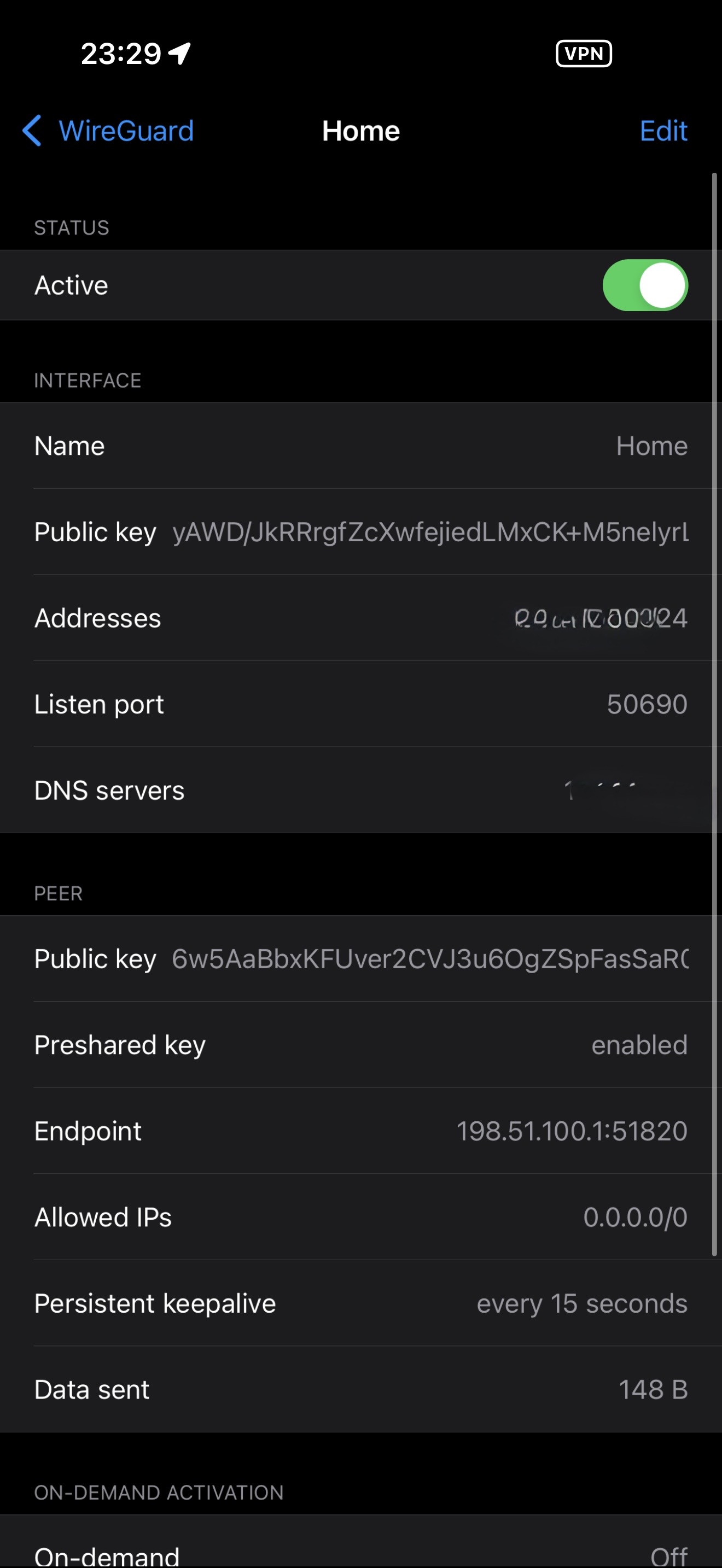
No, you do not. The required firewall rule is created automatically when the WireGuard service is enabled.
If you would like to verify this from the shell, you can check /etc/config/firewall for a rule allowing UDP on the configured listen port, or run: iptables -L INPUT -n -v | grep 51820. Replace 51820 with your configured WireGuard listen port if it differs.
To my understanding, this behavior is by design in the WireGuard client software. When the status shows “Active,” it simply means the tunnel interface is enabled and allowed to send encrypted packets. It does not confirm that the endpoint is reachable, that the peer key matches, or that a handshake has occurred.
A more reliable indicator is a recent handshake timestamp along with bidirectional traffic counters. If TX increases while RX remains at zero (or no Data received rendered), the client is sending handshake attempts but not receiving responses.
You can also confirm functionality by pinging a known internal IP that is only reachable over the tunnel.
If you would like to visualize this behavior, edit the tunnel and temporarily replace the endpoint hostname under the Peer section with 192.0.2.1. This address is reserved for documentation and is not publicly routable. The tunnel will still show “Active,” but no handshake will occur and no traffic will pass.
This demonstrates that the status reflects interface state rather than actual peer reachability.