I recently purchased a couple of AP6 Pros connected to a Route10. I’m having some pretty major issues with WiFi speeds and weak to very weak signal.
I’m in the middle of nowhere with no close neighbors so the interference should be very low.
The house is a wooden log house with approximately 25-30cm thick “logs” as walls. Can this be the issue? I feel like I’ve tried everything in terms of settings (change signal strength, switch channels, etc)
My office is on the second floor and is situated about 2 meters from the AP that’s on the ceiling of the first floor. So between the AP and my computer there is one log wall and floor (about 10-20cm thickness). The AP is mounted to the ceiling of the first floor, so downwards if that makes a difference? I have no issues with any signal when I’m on the first floor.
The frustrating thing here is that before I installed the APs and Route10 I was using a cheap 4g router and that gave me a much better signal.
I’ve also had some other issues with 2.4ghz devices barely connecting because of weak signal.
What can I do to improve the situation? Anything in particular that I should try?
Do your devices well support Wi-Fi speed? If you have an old tablet, it may be the cause of the slow speed.
I don’t have any old devices that are connected to WiFi. I do have some LED light bulbs that are WiFi connected though. But I didn’t have any issues with those when I used the cheap 4G router
For your IoT devices, do you force the 5Ghz ?
No, most do not support 5Ghz, so naturally I have to use 2.4.
Do you enable Fast Roaming? That may be link to device connection if they are older devices.
I do not know what this is?
What is the bandwith size?
Auto
Does the 2 AP6 are close to each other ? They may cause mutual interference.
They are on opposite ends of the house, if I disconnect one of them I will not get any signal in that part of the house
You said that you used a cheap 4G router, but what is you internet link now ? Still 4G? Starlink ? Fiber?
Out of curiosity, what kind of signal strength are the clients reporting from the Devices page in the controller? A screenshot of that page might be helpful just to give everyone a better idea of what the weak signal looks like. Changing the WiFi Signal setting to “Raw” in the controller settings would probably make getting a screenshot a little easier too
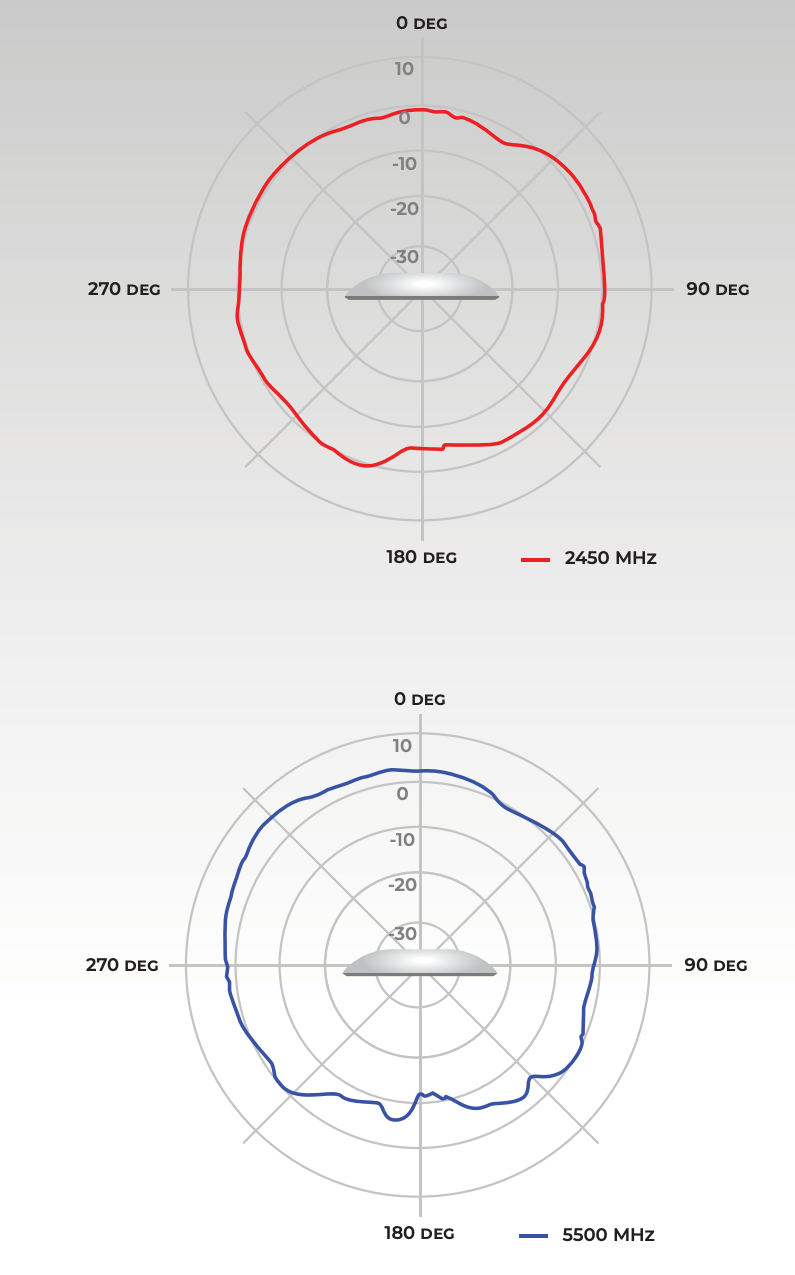
The APs do have a weaker signal from the back, per the radiation patterns in the datasheet I believe. For example:
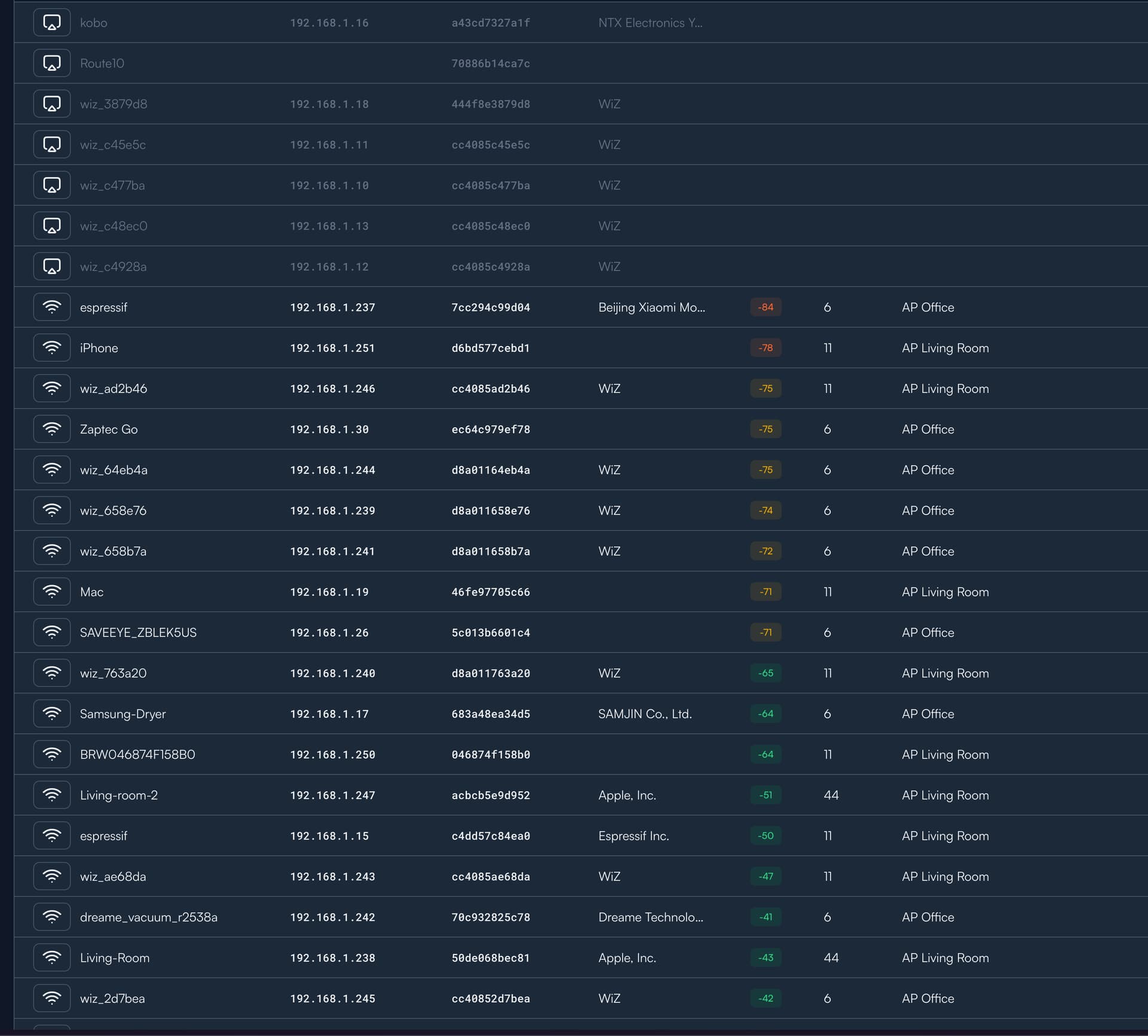
Yeah - here’s what it looks like. Sorted by worst signal to best signal.
The iPhone at the top is currently in my office (which is closest to the AP Living Room (I know, the naming is not great). Same with the Mac with the -71 signal strength.
The Zaptec Go and SAVEEYE devices are outside so I would expect those to have a worse signal, even though the AP is literally in the window or they wouldn’t get a signal at all.
All the green devices are pretty much in line of sight of their corresponding APs.
What are the corresponding negotiated link speeds from Route10/Controller perspective? (As in column TX/RX Rate)
Can you pinpoint the issue to be within the network our on the way out/in? Like trying speedtest (WiFi client towards external server) and iperf3 (WiFi client towards Route10)?
Yeah, dipping into the -70’s and -80s definitely isn’t optimal. Thanks for the screenshot by the way!
Another question, what channels and power (ERIP) are the access points running at? Should be able to get that info by hovering over the signal icons next to each AP in the Network screen.
20 and 80 Mhz respectively for 2.4 and 5 Ghz. I’ve tried setting it to maximum (160) and I’m seeing a slight improvement in signal strength (-72-73 on 5 Ghz).
Thanks! That’s interesting, looking at a couple of AP6 Pro’s I have access to they’re running at the following:
2.4GHz: 26 dBm EIRP
5GHz: 30 dBm EIRP
So they’re definitely running at lower power than my example units, although I know that can be affected by regulatory requirements as well as if they APs think there’s interference in the evironment.
Something to try might be going to each AP and setting the power setting to “High” just to see if they can actually broadcast at a higher power level. Maybe just start with adjusting one of the APs and see if anything changes.