Hi, this is all my own doing, but after about 6 hours of ‘messing’ around with VLANs and a lot of help from ChatGPT I have given up on trying to add some VLANS to my network, but I have lost access to my 2x8 port switches. I assume its because the uplink ports are still trying to use a VLAN thats no longer there, namely VLAN50. I’ve hard reset one of them, and it shows up in my network panel with an option to add it back in, but as soon as I do, it then shows as disconnected. Is there an easy fix for this?
I’ll come back to the original issue in another post, but in case it helps I was trying to create 5 VLAN
i think the bit that I got very confused with was linking the Alta switches and router together on the management VLAN and now its all a bit messed up and my wired network is only getting self assigned IPs too
Hi, yes I did configure them to allow all vlans, but no I din’t enable isolation.
I have removed all the vlans for now and am just trying to get the switch back, but I assume its still picking up something from the old vlan settings on the router.
I had read the article and viewed some Youtube videos too and thought I was armed with a enough knowledge, but clearly not.
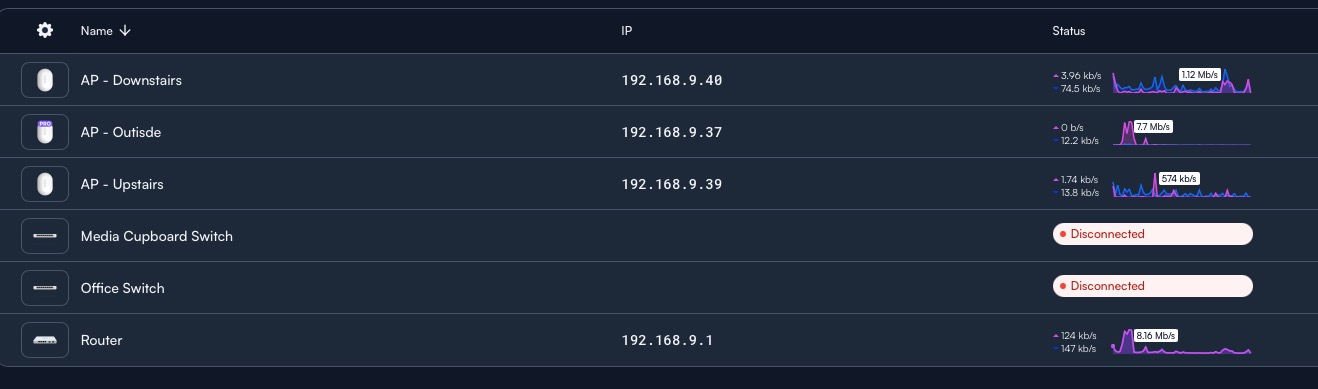
This is my current state of play, I’ve removed all the vlans, and reset my network to the IP range it was using before I started, but of course its still showing the 2 switches as disconnected, the Office Switch Connects from the Media Cupboard Switch.
Managed to get the office switch back up and running, moved it to connect direct to the Route10 and then did a full reset on it, it allowed me to then set it up again and all is good, the same doesn’t happen though when I do the other switch