Anyway knows what this means?
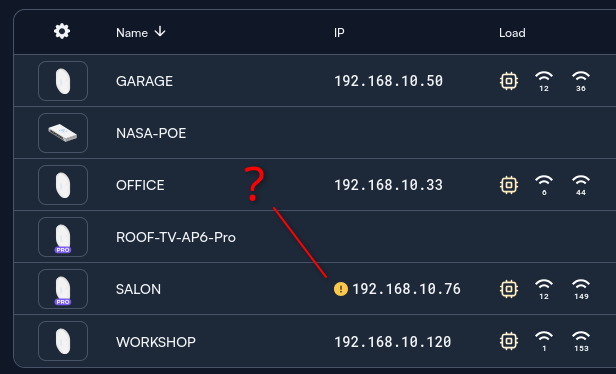
Typically means the link negotiated at less than 1 gig. Does it say anything if you hover over it?
@jeffk931 for the win
At present, that exclamation point will appear if the AP is not getting a gigabit Ethernet link. Mousing over it should show you what the link speed is. Note that it’s the same rules for the AP7-Pro.
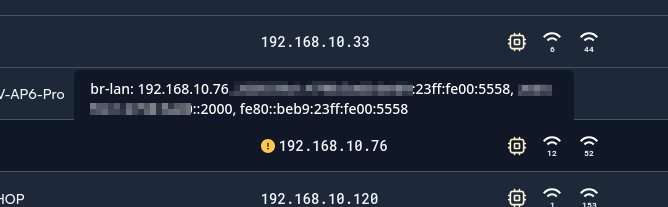
Seems like something a little funky is going on there. Here’s how it looks at a site where an access point is definitely connected at 100Mbps, for example:
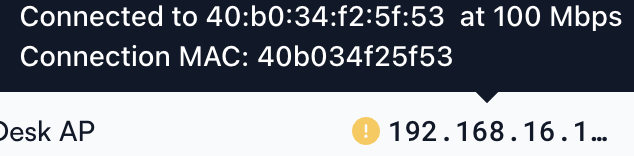
Perhaps @Alta-Matt_v2 has a thought on what else to check, but it could be worthwhile to open up a support ticket and have someone invited to the site to take a closer look as well
I’ll shoot you a DM with my email to invite to the site.
If nothing is popping up when you mouse over the exclamation mark itself, it could be the browser? What browser are you using?
@Heiko apologies, I didn’t realize this was a local install.
I cannot access the site/controller until a port forward is set up. We need TCP 443 to be forwarded through to the IP of the local controller in order for me to access it.
If you’re using a Route10, this article will guide you through that. If you’re not using a Route10, please check with your router’s manufacturer on how to port forward if you’re not already familiar.