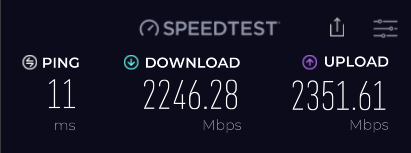
Just swapped the Route 10 in instead of the Zyxel provided.
Got the PPPoE Username and Password from support and reset the Route10 and configured using the wizard. It did need some persuasion to get going, firmware update, ONT box restart but now seems fine.
I’m on a 900/900 connection and I was getting 935 ish down and 945 up pre route 10 after I’m getting 1140ish down and around 900 up so a chunk quicker download.
Well there definitely could be reasons for this depending on the other options enabled, like for example IPS/IDS can impact performance depending on the threat level. So I can’t guarantee the following will make any difference, or not.
I also have a PPPoE WAN and I needed to set the Acceleration option to Disabled on the Route10 to be able to fully utilize it. My symmetrical WAN was anything but when it’s Enabled, and it was the download that was impacted.
If you open the Route10 config on mobile or web you should end up on Ports, scroll down and expand Advanced, choose the menu beside Acceleration and try changing it to Disabled. Worst case scenario, it doesn’t help, you revert, but this likely will make a noticeable change for you.
Changing combinations of the IDS and acceleration enabled and disabled makes little differences to the point it might just be test variance. But yes a connection that was almost perfectly symmetric isn’t on the Route 10. Going with the ISP not capping me on the download and the Route 10 happily using more.
Over 1100 down on a 900 connection is quite impressive
Interesting the upload doesn’t do the same, but I’m not going to be making use of it, this is just my connecection at home.
With IPS or IDS on, all bets are off imho. I pay for 3Gbps symmetrical service and get ~1-1.4Gbps down with either enabled, on high (which is the option with the least impact on performance. I like to utilize my throughput so I opt not to use either IDS or IPS. If IDS or IPS is enabled, I also have to fully reboot after disabling before speed is restored..
This is currently limited by the 2.5GbE PHY that is connected, if I moved this to a 10Gbps interface then it would be closer to 3200/3200. So it’s more than capable.
EDIT: I also disable flow control on all interfaces on my Route10, and enable baby jumbos as my primary provider supports those, and it does help me reliably get that last little bit out of my connection. These latter steps typically aren’t required for most.
Sorry, my wording yesterday is a little harsh due to poor personal experience on multi-gig PPPoE. I’m not sure what to expect in all cases, but PPPoE generally carries a fair amount of processing cost which is not favourable when you start layering on other features, and that statement has carried across numerous vendors for me over the years.
I think it’s safe to say there is likely to be some loss if using features like IPS and/or IDS, banIP (region banning/blocklists), etc, on the wired side.
What physical medium are you using between the Route10 and the Trooli provided ONT (is it Ethernet or Fibre)?
If it’s Ethernet, is it negotiating at 2.5Gbps or 1Gbps? The port LED or status should reflect this, blue is 1GbE, and multi-gig is white-ish (depending on speed, typically leaning light grey in the FE for 2.5Gbps).
Did you try it fully without and after a reboot to see if the performance was the full expected speed?
I also added in some block lists to see if that had an impact. It’s still happy as Larry.
It’s negotiating at 2.5 on the RJ45 WAN port on the Route 10, it’s got the ISP supplier RJ45 cabel suspecting Cat 5e, though might be better. (I’ll go find better if you’re curious to any impact)
My PC is wired also negotiating at 2.5 and that’s using Cat 8 (because I thought I’d try it).
I’m perfectly happy my symetric line is no longer and has sped up on the download.