Strange behavior of AP6-Pro, Auto channel restriction, and Auto channel Selection

Hello everyone,

I just finished the deployment of a nice install of 10 AP6-Pro ( 1 Outdoor ), an S12 Switch, and a 48PoE switch.

After the install I ran the channel replanning to optimize everything, and nothing changed even when other channel where less congestionned.

Also, I have 2 AP which deactivated the 2.4Ghz because the channel was too congested, even when, again, there where channel almost not utilized.

And last but not least, the channel restriction doesn’t seems to work, whatever channel i try to restrict, the AP’s select it anyway, even if it is the mot congested.

Did someone observe the same issues ?

Thank you,

Hi there!

If you ran a quick channel replan, it’s expected that most channels won’t change unless they’re performing particularly poorly. If you hold Shift while clicking the button, it will switch to a full replan. This process takes longer and can be more disruptive, but it may result in more noticeable channel changes. Also, giving the system a few days to learn the RF environment typically leads to better channel decisions over time.

Some 2 GHz radios being disabled when there are several APs is expected behavior. When channels 1, 6, and 11 are highly utilized and the system determines there is already sufficient 2 GHz coverage, it may disable some radios to reduce overall congestion and channel overlap. If you prefer to keep 2 GHz enabled on those APs, you can manually assign a channel.

As for channel restrictions, I’m not currently aware of any issues. That said, changes may take a day or two to fully take effect.

Hello Corbin,

Thank you for the informations. I’ll let the system stabilize itself and check again in a couple of days.

Have a nice evening :slight_smile:

Hi j.debuijl, Alta-Corbin,

I can confirm that the AutoChannel feature isn’t working for me either. It was working some time ago, and I loved it. But now, I can’t use it anymore.

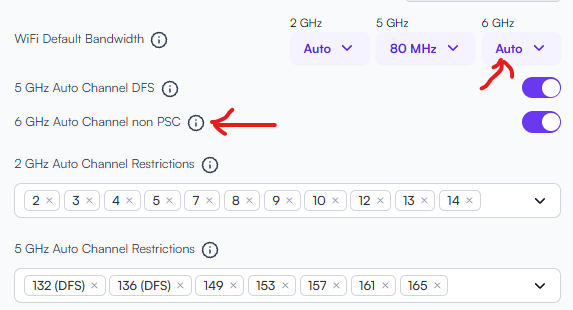
I remember exactly when it started happening. It occurred after an AP software update, though I don’t remember which version. When I looked at the controller, I saw something I had never seen before. It’s marked in red in the screenshot. After that, the feature never worked again:

For me, the problem started when the AP7 features, such as 6 GHz Band and 6 GHz Auto Channel, were introduced.

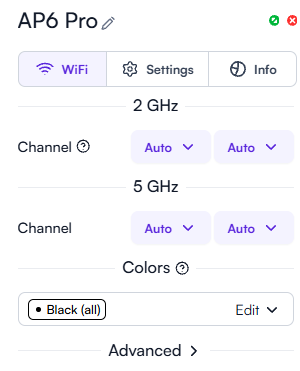
As you can see in the picture above, I excluded channel 136 and set the bandwidth in the 5Ghz band to 80 MHz. All of my access point settings are configured to “Auto,” as shown in the picture below:

Unfortunately, the following three actions lead to the same result:

  • Auto Channel Replanning via Quick Replan.
  • Auto Channel Replanning via Full Replan,
  • Restarting the access point (AP).

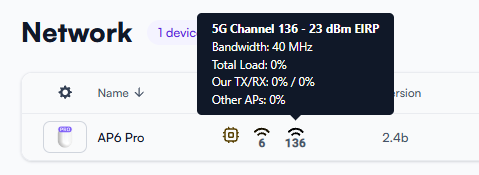
After executing these actions (or one of them), my AP operates on channel 136 with a 40 MHz bandwidth. As you can see in the following image, this contradicts my above configuration.

I can confirm that the auto channel configuration completely ignores both the channel exclusion list and the channel bandwidth settings. And I can’t understand what criteria the channel is selected based on.

It seems that the previously mentioned AP7 update permanently sets channels 136 and 40 MHz for 5Ghz in my case. Even under the worst conditions, such as a strong signal from another AP on channel 136, the automatic configuration always selects the 136 and 40 MHz combination for my AP.

I loved this feature, but unfortunately, I can’t use it anymore because it stopped working. I’m currently manually configuring the channels and bandwidth – just as I did in the old days.

Hello Joachim,

Correct it was part of why my question popped, that installation is located in a dense urban area, so having to manage channels for each AP separately is impossible, because the modem of the neighbors will also replan their channel often, so it’s not really effective.

I’m mostly happy with alta labs products, but there is still a bunch of optimisation/correction to be made software-wise, but i’m confident that it will get better with time, so we should stay positive ! :grin:

@Joachim and @j.debuijl

Thanks for sharing your feedback and detailed notes! I took another look and found a couple of bugs that should be addressed in the next AP release.

  • Specific APs may not update their channel/bandwidth after new planning results are applied.

  • Some 80 MHz channels (136@80 for example) were not being applied correctly. This could cause channels to remain unchanged after a plan update or result in the AP falling back to a lower bandwidth on the planned channel.

I haven’t been able to reproduce any issues related to the restricted channel options. It’s possible these channel application bugs made it appear as though the restricted channel option was not working.