Do Steamemo switches work with Alta routers and access points? I have a Steamemo 10 port “managed” switch between the Alta router and access point. The AP pro gets an IP address but does not give any out if the SSID is linked to a vlan. If the SSID is not linked to a vlan it will give out IP addresses. I put managed in scare quotes because it does very little. The switch is , however, cheap
Haven’t worked with that particular brand of switch myself, but does it support tagging a VLAN on the switch ports? Because off hand it sounds like the switch isn’t passing along the VLAN tags properly between the access point and router.
It does support tagging. But if I tag a port for a vlan the AP gets vlan IP address, but no addresses are given out
Hmm, could we maybe have some screenshots of how the tagging looks right now? And as a test, does the AP seem to work properly if it’s connected directly to the Route10? Just to make sure we aren’t chasing our tail and it’s definitely the switch that is causing us trouble.
Yes it works directly connected to the Route 10. I also tried removing everything from the switch but the AP and the Route 10.
Sorry, but what do you mean by how the tagging looks now? To get it working I have the SSID set to use just the default vlan 1.
Ah, sorry, I guess how the VLANs were meant to look. Like how they were configured on the switch, for example.
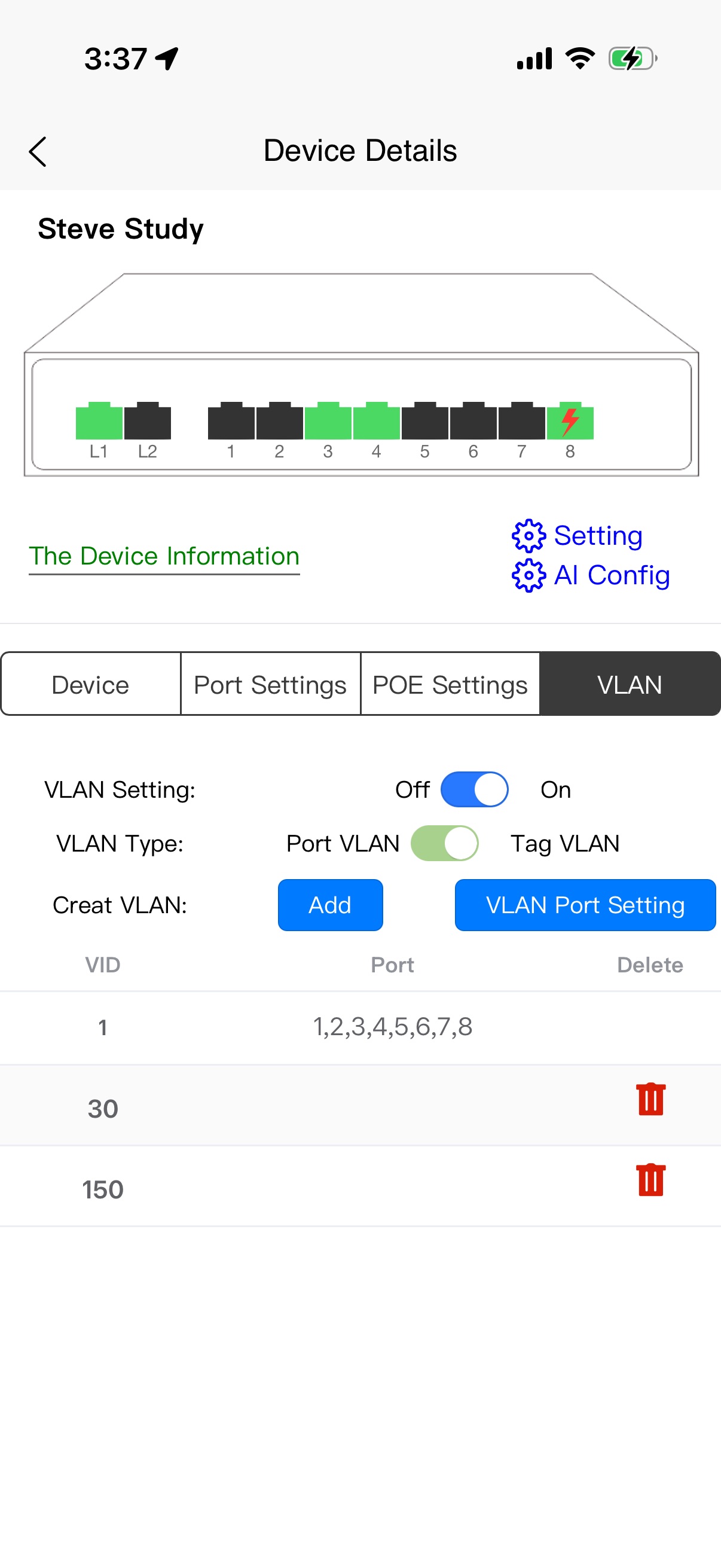
Are there any more options available when tapping on VLAN Port Setting? Based on that interface my first thought is that the VLANs have been added to the switch but the ports aren’t tagged. I’m thinking that if any ports are tagged then there should be port numbers listed next to each VLAN.
You are correct. As I said I untagged everything so I could get it to work. To tag I would add a port to the 30 or 150 category
OK, I see. Sorry if it seems like I’m asking some basic questions, just making sure I understand how everything was configured. Especially since I haven’t personally used that switch but have had tagging work fine with other third party switches I’ve used.
So which port is the router connected to the switch on? I’m assuming the AP is on port 8 since the switch is indicating there’s power on that port.
The router is connected to L1 which is a trunk port. The port with POE turned on is an Alta Labs AP6 pro
Is L1 automatically tagged on VLAN1 then? Just noticing it’s not in the list of tagged ports
Yes, it defaults to 1. I can assign a different vlan though
Basically I’ve been trying to spot if a port that should be getting tagged hasn’t been getting tagged since that seemed to be the most likely issue. However, if we’re sure all the ports that need to be tagged (port where the router connects to the switch and where the AP connects to the switch mainly) have been getting tagged then I guess I’m a little out of ideas on what to troubleshoot next.
I might suggest reaching out directly to Alta’s support via support@alta.inc since a tech can be invited to the site to confirm nothing is amiss on with the router config.
I’ve used Steamemo before. They are a cheap switch that have some management capabilities. The problem I have found is that they cannot pass more than 1 vlan at a time. You can pass vlans to the switch, but each port can only untag the vlan. It’s can’t pass tagged traffic. This switch is a good option is you want to pass 2 networks to it and then split it to use different ports for different networks, but you can’t have more than 1 network on the port. This is a Steamemo limitation and has nothing to do with your Alta Labs configuration. An unmanaged switch would pass the tagged traffic, but because it is managed it needs to be configured to pass it, and they don’t have the capability. It only gives you the option to set the native vlan that you want untagged on each port.