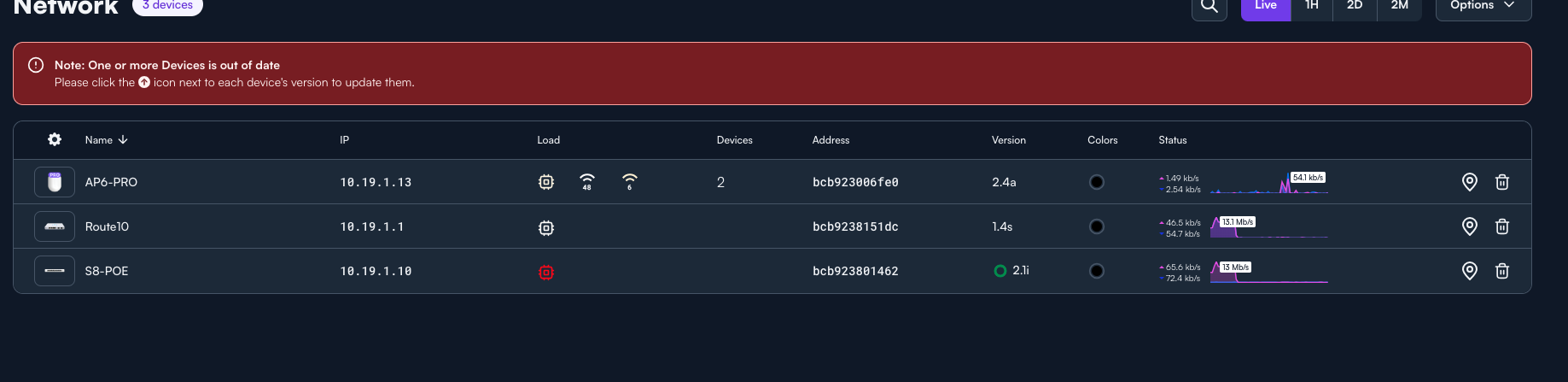
After the firmware update is complete, port 8 will run at 100 Mbps. Even after powering off and on.
Help!
After the firmware update is complete, port 8 will run at 100 Mbps. Even after powering off and on.
Help!
Can you invite me to your site to take a look?
I am running a CONTROL unit, how do I invite you?
The two easiest ways are:
Ultimately, the controller just needs to be accessible to the outside some how. If you need, I can also give you my IP address I’ll be coming from, and you can allow that, for more security.
I am behind CG-NAT so, no port forward for me. I dont have the resources for reverse-proxy.
This why it would be great to manage CONTROL from the cloud like UI.
OK, thanks for the invite, I see that. If you can at least tell me your current WAN IP address (from ipinfo.io) then I should hopefully be able to get in.
Heads up, guys,
The port on the S8-POE switch has gone back to 100 Mbps mode. I have tested and replaced the cables; soft reboots and power restarts haven’t resolved the issue.
I am noticing a trend: when the switch temperature exceeds 50 degrees Celsius, this down-speed issue occurs. Nothing I do get the port to function normally.
Please check your warranty, as this may affect those of you with these switches in production. I am not sure whether NFR-Kits are covered by warranty replacements.
Guys,
So, It appears the switch has a hard ware fault.
Calls to the support number are not allowed from my region (Caribbean) and I am not seeing an internation number.
Non-toll free number is +1 435 773-4702 . Hopefully you shouldn’t have issues calling that. NFR units are under warranty. Yes, if there is a hardware issue, we’d certainly like to understand it.
Guys,
[UPDATE] New behaviour.
Port 3 is exhibiting the same behaviour: it flaps down to 100 Mbps, after which the switch disconnects all ports, and the link lights go off except for POE, which must be powered and rebooted.
I reverted the firmware to the default version as instructed by support, but the version remained at 2.3p, which didn’t resolve the issue.
Keed in mind I didnt have this issue prior to firmware 2.3p.
I’ll do a proper investigation on my end, but I might be seeing something similar. I noticed this recently after the 2.3p update.
For context, I have an S8 switch too. My AP6 shows as connected at 100Mbps in the cloud controller, with a yellow exclamation mark next to its IP. Hovering over it confirms “100Mbps connected at Port 3.” However, checking the S8 switch directly, Port 3 appears blue (indicating 1Gbps+ per Alta docs), not orange (10/100Mbps).
This seems like contradictory info, possibly a UI bug in the controller?
I want to run an actual speed test to confirm if it’s display-only or a real throughput issue. Some complicating factors: The AP6 runs via TP-Link Powerline Ethernet 1Gbps (connected to port 3) to provide WiFi in underground parking (only power outlet available), and it’s been stable in the controller for 6+ months with no prior issues.
For me, the link lights changed to ORANGE and the R10 was left connected at 100Mbps
So, after the firmware didn’t downgrade, ports flapped to 100Mbps.
This issue has recurred several times since the last update. I have changed many cables with the same result.
To get the port to connect at 1GB, I have to reconnect the cable to the Route10 each time and then hope for the best.
I am convinced that this issue is firmware-related and that I am not the only one experiencing this after the firmware upgrade to 2.3p. Be advised that firmware downgrades have failed.
I apologize that you are seeing an issue there, but I assure you based on our analytics that the issue is not widespread. We are committed to making sure you have a better experience with our hardware moving forward. From what I can tell, you were approved for RMA on the problematic switch, right?
Yes, I was approved. Unfortunately, the return cost is almost twice the cost of a new unit. So, I am at a loss. I am outside the US.
To date, no one from the RMA team has reached out to me. So I have opted to buy a used S8-POE.
It’s not a big deal, as my setup is an NFR and just there for testing. I am waiting to see what the next firmware will fix.
OK, you should definitely have the return label in your inbox. Can you confirm?