Tried out a Route 10 today hoping to lower the power consumption in my home lab and I ran into some performance issues.
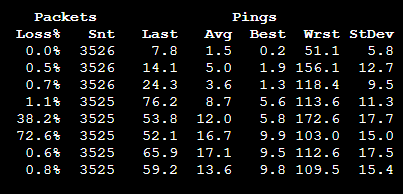
I am currently pushing about 1-2Gbps through my WAN connection which is 6Gbps GPON fiber. With my regular pfSense firewall handling routing I see 9-10ms to 1.1.1.1 under load. With the Route10 it was fluctuating between 10-60ms with the average sitting around 30-40ms. The high latency wasn’t just limited to ICMP either, online games saw a similar latency increase under load. The Alta Management UI indicated the device was under 75-80% “load”.
I had to revert back to my regular setup for now but I am planning to move some devices to the Route10 to hopefully troubleshoot the performance issue. While the traffic levels aren’t crazy high, one metric that is extremely high on my network right now is the “State table size”(as it’s called in pfSense) and I’m curious what the realistic limit for this metric is on the Route10, does anyone know and is there any place to track this metric?
Spent a few hours putting my heavy traffic devices behind the Route 10 while keeping the rest of my devices behind my pfSense box to gather some data. If there’s any more information I can grab please let me know.
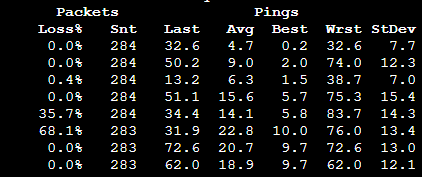
MTR under load, expected latency at the last hop is 11ms:
I personally can push my full 2gb line that is over provisioned to provide about 2.3gb up/down with everything enabled. Sounds like you are pushing a lot more though to be honest. You probably won’t be able to run IPS in inline mode.
Yeah I’m not sure which resource I am exhausting but there’s definitely a bottleneck somewhere. Like I said I think it’s the amount of open connections in this case but I don’t know where to verify that. It’s choking currently at only 1Gbps up/down simultaneously. Hardware acceleration is enabled and I only have a basic set of firewall rules.
Btw the reason I asked on the udp is you were hitting the same wall I was.. they turn off udp hardware acceleration separate from the switch in the GUI..
Yeah I’ll probably do that after I get off work on Monday to see if there’s a solution. Maybe this router just isn’t for me which is ok, this is an extreme workload.
Dang 600k connection. I run a lot of my stuff via wireguard VPN connections to offload and “such” but man.. I would wait till they chime in as they might have some optimization but wonder if that is just the upper bands.
Thanks for following up with support and getting us access there. I was able to take a look at it today. Your load of bittorrent traffic is astronomical, looks like a seed farm with multiple active hosts. I seed about 40 Linux torrents 24/7, pushing >100 Mbps up 95th percentile, and use a tiny fraction of the connections and connection churn you’re seeing. It’s not the number of connections, it’s the huge constant rate of connection churn you have that’s inherent in massive scale bittorrent. Well into thousands of connections per second of churn much of the time. You’d need >50K active devices in normal circumstances to approach the churn you’re seeing. We have sites with >1000 active users, even with active bittorrent users among them, who don’t even come remotely close.
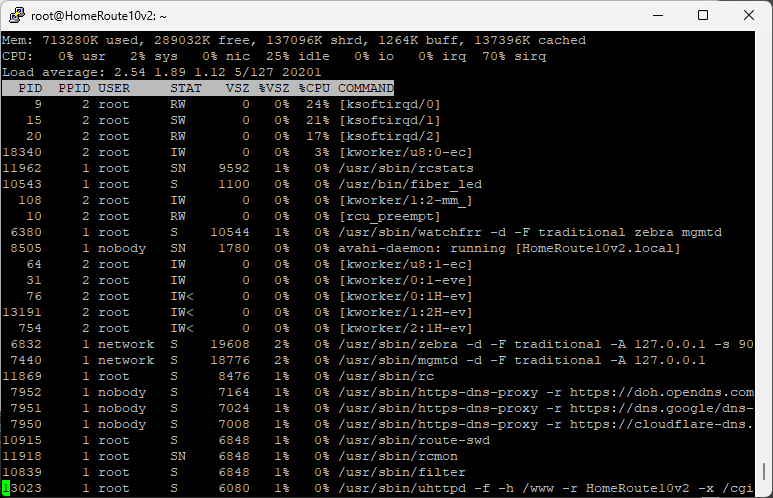
It’s the worst case scenario workload for an embedded router. Extremely high connection churn, and constant high rate of new flows that must initially be handled in the CPU before they can benefit from offload. Under that kind of load, CPU time is consumed by conntrack updates, new flow processing, and softirq/network stack work, which leads to latency spikes.
There isn’t an embedded router in the world that will handle that kind of load with no noticeable latency impact, as it ends up too CPU-heavy outside of things that offload can handle. Route10 is as good as it gets anywhere near its price point.
Given it looks like that’s your expected, desired load, you really need an x86, or a commercial router costing vastly more than Route10, to handle that level of traffic with no jitter of note unfortunately. It’s a brutal workload that’s well outside the norm.
Understood, thank you very much for spending the time looking into it. I will admit I am intentionally running a worse case scenario to try to evaluate a replacement for my typical x86 router. Having seen little impact on my current router I may have over done it. I will evaluate the device with a more realistic load and see if it will work for me.
that would be interesting to see if improves anything, as running torrents behind this router with uTP (UDP) enabled on client, will make the connection crawl like a snail.
Tested with only one torrent TCP+uTP enabled, around 2.5gbps traffic IN+OUT and traffic looked like it was limited. since i have a PPPoE connection that handle around 8.2Gbps it was clear, so i run speedtest on my server and surprise… under 2.5gbps download and torrent traffic affected by the speedtest.
the client had ~90connections and around 50extra for the active downloading torrent. i don`t agree with the solution provided as it”s clear that UDP acceleration is not working as it should, even in low load scenarios as i tested it, that is way more that this router should handle