A new firmware release is now available for Route10, introducing a simplified approach to building and managing site-to-site VPNs, from single connections to multi-node topologies.
- Add support for AltaConnect.
To use AltaConnect, go to the Site Manager, then click AltaConnect. Easily create multi-site mesh and star VPNs between all of your Route10 appliances.
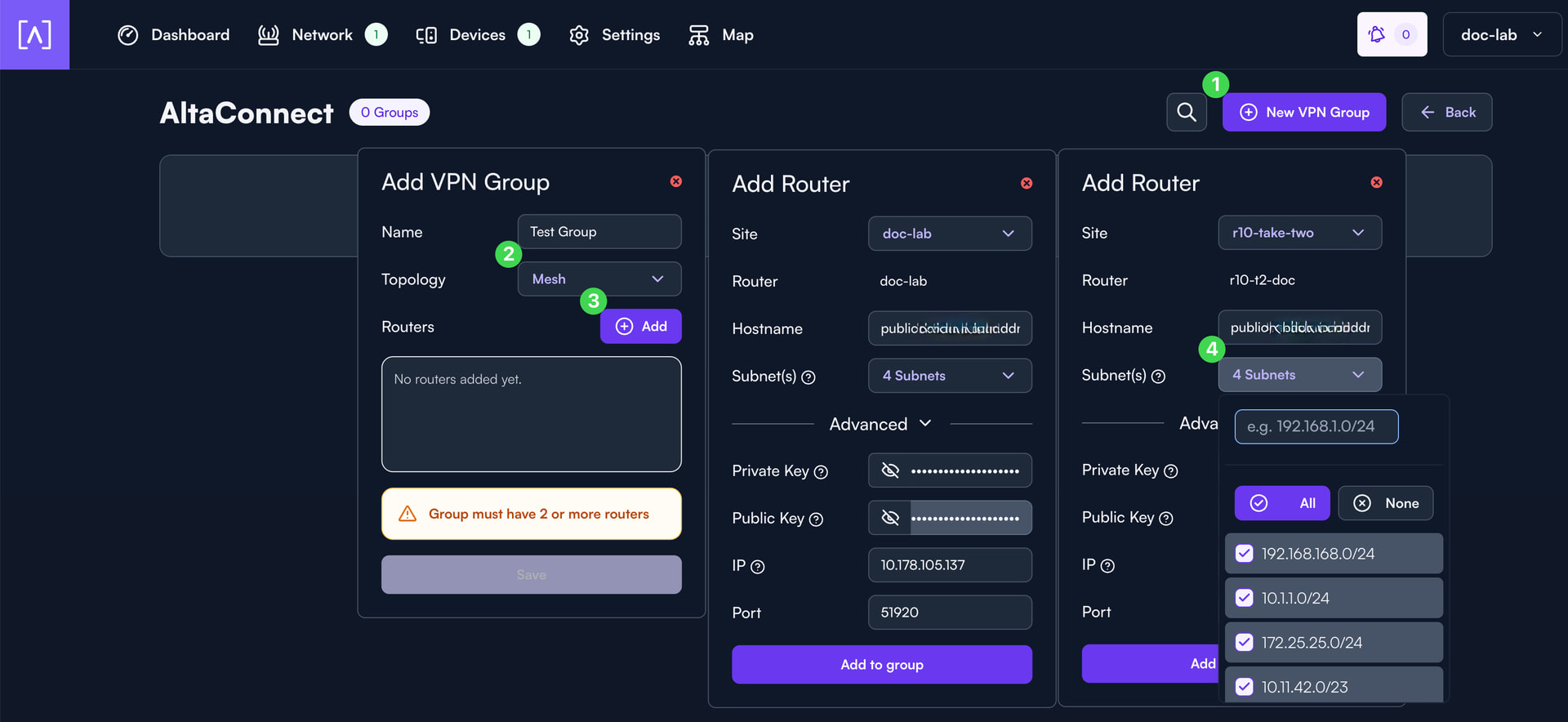
In the AltaConnect overview, you can create and manage VPN Groups. A few key steps:
- Select New VPN Group to begin creating a configuration.
- Choose your desired topology (e.g., mesh or star).
- Add the routers you want included in the group.
- Select the subnets that should be accessible for each node in the VPN group.
Additional configuration options are available, but the above highlights the core workflow introduced with this release.
This update is being rolled out now. You can manually initiate the upgrade if you’d like, or it will automatically update overnight (if auto-updates are enabled). The complete, up-to-date changelog is available here:
If you have questions, feedback, or run into any issues, feel free to reply here or start a new topic. Including configuration details or relevant logs where possible helps us troubleshoot and respond more quickly.