This is a hotfix release to address a regression in 1.4u and adds support for Policy Based Routing:
Add support for PBR (coerce source/dest IP/subnet traffic to specific WAN).
Resolve stability issues when firewall groups were configured (introduced in 1.4u).
Here are the changes from 1.4u to save having to go back to the former release post:
WAN Status:
Add support for Speed Test.
Add support for Site Location.
Improve L2TP server compatibility with Windows clients.
Dynamic Routing: Add support for IS-IS.
This update is being rolled out now. You can manually initiate the upgrade if you’d like, or it will automatically update overnight (if auto-updates are enabled). The complete, up-to-date changelog is available here:
If you have questions, feedback, or run into any issues, feel free to reply here or start a new topic. Including configuration details or relevant logs where possible helps us troubleshoot and respond more quickly.
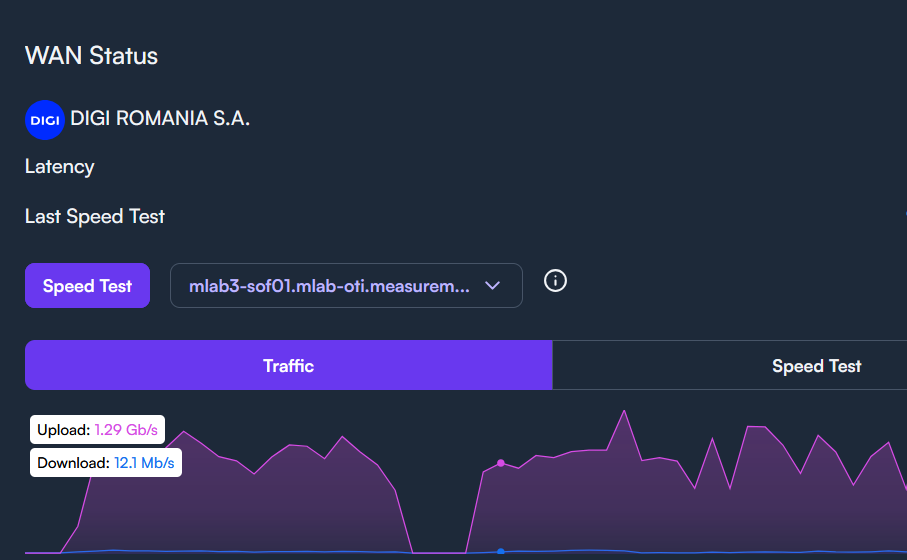
Now that connectivity has settled down a bit, a quick comment on the WAN traffic graph
I noticed it seems a bit reversed from what I would expect? For instance, if a client on the network is downloading something, that seems to be shown as upload traffic on the WAN graph and then the opposite when the client is uploading.
No issue’s with WAN pppoe connection after update, but my site location doesnt save once set. All fixed. This was due to location and tracking settings in the browser im using. Thanks and keep up the good work.
That’s fair! And that’s probably correct as far as to why the traffic is displaying that way.
Although I did observe that the speeds are shown as expected when running the speed test from the dashboard, so the “perspective” might be getting flipped at least when traffic is shown when the test is running
Actually, toggling between Speedtest and Traffic while running the speedtest shows the same numbers (more or less depending on other traffic) but opposite directions.
Traffic reflects the WAN device. The same as the WAN device as in Devices. Speedtest reflects the Speedtest only, not tied to any device, just the download speed and the upload speed.
that speedtest function is useless for me, as i`m getting +8gbps and the values shown there are less than 2gbps, most of the times under 1gbps.
i still wonder when will have a dedicated page for DHCP settings and IP assignment, it may look simple to assign IP`s to devices, but when you have 50+ devices and not all of them are active, some are replaced… and so on … you interface i`s just a pain in the **** to manage that list. keeping a separate list in excel its not ok
My wireless network keeps disappearing from the settings tab. All devices are still connected and I can see the ssid, just can’t see the wireless network I created in the software. Anyone else have this issue?
Just to chime in real quick, I haven’t seen this myself after this firmware upgrade. Is that happening from the app, cloud controller, or a local controller?
It’s happening via web browser to the cloud controller. The only work around is to create a copy of my site, then switch back and forth from the copy back to the original, then it appears again. Thinking of starting from scratch again but don’t have the time yet.
What web browser is that happening in? You might be able to spot an error by opening the developer console with F12 then doing the same switch back and forth. Or trying a different browser just to see if anything acts different.
Yeah I wish the route 10s network graph was configurable since it basically is useless..it doesn’t show wan vs lan traffic and such. Just everything in and out which I guess might be helpful to know it is working but doesn’t really show the flow.