Can someone help me understand how to route specific VLAN traffic through ProtonVPN using a Wireguard config?
Perhaps I can ask this question a different way. I would like to set up a clientVPN connection on Route10 to route most of my traffic through ProtonVPN. Right now it seems like I can only set up a site to site, and not a client. Am I missing something?
I was thinking about this a little last night, but would you be able to setup a static route to send traffic from the subnet through the interface connecting to ProtonVPN? I haven’t really tried it myself but it sounds plausible to me at least 
Otherwise I know we could start getting into Policy Based Routing using netifd from the CLI
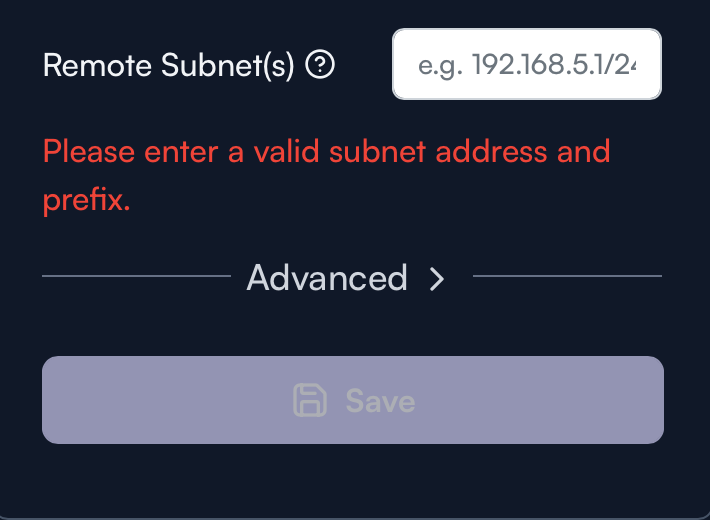
Dang! I thought that’s part of what this option did:
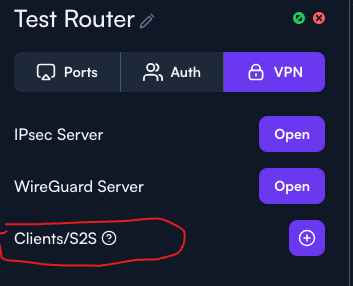
There’s some chat about this as well a few months ago in a different topic I think: How to use wg client (w/ static routing) in route10? - #5 by erpn7
Looks like that thread is discussing exactly the problem I am having… not sure there was ever any resolution. I bumped the thread.
Yeah, it won’t let you configure 0.0.0.0/0 on the UI, bummer.
My guess would be to assign a dummy IP (1.0.0.0/0) for example, get the config to stick within the R10, but don’t enable it. Log in through CLI and modify the route to 0.0.0.0/0, save to post-cfg.sh?
This is my /cfg/rc.local config. You can modify it for your needs.
~ # cat /cfg/rc.local
#!/bin/ash


# === WireGuard Interface ===
if ! uci show network | grep -q "^network.wg0="; then
    uci set network.wg0='interface'
    uci set network.wg0.proto='wireguard'
    uci set network.wg0.private_key=''
    uci set network.wg0.addresses=''
    uci set network.wg0.peerdns='0'
    uci add_list network.wg0.dns=''
fi

# === WireGuard Peer ===
if ! uci show network | grep -q "network.@wireguard_wg0.*.public_key=''"; then
    uci add network wireguard_wg0
    uci set network.@wireguard_wg0[-1].public_key=''
    uci set network.@wireguard_wg0[-1].allowed_ips='0.0.0.0/0'
    uci set network.@wireguard_wg0[-1].endpoint_host=''
    uci set network.@wireguard_wg0[-1].endpoint_port='51820'
    uci set network.@wireguard_wg0[-1].persistent_keepalive='25'
fi

uci commit network
/etc/init.d/network reload
ifup wg0

# === Firewall Zone for WireGuard ===
if ! uci show firewall | grep -q "firewall.wg0_zone"; then
    uci set firewall.wg0_zone="zone"
    uci set firewall.wg0_zone.name="wg0"
    uci set firewall.wg0_zone.network="wg0"
    uci set firewall.wg0_zone.input="ACCEPT"
    uci set firewall.wg0_zone.output="ACCEPT"
    uci set firewall.wg0_zone.forward="REJECT"
    uci set firewall.wg0_zone.masq="1"
    uci set firewall.wg0_zone.mtu_fix="1"
fi

if ! uci get firewall.@zone[2].network | grep -q 'wg0'; then
    uci add_list firewall.@zone[2].network='wg0'
fi

# === Custom Firewall Rule ===
if ! uci show firewall | grep -q "Block_10.14.66.0_to_WAN"; then
    uci add firewall rule
    uci set firewall.@rule[-1].name='Block_10.14.66.0_to_WAN'
    uci set firewall.@rule[-1].src='lan'
    uci set firewall.@rule[-1].src_ip='10.14.66.0/24'
    uci set firewall.@rule[-1].dest='wan'
    uci set firewall.@rule[-1].proto='all'
    uci set firewall.@rule[-1].target='REJECT'
    uci set firewall.@rule[-1].enabled='1'
fi

uci commit firewall
/etc/init.d/firewall restart

# === Routing Table and Rules ===
grep -q "wgroute" /etc/iproute2/rt_tables || echo "200 wgroute" >> /etc/iproute2/rt_tables

ip route show table wgroute | grep -q "^default" || ip route add default dev wg0 table wgroute

ip rule | grep -q "from 10.14.66.0/24.*table wgroute" || ip rule add from 10.14.66.0/24 table wgroute priority 300
ip rule | grep -q "to 10.14.1.0/24.*lookup main" || ip rule add to 10.14.1.0/24 lookup main

# === VPN Route Checker Script ===
cat << 'EOF' > /root/vpn-route-check.sh
#!/bin/ash

INTERFACE="10.14.66.1"
EXPECTED_CITY="Göteborg"
VPN_IF="wg0"
ROUTING_TABLE="wgroute"
LOG_TAG="VPNRouteCheck"

CITY=$(curl --silent --interface "$INTERFACE" http://ipinfo.io/city)

if [ "$CITY" != "$EXPECTED_CITY" ]; then
    logger -t "$LOG_TAG" "❌ City mismatch: '$CITY'. Reapplying route through $VPN_IF."
    ip route flush table $ROUTING_TABLE
    ip route add default dev "$VPN_IF" table $ROUTING_TABLE
    ip rule add from 10.14.66.0/24 table $ROUTING_TABLE priority 300
    logger -t "$LOG_TAG" "✅ Route reapplied."
else
    logger -t "$LOG_TAG" "✅ Routing through expected city: '$CITY'."
fi
EOF

chmod +x /root/vpn-route-check.sh

# === Cron Job for VPN Check ===
grep -q "/root/vpn-route-check.sh" /etc/crontabs/root || echo "* * * * * /root/vpn-route-check.sh" >> /etc/crontabs/root
/etc/init.d/cron enable
/etc/init.d/cron start

# === Custom Restart on Firewall Reload ===
grep -q "/cfg/rc.local restart" /etc/init.d/firewall || sed -i '/reload_service()/a\        /cfg/rc.local restart' /etc/init.d/firewall

exit 0
I really appreciate that! I like that we can get by with configs like this, but I really hope this can be fixed in the UI sooner rather than later. They released a “Client” section in the VPN config, and this sure seems like a bare minimum need for that to work correctly.
Yeah right now its just a split tunnel in the UI which in most business cases is what you want. But yeah I cant wait until policy based routing is implemented.