I have been running a route 10 for a bit now and at about 9:05 am the Internet dropped on it. Thinking it just froze up or something I restarted it but the LEDs are set to turn off and it turns off literally immediately as it is booting so no way to see if links are truly occuring. I connected to my gateway to only be reminded that alta just expects you to use a cloud based system and there is literally no way to diagnose it from a gui. I frankly don’t know how to diagnose it from command line so I eventually went and reset it thinking I could just set it up from scratch. Went through the little wizard and…. Nothing didn’t work. Starting to think maybe the isp was having an issue so I moved my cables to my old router and moved my was-110 back. Turned it on and everything immediately came up. On the app I noticed it shows I have 4 wans now that I never created two. I still don’t understand how you are supposed to diagnose issues with your connection and stuff if there is literally 0 information presented on the gateway. I have no idea how I can figure out why the alta won’t connect given the old setup instantly just worked like it expected. I changed nothing and haven’t really messed with the alta since the hardware acceleration stuff.
Sorry to hear that the Internet dropped off on your Route10.
If you can’t get it reconnected via the wizard, it seems like there is a new problem with your Route10 and/or connection that wasn’t present when it was working previously.
Can you tell me if you get link lights when plugging in your ISP connection to your WAN during the wizard? Are you using RJ45 or SFP for your WAN, and does it connect when you use the other port?
I’m using a was-110 sfp that allows me to bypass my att gateway and run the fiber directly into the route 10. The only requirement is that it have the mac cloned from the gateway which it did. Since I have a script that allows me to see what the was-110 is saying it says that it was ready to pass traffic which is “O 5.1” which is one reason I attempted switching back to the old stuff. It seems to be correct as it immediately started working. The port led flashes and is connected at 10gb like expected but the wizard never shows connected to my isp(att fiber) and gives not indication of why it thinks there is an issue. Whether it’s not getting an IP or maybe dns is hosed up or what. Just shows nothing making it difficult to diagnose anything as from everything I can see it points to the route 10 just not passing traffic as dhcp on the range works(workstation getting connection/IP) and can ping everything but the Internet.
It’s difficult to debug what’s going on without looking at the system logs, and the most common WAN scenarios will connect just fine as long as the configuration is correct and matches ISP’s expectations.
I’d recommend that you set up the Route10 as a secondary router, i.e. as a DHCP client on an already-working Internet connection on WAN1/RJ45, first. Then add your SSH key so that you can SSH in to the Route10 (see https://help.alta.inc/hc/en-us/articles/26753020799131-How-To-Use-SSH-Keys-For-Management for help). Then make sure WAN2 is set up (with MAC address cloned) in manage.alta.inc. Then plug your WAS-110 into the Route10 while you are SSH’ed in to it. You can then monitor the system log with the logs command. You can also view the entire system log with cat /var/log/messages.
If the logs don’t make it clear why Route10 on your WAS-110 isn’t working, let me know, and we can run some commands to check if your uplink is responding to ARP (arping), routing (ping 1.1.1.1), or able to resolve DNS (nslookup ``alta.inc`` 1.1.1.1).
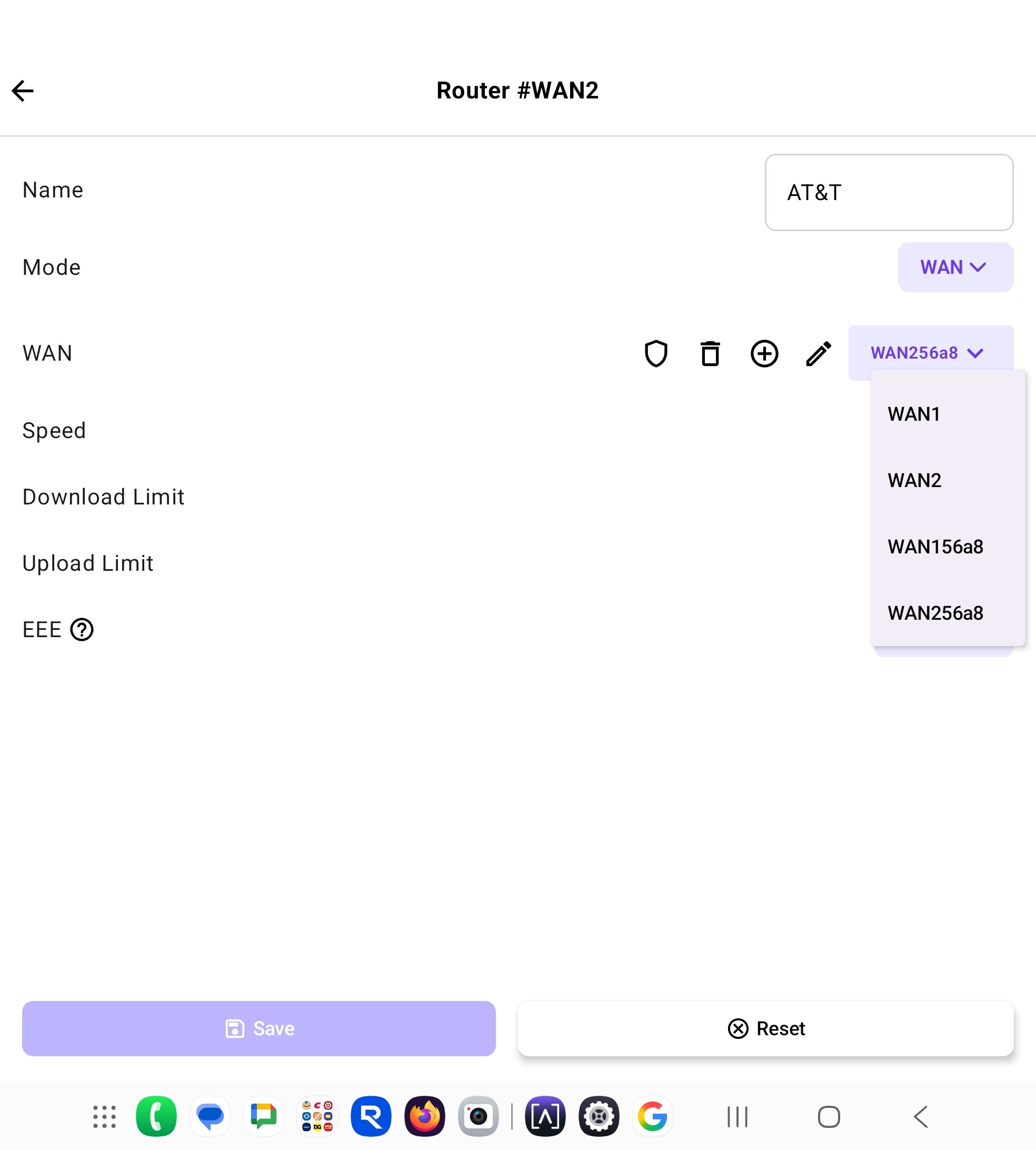
So.. I decided I hate myself enough to try doing this again and I can’t figure out what is wrong. For one thing I still cannot understand how Alta expects someone to diagnose an issue without internet. There should be an “MBI” or “minimum basic interface” to understand what exactly is going on in the route10. I basically borrowed a hotspot just to get access to the internet via WAN1 interface to see what is happening on WAN2 and as far as I can tell the alta management interface keeps pushing down these generated wan configurations that I have never created. I have deleted them now 3 times out of the interface and they just regenerate and assign it to my WAN2 and the one it assigns is missing the cloned MAC so my SFP/ONT will not function because of this. When I got to the network map it appears it is constantly using my WAN1 interface even though I fix the WAN2 and it should 100% be functional. I’m at a loss at this point of how to resolve this. It all started as I said in the original post that it just “forgot” my WAN2 was the correct interface and I have no way of knowing why it’s not able to use WAN2 any longer. My old router functions perfectly with this SFP and other devices I try it on as long as the cloned MAC is there it nearly instantly comes up.
Any suggestions are welcome but as I said I’m really confused on how Alta expects to diagnose these issues. If I wasn’t able to borrow this hotspot I wouldn’t be able to really diagnose it at all.
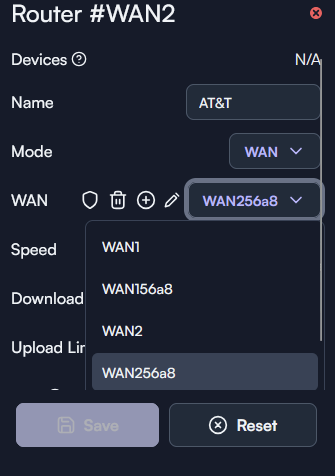
After deleting the WAN256a8 6x now for some reason the 7x it finally decided it was going to listen and not assign it to WAN2 and now it started to work. I have no idea why it keeps creating those but if it does I assume it will just break my internet again.
If you’re managing your network through Alta’s cloud services, then create an entirely new site, delete all the equipment from the existing, migrate to the new, run through your initial set up and WAN config only on the new site. Confirm internet and monitor. Extend your monitoring to anywhere from 7-14 days.
Is this common with their stuff?
Also.. trying to do this. Wasn’t working again so used the hotspot again. Got in and looked at the wan2 connection and it showed the information for the cloned MAC was not filled in even though I specifically did that during the setup. I’ve also come to realize there is no real way to see what IP it got or not in the UI. I really don’t get it though. This was all working like flawlessly before that one day where it seemingly got confused and now it’s having these quirky issues. My old router I can hook this up and it will work basically instantly. If it wasn’t for the hotspot I wouldn’t even of been able to see any of this. When I cat the log @Alta-Jeff said to cat it doesn’t really show anything about the interfaces or anything. Just stuff about it starting up and DHCP handing out addresses.
Honestly using ssh or posting the full logs (via DM to me) is the easiest way to debug these sorts of corner case issues. Ssh gives you the full toolset to diagnose the problem, but of course requires knowledge of Linux networking. If this was a very common problem, it would most likely be in the system log, which can be grabbed with the “logs” command in ssh (then maybe re-seat the module, and view the logs).
Does the SFP transceiver work for a short period of time, then stop randomly? Does it not come up after a reboot, and then starts working when you re-seat it? I don’t think repeatedly modifying the configuration will help. It is possible that there is some incompatibility with this specific transceiver (the was-110? What is the brand?), so I’m wondering if we can possibly pick one up.
At this point I’m starting to think it’s not properly submitting the cloned Mac to the interface and that is where all my problems are coming from. Frankly I have no way to verify that besides just looking at the interface which seems to show correct in the new site but it’s obviously not coming up. I know that is basically the only reason it won’t come up immediately is that the Mac isn’t showing and I know my old router always does it properly..it worked for weeks though so no idea why that one day it decided to break and now just isn’t working unless it never actually worked and it passes the time limit of like 20+ minutes where the ISP will just accept any MAC.
Sent you a dm
No it’s functional at all times. It comes up immediately after reboots. If there is an incompatibility it didn’t show for over 2 weeks.
For a sanity check. What gateway device did your ISP provide when your service was installed?
Bgw620 from att fiber. Also if I plug this back into my old setup it comes up right after the router is finished booting
Where I was headed with all this. Clearly the configuration on your ONU, or the unit itself might be in question here. Was this working on your Asus GT-AXE16000? Did you have a media converter? Or is this your first time exploring with the ONU over the Route10?
So through all my digging today I think i finally might of figured out what is happening but I think it is some sort of bug.(Long explanation)
First time I had the issue and it wiped out my connection it generated those strange config names. In the new config my cloned MAC wasn’t there. On the bypass with AT&T fiber if you present a MAC that isn’t the cloned gateway it basically starts a 20-30 minute timer(I think mine is 20 minutes but could be wrong). By the time I got tired of trying to figure it out the first time and switched to my old system the 20 minutes was almost up and the old router submitted the correct MAC and was immediately accepted.
Today I tried again.. the Alta when it comes up reset it of course won’t have it but then it kept putting the strange config back over and over with me fighting it. So it was flipping from good to bad resetting the 20 minute timer.
I then did a new site as you suggested and re-entered everything but by deleting the route10.. it yet again presented the real MAC instead of the cloned and started the timer over again.
I don’t know why my old router seemingly can go back without the timer seemingly affecting it but it has also had the same MAC set in it for years.
During testing with Jeff.. it reverted yet again but this time to WAN1 config(my hotspot config) and was immediately accepted I guess because the timer ran out during the reboot. After that every time I rebooted as long as the MAC stayed the same it came immediately online.
Well frankly I’m kind of nervous to leave it as the original route 10 MAC since I’m not sure if AT&T will pay attention to those things so I eventually put it back to the cloned mac again but with a twist. I had my old router plugged in with the old MAC as well and I did some packet captures Jeff asked for. I brought the route 10 up without the SFP plugged in. Made absolutely sure via the hotspot that WAN#2 had WAN2 config with the cloned MAC. After that I plugged in the SFP and rebooted the route10 with the hotspot still plugged in and it worked correctly. Now I can reboot it constantly and not have issues as long as it doesn’t swap the config again. The question comes now.. why do the configs seem to swap? Since it even happened in the new site and the audit logs show nothing about me switching it. I assume it’s a bug but I need to I guess wait for it to happen again.
So TLDR AT&T blocks unknown MACs for 20-30 minutes. I was impatient/nervous/no real insight into what alta was doing and wouldn’t give it enough time. I’m not exactly sure old router comes up as fast as it does but it doesn’t seem to need to wait like alta does if it presents the wrong MAC.
Thanks for patiently iterating through this with me. We cannot reproduce anything similar, but if you find a way to get the WAN field for a port to get corrupted/reset, like what you’ve been seeing, we can definitely take a look at fixing it.
New update.. so tried multiple things after talking to the 8311 group and what they think.
I attempted to cold boot with the sfp installed and the Mac cloned. This took like 30ish minutes to come up. The 8311 people think it was leaking dhcp request from the original Mac thus causing issues.
Cold booted with original Mac and waited… and waited some more. Waited for over 60 minutes and started trying stuff and after a bit reboot and cold reboot of the sfp it finally came up.
Third try
Thinking that since I didn’t clone the Mac and 8311 people suggested just not cloning since they said yes it would take longer to go back to the gateway or my old router once att learned the original Mac it should come right back up.
The answer thus far is no it won’t. Took over 30 minutes to get an IP.
I have three or four problems. I guess..
- I can’t really tell what the route 10 is trying to do with the interface. Is it attempting to keep trying to get a dchp? Does it just give up? The interface doesn’t say.
- The interface doesn’t really indicate what wan port it is currently using. On the new dashboard where it shows speed tests it shows IP for both but it doesn’t actually have an IP for the wan2 interface.
- The route 10 eventually adds the stick into the devices tab as a Nokia device (I assume att gateway). I’m unsure if this is causing any sort of issue as it seems to learn whatever it’s reaching out to on the wan.
- It would be nice if you could set the route 10 network utilization to show wan interfaces only vs everything as it basically is a useless chart for me given it shows everything moving through it when at least on my old routers the in and out the wan is what matters for the router.(Perhaps this is just a me thing).
Anyways as long as the sfp stays up it will instantly reconnect so it has to be around it powering off and back on. By the way if your wondering “why does it matter? You should have backup battery!”. I agree and I do and what set this all off is the backup battery died on me so then every time we had a bad storm or something the power might blip then I get to wait a long time for Internet to come back. I did add a new battery but the problem is that it is indeed just a battery and if the power goes out for longer then it’s life or I turn it off to conserve the battery’s life then I’m back to waiting again.