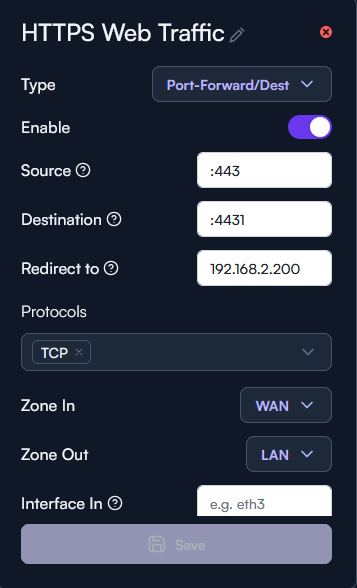
So.. I’ll admit I’m not a network engineer though I’m a Systems Engineer.. I generally know a lot about networking but I’ve never configured higher level stuff from scratch. The thing is though I’m apparently not understanding something as I’ve been attempting to do something as basic as forward 443 https traffic from the wan to my webserver and I cannot seemingly pull this off. I weirdly was able to forward something else but 443 seems to be refusing no matter what I do. Am I missing something? Do I need to make filter rules for each port forward? The thing that works has no filter rule so that wouldn’t make sense. I looked through other topics but they seem to get resolved without really stating a solution and I find it crazy I’m having this issue. I’ve been wanting to move to alta from my AXE16000 since a @Unflawed basically did the feature request themselves that forwards domains via vpn.
While you are helping me.. what is the way to setup a mirror for lans? Like you have a domain that is your WAN’s ip and when a lan user types the domain it reflects it correctly to the same route that the wan would of taken? Currently it routes it to the gateway of the vlan which isn’t what I was expecting(though pfsense and friends I guess do something similar).
This guide should be helpful: https://help.alta.inc/hc/en-us/articles/36709164963995-Port-Forwarding
Basically, you need to leave everything as default except for:
- Set destination to :443 (WAN TCP port you want to forward)
- Set Redirect to to your web server
- Select TCP protocol
- Set Zone out as LAN (optional)
If you want to resolve internal hostnames differently than when you are outside of your LAN:
- Create a file in /cfg called hosts with your personal hosts file (formatted just like /etc/hosts)
- Create /cfg/post-cfg.sh that has the following contents:
cp /cfg/hosts /tmp/hosts
/etc/init.d/dnsmasq reload
I guess re-reading it a few times… it does make sense but I guess I’m just not used to this wording. I assumed the source was the interface/port(wan) and you could get specific and that the destination was the port(destination you were wanting to send it) but guess I should of asked why “redirect to” was a thing as well..
Well guess sorry for the stupid question as looking at it now it does seem kind of stupid.
Also, thanks for helping even though it probably looked stupid. I had found the guide you suggested but clearly I was having reading comprehension problems or something.
If I could query you a little further. I did what you show here on the internal routing but the problem is the device it’s routing to as you can see with the port forwarding is a different port.(443 is used for something else on this host) How would you go about hitting the correct port if it just is basically using a host file type situation.
If you want to do a different port on the LAN side, just change it on the Redirect to value, i.e. 192.168.1.10:4444
Wouldn’t the forward not come into effect because it only applies to WAN origination? With the stuff you posted
If you want to resolve internal hostnames differently than when you are outside of your LAN:
Create a file in /cfg called hosts with your personal hosts file (formatted just like /etc/hosts)
Create /cfg/post-cfg.sh that has the following contents:
cp /cfg/hosts /tmp/hosts
/etc/init.d/dnsmasq reload
it just immediately goes to that IP address since it’s basically just a resolver but the port would remain unchanged unless you are saying I can say “destination x.x.x.x port”, and then say in lan and out is lan as well? That would break the 443 though direct to it in my lan.
Yes, if you resolve to an internal IP, the port-forward would not take effect because your Router would not get hit at all. However, by default when you use port-forwarding on Route10 (and most routers today), NAT hairpinning is enabled by default. This allows you to connect to the WAN IP address from the LAN, and the router will perform port-forwarding as if the connections are coming from the WAN-side.
Hairpin is the word I was missing. It doesn’t do this properly though. Instead it just redirects me to the gateway IP address port 443 even though the dns is set for the wan IP and should follow the same forward as wan.
That is why I did the resolver thing you mentioned at first as I was under the impression it was just the way alta had to be setup but if alta supports hairpin then I guess maybe it’s turned off? I’m not seeing an option for it anywhere.
Is there a reason it would go to the gateway IP instead of following through with the forward?
I ended up just wiping the whole thing and starting over again and for some reason hairpin is working now