Hi,
I would like to report a bug in regards to rate limiting a port on the Route10.
When setting the desired upload rate limit, the actual rate limit is inconsistent and does not let you exceed speeds of 120mbps (average).
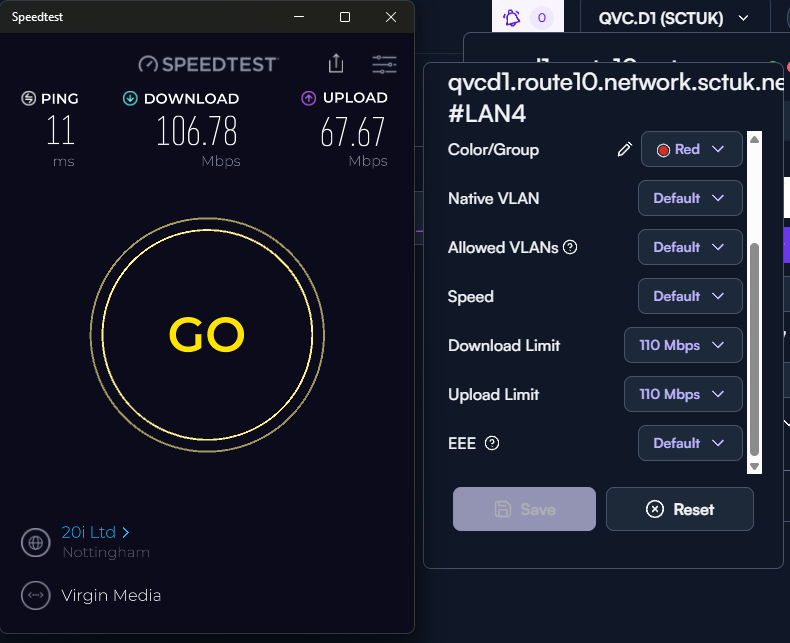
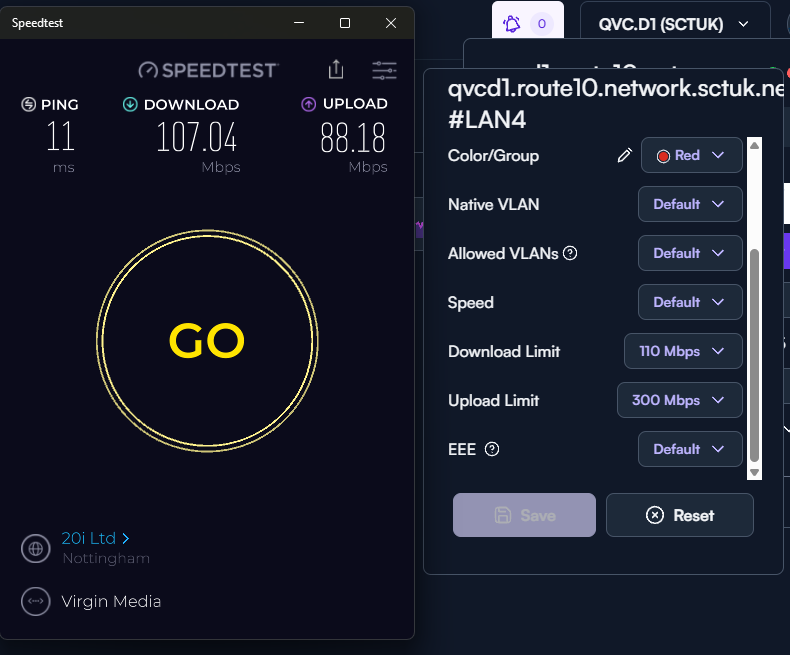
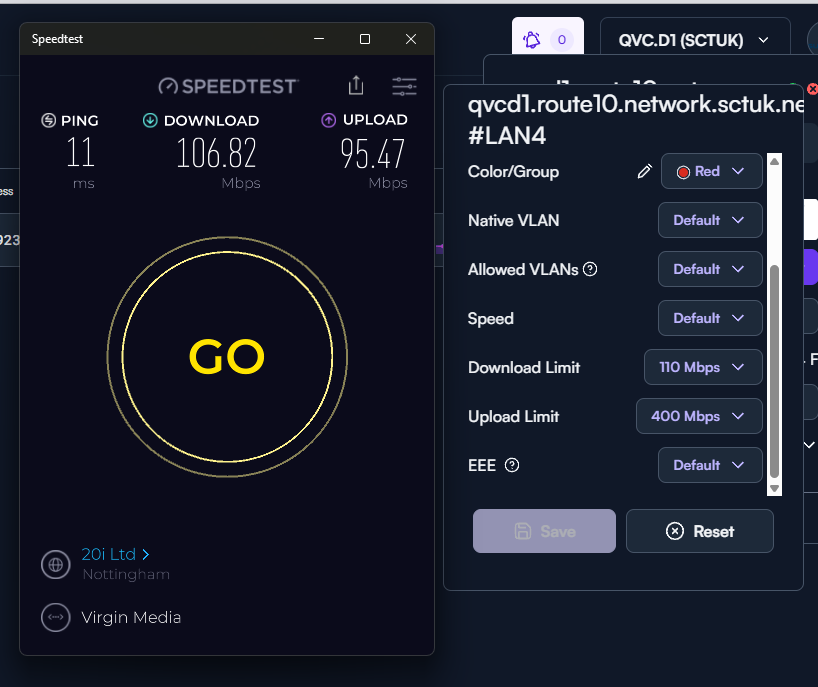
Upload rate: 110Mbps > Tested actual rate: 67Mbps.
Upload rate: 200Mbps > Tested actual rate: 85Mbps.
Upload rate: 300Mbps > Tested actual rate: 88Mbps.
Upload rate: 400Mbps > Tested actual rate: 95Mbps.
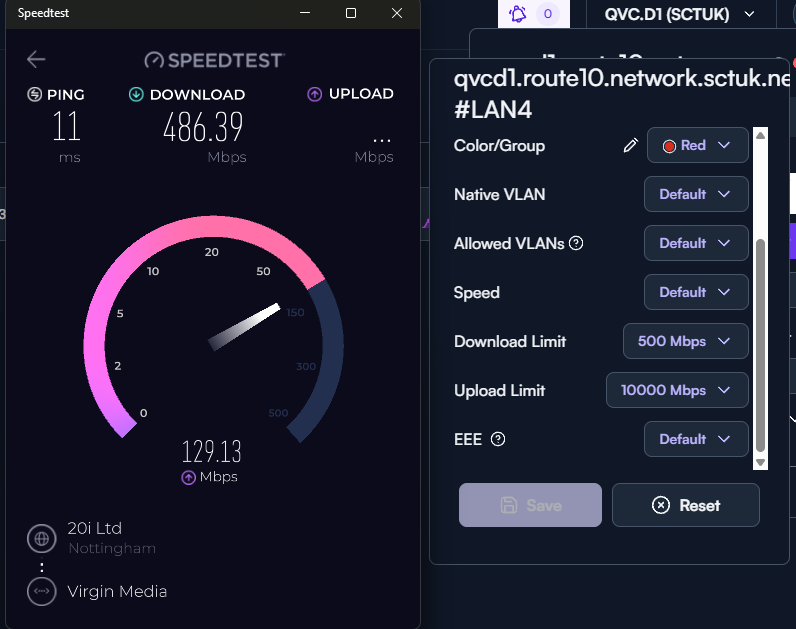
Upload rate: 500Mbps > Tested actual rate: 88Mbps.
Upload rate: 1000Mbps > Tested actual rate: 105Mbps.
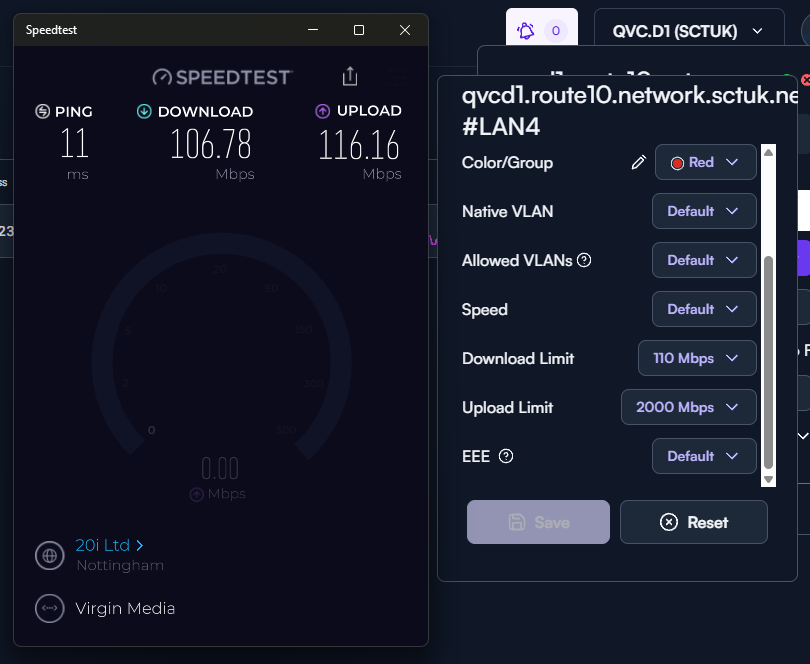
Upload rate: 2000Mbps > Tested actual rate: 116Mbps.
Upload rate: 10000Mbps > Tested actual rate: 121Mbps.
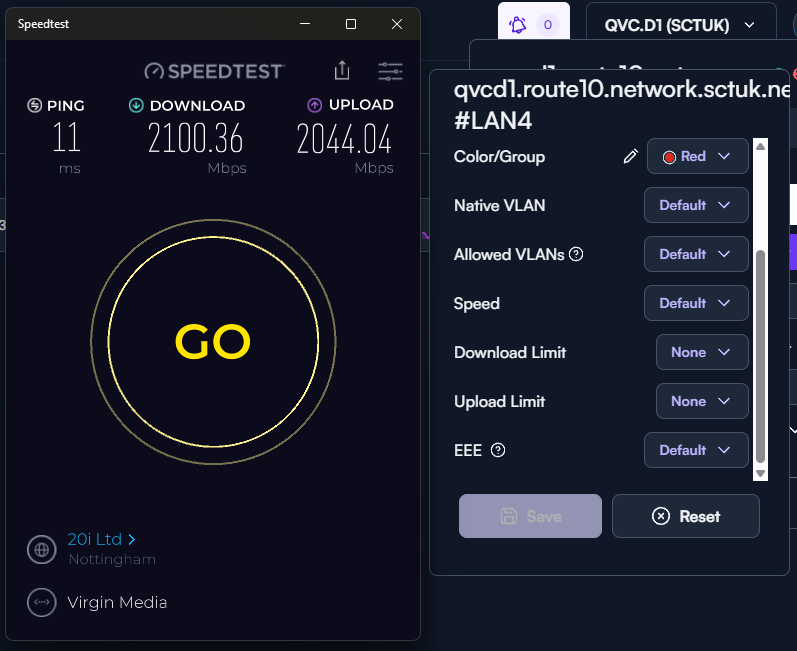
Also note, setting the port speed manually to ‘10000Mbps’ (10Gbps) yields 121Mbps, yet when disabling rate limiting (defaulting to port speed of 10Gbps) full speed is achieved.
This only seems to be an issue with upload rate limiting, and not download rate limiting from my testing.
Please see attached screenshots.
Hardware disclaimer:
LAN4 is a SFP (10G-SR Cisco) serving a HP Aruba 6300M
ISP is Virgin Media XGSPON (2gbps symmetrical) service.
All tests were done from a device connecting to HP Aruba switch via 10GB SFP.
Regards,
JJ
Thank you for the post! This has been a known issue related to how the hardware accelerated rate-limiting operates. It is unfortunately not accurate, and needs to be tuned to your specific environment for desired results.
If you want to have accurate rate limiting, albeit without hardware acceleration, please enable rate limiting on your WAN connection using CAKE (instead of on the port). You should have a much better experience than the port-based rate limiting.
Thanks for the explanation, Jeff.
JJ
Quick question on this; would that mean there are options that could be tuned by the user to adjust this behavior if they were so inclined? At least from the CLI? I know there’s the SSDK shell down in the CLI, for instance, which I think is where some of the hardware accelerated stuff and settings live. Although feel free to correct me on that as I haven’t really tried to monkey around with it!
If you want to use the hardware-accelerated port rate-limiting feature, the tuning would involve tweaking the limits until you achieve the desired throughput.
Oh ok, gotcha and thanks!
Hi Jeff,
This isn’t fully possible. As you can see from my screenshots setting the limit to the max possible still only yields 120mbps.
There would be no tweaking as such as if you intend to set a limit greater than 120mbps, it wouldn’t physically be possible.
Setting a limit of 10,000mbps yielded a hardware accelerated limit of 120mbps, as you can see from the screenshot.
Regards,
JJ
The important point here is making sure you set the liming on the wan itself, NOT a port. CAKE only operates when the limited are set on the wan configuration.
If you was port limiting you wouldn’t be placing it on the WAN side, this makes this feature useless. The intended use scenario would be to limit a certain port from utilizing all of the WAN connection (for access points and low traffic networks).
I’m not sure why anybody would place this on WAN side, and even if you did; it would be a very minor limit to prevent full saturation of the WAN.
My apologies I misunderstood what you were trying to accomplish.
I thought so 
No worries, i just wanted to clarify the intended use scenario.
Even setting the hardware accelerated limit to 10,000mbps, yields a throughput of 120mbps, and it doesn’t scale consistently as you can see from the screenshots.
Im not sure on the logic used for the scaling, but if you wanted a limit of 250mbps for example, you’d need to set the rate limit to 35,000mbps, which is obviously (i hope) not going to work being 3.5x greater than the physical link.
This is assuming the rate scales accordingly (which it doesn’t).
Slight side tangent, but limiting the speed on the WAN side would activate the CAKE traffic shaper, which might be useful in it’s own way depending on the end goal: Let them run CAKE [LWN.net]
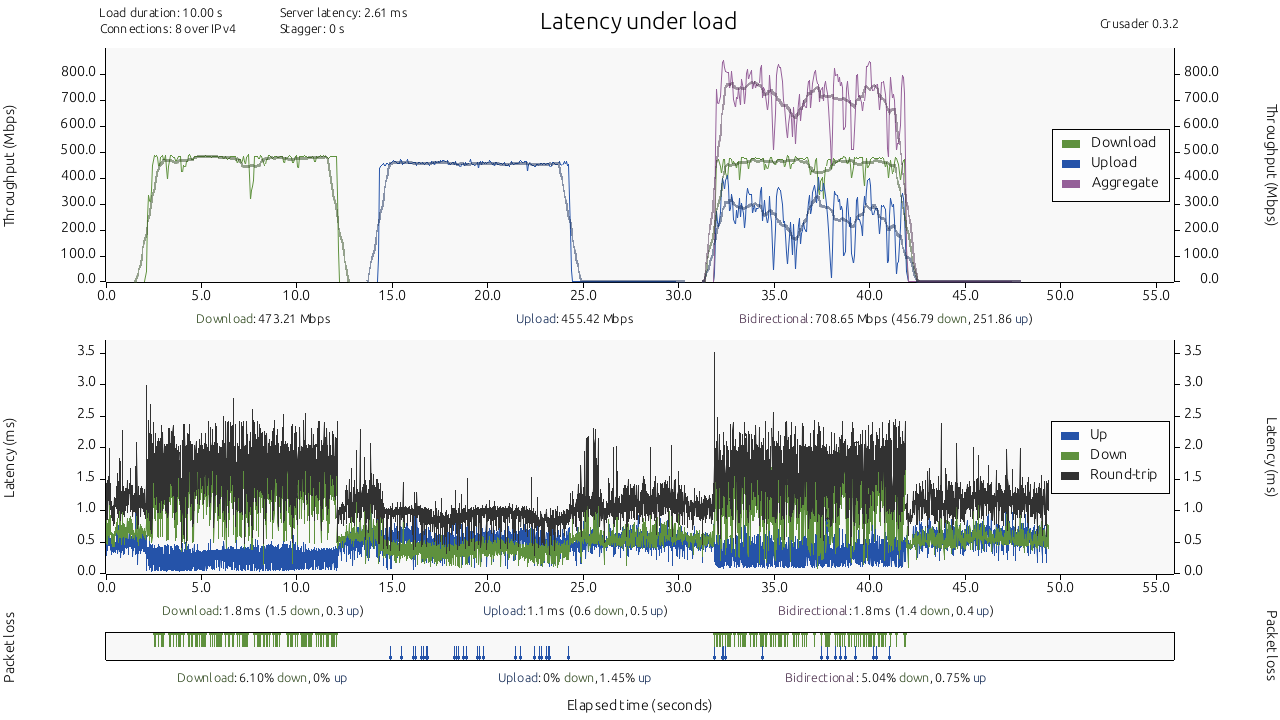
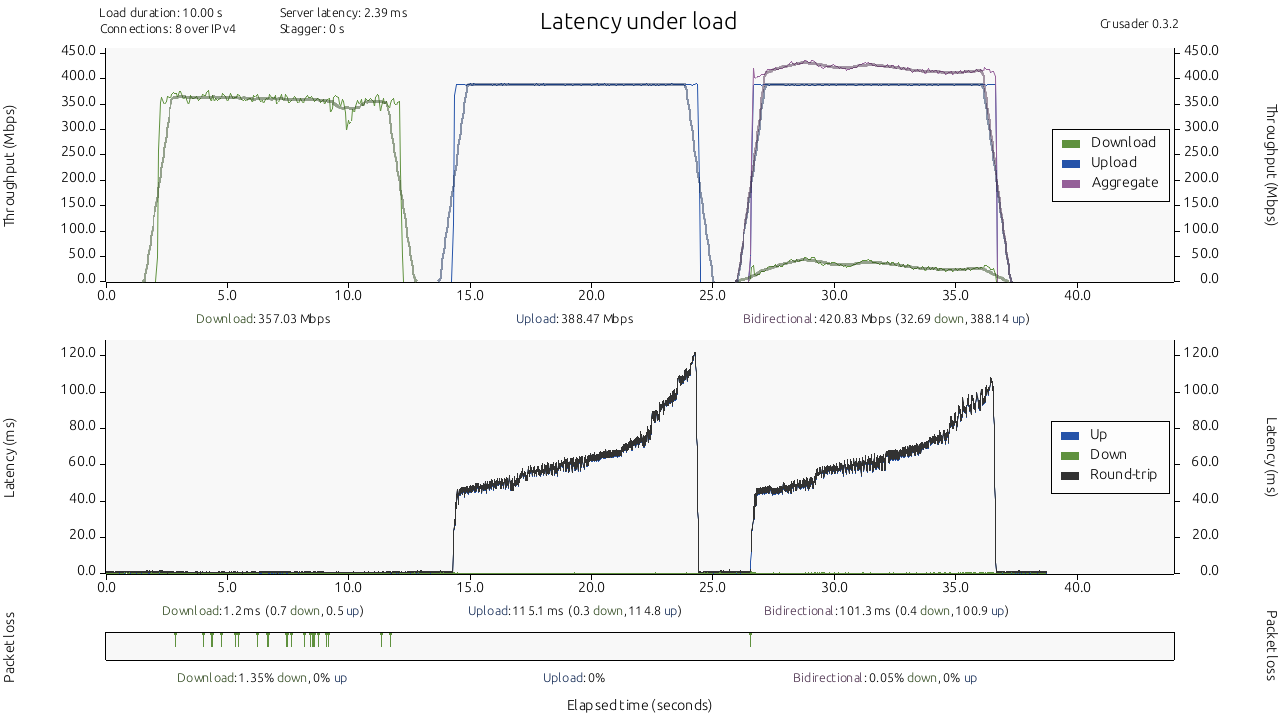
I was kinda curious to test out the port rate limiting more, but since I don’t have the bandwidth on the WAN side to test like @SuttonsCloud did, I opted to do it locally between two devices  .
.
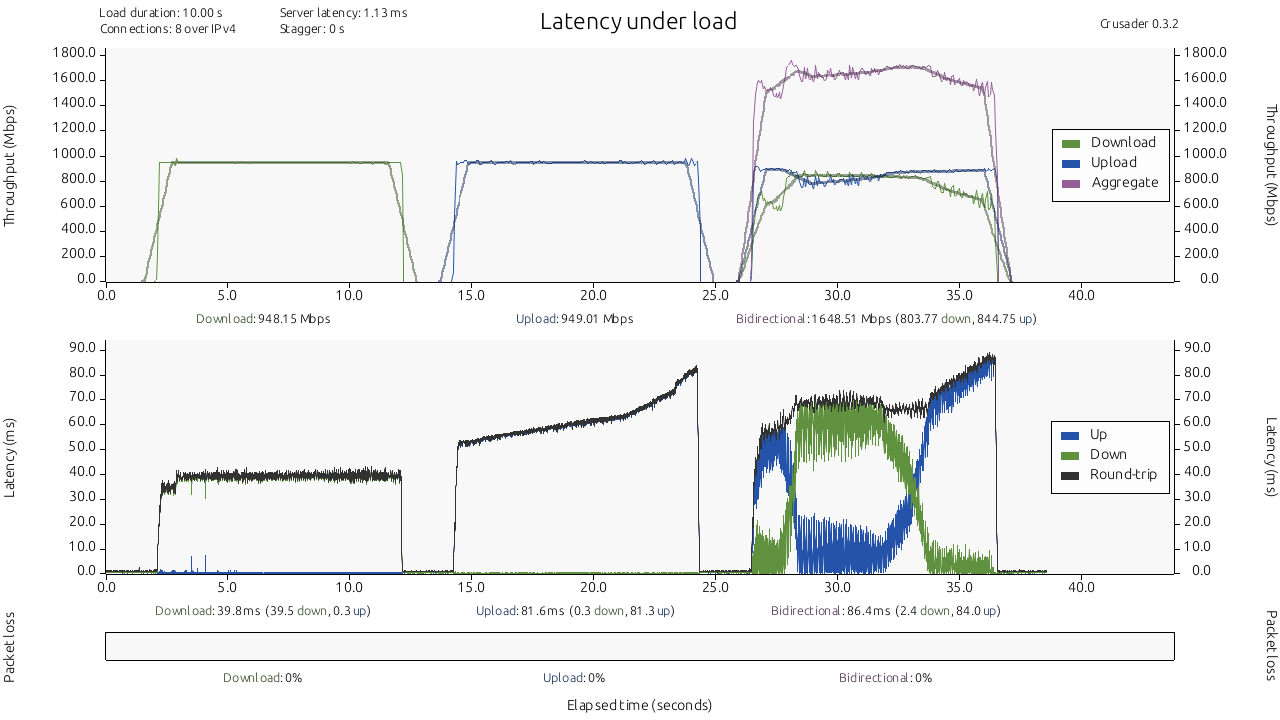
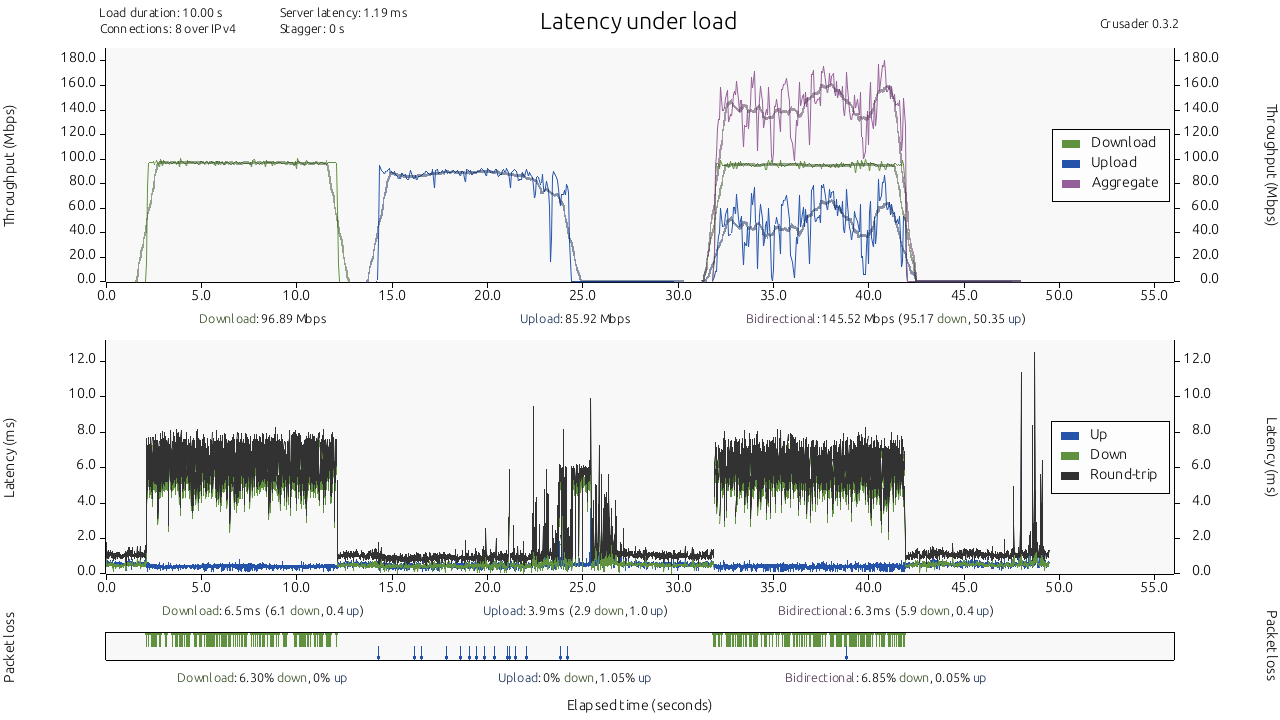
One PC connected at 1Gbps on LAN3 and the other connected to LAN4 at 10Gbps. So for the sake of sating my own curiosity I ran some tests. Doesn’t really offer any particular answers but I thought it could be interesting to see if it behaved differently when not traversing the WAN.
For example, full LAN3 port speed (1Gbps)
LAN3 @ 100Mbps
LAN3 @ 500Mbps
And also LAN4 @ 400Mbps
The tool I used to run these is called Crusader, if anyone is wondering where the heck these graphs came from. GitHub - Zoxc/crusader: A network throughput and latency tester.
@jmszuch That helps a lot, that’s some great info.
From your tests, what i can see is that the issue only seems to be apparent when traffic is traversing from the LAN interfaces to WAN.
Other than the LAN>WAN issue, it does ‘work’. It definitely needs to be sharpened up and the logic improved. With the limit set at 400mbps, getting a download of 357mbps definitely falls below my standard of acceptable though - yet again im a tough man to please.
Nice one!
Thanks! Glad that helped!
That was definitely my assesment as well based on the results I was getting.
To be a bit more fair, the 400Mbps test is where I limited the speed on the 10Gb port. The 10Gb port is going to a Mikrotik RB5009 where the second computer is connected at 1Gbps. So the connection between the routers is running at 10Gb, but that’s it. I could guess there might be some flow control stuff messing with the througput there, but I’d have to test that some more to say for sure.