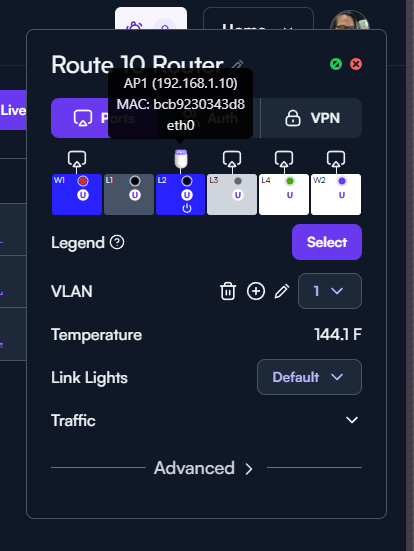
I’m having an issue with setting up my AP6 Pros.
Here is my setup:
ISP smartNID/ONT - in bridge mode
eero max 7 - in bridge mode
Route 10 - DHCP
2 AP6 Pros - DHCP
If I connect the AP6 Pros directly to the Route 10 they work fine. I can take one of them and move it where I need it using a PoE injector and it grabs a signal by piggybacking off of the AP still connected to the router.
Where I’m having an issue is when I remove the 2nd AP from the router and move it to where I need it. That’s when neither AP is recognized and can’t connect. I was hoping to use the eero to broadcast a wifi signal that the APs could pick up once they had been configured and moved to where I need them. Unfortunately, that is not happening.
I have tried powercycling and PoR’ing the APs. I’ve tried putting the eero in DHCP (they actually recommend double NATing), powercycling and resetting it. I’ve deleted and re-added the APs and their settings in the Route 10 and rebooted the route 10. Nothing is working. So far, it seems like the only way to get the APs to work is to have one remain connected to the route 10 and have the other piggyback off of it from wherever I put it.
I know that mixing and matching manufacturer’s networking hardware is not recommended/supported, but I was hoping someone might have a similar setup they got working or could make some recommendations.
Thank you
Mesh cannot operate across product vendors, so you’ll have to replace the Eero with an Alta AP.
The eero is in bridge mode. This disables its mesh functionality and has act only as an access point.
The feature you are trying to implement is meshing, and is not possible across vendors. Our APs do not have a way to connect to any arbitrary SSID, so you will have to replace the Eero with an Alta AP or hardwire your APs.
I think a little diagram with what the intended result is supposed to look like might be handy for this scenario. Reading the original post, I know this section
made it sound, to me anyway, like the goal was for the Alta AP to be wirelessly repeating the signal from the Eero and then meshing that over to the second access point. Which wouldn’t work since they would only repeat/mesh another Alta Labs access point.
I don’t really care about meshing. What I was hoping for was the ability to have both AP6 Pros connected remotely so I can place them where I need them (one outside on the back patio and one in the basement). But, the only way I can get them to be recognized/work currently is to have one hardwired to my route 10 router and then the second one, which I can place remotely if the “main” AP is hardwired, will piggyback a signal off of that.
My hope was that I could use the eero as just a wifi router to broadcast a wifi signal that the APs could pick up. The eero is in bridge mode and is hardwired to a port on the route 10. The route 10 recognizes it, assigns it an ip. The eero recognizes the route 10 and the devices connected wirelessly on the both the APs. Where I am stuck is the inability to remove the “main” AP from it’s hardwired connection to the route 10 and move it to where I need it and have it be recognized by the route 10 and pick up a signal from the eero.
And that’s fine! I think the main point of claritication on my end is that at least one of the AP6’s has to have a wire going back into the network. Whether that’s connected into the Route10, the Eero, a network switch, or a power injector that has a wire going back into one of those devices.
When moving the “main” AP to it’s intended location, how does it connect back out to the Internet? If there isn’t a ethernet cable connected to the AP6 that eventually leads back to where the Internet is coming in then we’re going to have a bad time.
I hope it doesn’t seem like I’m harping on this point too badly but I just want to make sure I’m understanding the setup properly and we’re not talking past each other. Especially since the goal is to have one of the APs “pick up a signal from the eero”
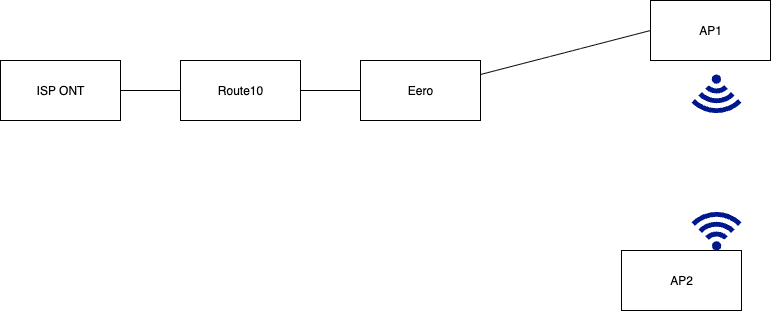
To summarize, this should work
Where the lines represent Ethernet connections between each device
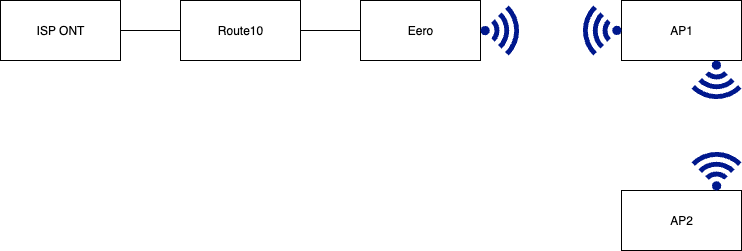
This would not work
Thank you for explaining it. I guess the issue was my understanding of the functionality of the AP6 Pro.
You’re welcome! I really hope that clarified things a bit.
The scenario you were going for would totally work if the Eero was another AP6 Pro or even if there was another Eero to wirelessly connect to the main one and then you connected the AP6 to that Eero with a wire. The meshing everyone talked about basically being an easy wireless repeater setup supported only between the vendors own equipment.
There are, of course, vendor agnostic wireless repeaters or wireless routers that can act as a wireless client. But that’s a bit beyond the scope of this topic.