Issue with static IP

Hello :slight_smile:

I have an issue when I set up static ip address from the device properties
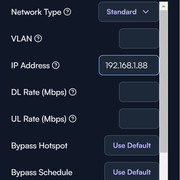
After the first static ip set, the DCHP server will start to slow down and will need 2 or 3 seconds to deliver new IP address to the new devices, after setting up a second static IP it will need 3 to 5 seconds to delivers an IP to new devices, and after setting up a static IP on 4 or 5 devices the Route 10’s DHCP will stop responding and will of course stop delivering new adress … after 24 hours all the devices will stop responding on the network because their lease expired and was not renewed.

Has anyone run into the same issue ?

Ps : I only have 1 VLAN , the route 10 is handling 100 devices ( running on the latest firmware )

This is probably related to a known issue. It looks like your device has a hostname with a space on it. In the interim, if you remove the space, or replace it with a hyphen, then that should alleviate the issue.

We will have a fix deployed soon.

Hello Mike :slight_smile:

I removed the spaces on the hostname and the issue is no longer happening !

Thank you !

1 Like

No problem! I’m glad to hear that workaround helped! The fix is close to being ready (along with something else), more news on that asap.

This thread has been automatically closed due to inactivity. If you believe you have the same issue, please create a new post describing your issue. Feel free to link to this post for context if desired.