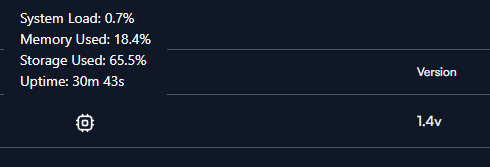
Route 10 has only 1 GB of RAM. With IPS (Suricata) enabled, the process consumes ~700 MB RSS and ~480 MB in swap — that’s over 1.2 GB total on a 1 GB device. Every night at 03:30, the built-in suricata-update cron job triggers a rule reload (kill -USR2), which temporarily requires even more memory. With only ~37 MB free RAM, this consistently causes the router to become unresponsive — WAN/PPPoE dies, but the device stays powered on (LEDs on, partial ping). Only a full power cycle recovers it.
This has been happening repeatedly between 3-5 AM for weeks. Disabling IPS and killing the Suricata process freed 722 MB of RAM instantly (37 MB → 748 MB available). The router has been rock solid since.
IPS should either be optimized to run within the Route 10’s memory constraints, or there should be a clear warning that enabling it on this hardware will cause instability. As it stands, it’s essentially unusable on the Route 10.
Linking to my discussion on the same topic here too:
I am not certain if enabling IPS did things much worse, from IDS only, but it may have tipped it over the edge…from being very close to the limits already. Already before, the memory was at the very edge, with high swap usage and low RAM margins. I did have quite a few other processes running, like my custom installation of fail2ban and geo, bogon and abuse block, and where enabling IPS just tipped it over. Disabling my custom tools made it better but not good, while also keeping IPS on.
Basically, I have had pretty much the same experience on crashes or stalls.
I would like to se some compromise where this Suricata integration is optimized for the available RAM, contrary to disabling it altogether, or enabling it with very intermittent stability/instability.
The handling of rules for Suricata is inefficient. Even at the most restrictive level (High Block Level), the script only disables a handful of rules, leaving ~49,000 active rules . This one-size-fits-all approach fails to prune rules that are irrelevant.
I have disabled IDS/IPS for now as its causing a high memory pressure given the limited capacity. I don’t think this will be actioned soon, so I’m looking at ways we can optimize via cli.
A few things I noted from sifting through the IDS/IPS script framework:
All rules seems to be loaded always, disregarding whether IPS inline is enabled or not. So, if that is working as I think, that would be an injection point for set of rules being candidates for trimming, at least for IDS only and the retroactive IPS.
The /a/suricata/data is recursively symlinking into itself. Just wondering if that is a bug that causes any unnecessary reloads or recompilations that wouldn’t happen otherwise, or if it has no impact whatsoever.
There is a DISABLE_CONF and DISABLE_OUT potential mixup in ips-rule-policy.sh. Rules to be disabled may be output to an incorrect file and leaving more rules in there than intended. I couldn’t find anything setting the DISABLE_CONF variable anywhere from a very broad and recursive grep. It may be there somewhere, so it may not be an issue, but I couldn’t find it.
suricata-update is running twice in the suricata-update.sh (from cron?) and from suricatad.sh, once first and then a second time after applying the IPS policy, and potentially running two rather memory intensive steps, unless short-circuit properly. Edit: The second run could potentially be where some substantial trimming could or should be taking place, at least for the IDS only (with retroactive IPS).
My idea would, conceptually, be to inject a call to a custom filter function from /usr/lib/suricata/python/suricata/update/rule.py. That custom filter function/script could filter what to disable and/or keep and inhibit further memory intense Python objects, based on one or two custom config file. That could hopefully prevent the updater to be so RAM intensive and also shrink the compiled rules file and then shrink memory usage as the downstream suricata engine would read a smaller rules file. Then, off course, the there would be a delicate work on selecting what to keep and what to filter out…
Yeah as you said there’s more than 1 issue, of which I created a patch to fix all of it.
Below are the results using IDS + Custom Block with only command-and-control, credential-theft rules. Yes only 2 categories but this is configurable. It will load about 4860 rules. Given there’s enough free memory I might add more categories later.
I checked the Suricata logs, verify the rules loaded, also checked other logs. I didn’t find issues. So far it’s looking good for me.
I initially attempted to just use Suricata via cli with the following:
Disabled IPS/IDS in the UI
Created a script with IPS Inline and configurable custom rules – I used domain-c2, command-and-control, credential-theft
Result:
I lowered the RAM usage to about 29% (as seen in the UI). Note that I have other custom services running. This translated to less swap file usage.
I didn’t like using IPS Inline as it reduced my download speed, so I dropped this cli only change.
So far I’m happy with the result but I’m not ready to release the script yet.
Aside from stability fixes (comes as a patch which might not work in the future), the script also allows you to configure what security categories you want Suricata to load. Of course the more categories loaded, the higher the memory consumption will be.
What speeds are you achieving now in IPS inline mode? I have experimented back and forth but, but in my original, multi-VLAN, IDS/IPS config I can’t seem to load with IPS inline due to I/O wait stall, so I don’t have any baseline speed for the moment. Then, from my own similar pruning framework down to appr. 15k rules (appr. high severity level only), and IPS inline enabled, I get severely capped, from my baseline 930/930 down to 500/500 or less. I haven’t downloaded your setup yet.
It only supports none inline mode – IDS + Reactive blocking. I initially had the inline mode support but removed it. It reduced my download speed from 530 to 380+ Mbps. I’ll put it back in the next version of the script but I’m expecting the same.
IPS Inline support is now available. Check the Github repository.
Just a note that for IPS Inline mode to properly work, the script will turn off software/hardware offloading. Offloaded packets bypass the CPU and thus bypass the NFQUEUE.
I would still recommend using the IDS + Reactive Blocking mode. Route10 doesn’t use a processor that supports instructions that scan data extremely fast – specific Intel or modern processors where Hyperscan can be used.
@ebuckland81 As expected, my download speed dropped to ~380 from ~530 Mbps. I added some NFQ tuning, see if it improves your download speed.
Just wanted to say thanks for your efforts here @Unflawed I’ll definitely be checking this out and will report back with how it goes
Your mention of Hyperscan reminded me of this post from one of the Emerging Threats team members about some newer features Suricata 8 supports:
Specifically, the possible use of Vectorscan which sounds like it’s supposed to be a drop in replacement for Hyperscan but supports some ARM SIMD instructions as well
Not necessarily saying there’s something to be done there, but it piqued my interest when reading and I figured I’d drop it here as well for anyone else who’s curious
Porting Vectorscan is feasible. It should be faster in parsing rules. But the bottleneck will still be NFQ. Plus offloading is off, so I expect marginal improvements to download speed.
With IPS_INLINE=1 and 4 security categories, I get a download speed that’s near my 550 plan – from ~380 Mbps it’s now from 525 to 535 Mbps. Of course this is with some NFQ optimizations. Vectorscan alone will not boost performance significantly.
I do think with Aho-Corasick + NFQ optimizations I’ll be able to get near ~500 Mb. But why bother when there’s Vectorscan.
More testing to be done for now. I’ll release it soon.
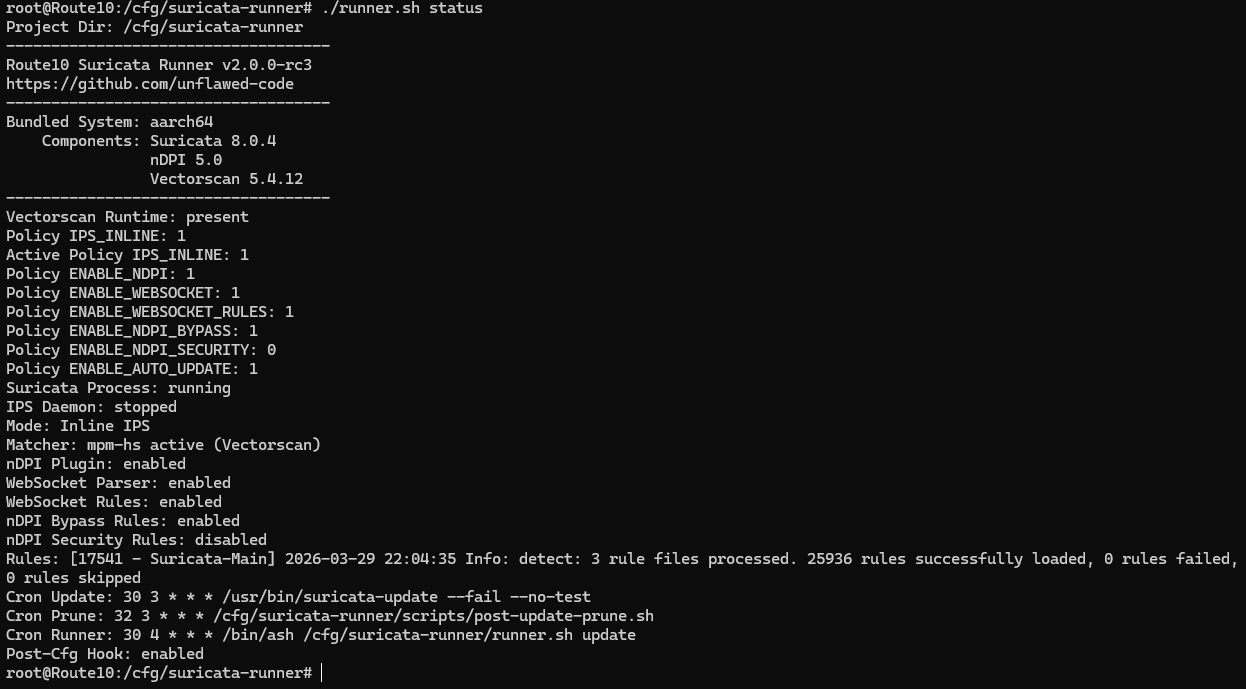
Vectorscan + Suricata 8.0.4 + nDPI 5.0 + NFQ tuning can significantly boost download. Of course you have to tune your security categories – I wouldn’t include everything.
Please note that Suricata 8.0.4 and nDPI 5.0 adds more performance tuning control. For example, I have this bypass rule which lets Suricata check only the beginning of the traffic and skips it when it identifies that it’s Netflix or Xbox:
pass ip any any <> any any (msg:"Route10 nDPI bypass Netflix"; ndpi-protocol:NetFlix; sid:2900101; rev:2;)
pass ip any any <> any any (msg:"Route10 nDPI bypass Xbox"; ndpi-protocol:Xbox; sid:2900114; rev:2;)
Refer to the documents in the /rules folder for details.
I hadn’t spotted that ability to setup a bypass rule when using nDPI with Suricata, so that’s a really neat catch.
How was patching the compatibility between Suricata and nDPI if you don’t mind me asking? I kinda gathered there was a bit of a stand off between the projects on who might be responsible for implimenting that support
Aside from missing dependencies in the beginning. I didn’t encounter compatibility issues when compiling Suricata 8x with ndpi. You mentioned standoff? When I compiled Suricata I had to pass enable ndpi flag and not the other way around.