I urgently need a button on my WAN connection that will simply refresh the interface, I know this can be done through scripting etc. but if there was a UI element for this my use case would be feature matched to OPNSense which would be amazing. The issue that I face an likely several others do as well is CGNAT with ATT fiber. Their stupid crappy gateways do allow IP passthrough that gives you a public IP but its fickle and will randomly jump back to issuing a private IP. Some of us that run Alta in homelab scenarios probably feel this pain as if I have no public IP I have no working forwarded services from my homelab. I know business is what matters but I am a partner and I have had to put a pause on selling Alta as we were having issues and they have all been taken care of in the past few firmware updates so I am really excited to make this my obvious choice for business purposes. Thank you again for the fast development its so refreshing to see a product move so quickly. If you need any more input or have questions let me know I am very invested in this issue.
Would that be a button to refresh the IP address being received by the router, like a DHCP release/renew? Or more to just refresh the Interface to display whatever address is currently assigned to the WAN interface?
Either way, sounds useful enough to me. Maybe a screenshot of how it’s implimented in OPNSense might be a useful point of comparison as well 
I will try and get into my OPNSense instance, currently you can click on the WAN port and hover here to see the IP like this,
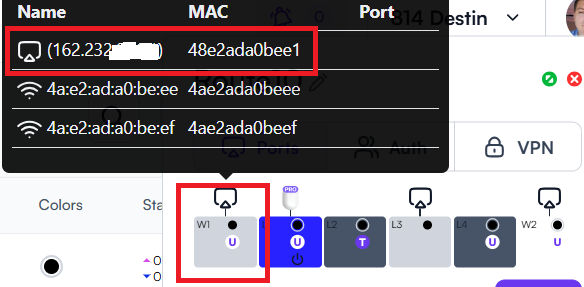
but yes either a release/renew would be great or shut the interface off for a second and back on. Its so stupid because ATT is the one known to have this issue. You have to give the ATT gateway the expected MAC and its supposed to allocate the public IP to that interface, it works for days, or weeks sometimes but just randomly shoots back a private IP. The best part is Alta has excellent MAC spoofing so I have the OPNSense interface and the Route10 using the same MAC so that makes it so convenient.
As a partner I’ve also had to stop selling these units in particular “Route10”.
WAN DHCP renew button + scheduled/automatic lease refresh (AT&T BGW private-pool scenario) — follow-up to #5792
Id like to add to follow-up for I need a WAN refresh key, which appears to still be unaddressed as of firmware 1.5b. I’ve hit the same class of problem and can add a second data point plus a more specific feature ask ..
Environment:
- Route10 on firmware 1.5b
- WAN 1: AT&T fiber via Arris BGW series gateway
- WAN 2: Cox fiber gateway
- Both WAN ports connect to a Juniper EX2300-C-12P — AT&T on VLAN 2193, Cox on VLAN 2194. The modems themselves terminate on a second downstream Juniper switch carrying the same VLANs over an 802.1Q trunk, so the Route10 WAN ports reach the gateways indirectly through the switched L2 path. Link state on the Route10 WAN ports therefore never drops when a modem-side event occurs, which likely matters here — the Route10 never sees a link-down event that would naturally trigger a fresh DHCP DISCOVER.
Behavior:
- Public static IP passthrough on the AT&T BGW: works flawlessly, no issue.
- Dynamic private IP pool (no passthrough): the Route10’s WAN DHCP lease eventually goes stale and traffic stops forwarding. The interface still shows up/leased, but nothing passes until a new lease is forced.
Current workaround (all manual): disable/re-enable the WAN interface in the UI, or physically unplug/replug the WAN cable, to force a new DHCP exchange. Not viable for remote or unattended sites.
Feature requests:
- UI button per WAN interface: DHCP Release/Renew (or a one-click interface bounce). OPNsense/pfSense both expose this per-interface.
- Configurable periodic DHCP renewal: force a DHCP renew on the WAN interface every X minutes/hours/days, independent of the lease timer handed out upstream. The BGW clearly isn’t honoring normal renewal behavior in the private-pool case, so a client-side forced refresh is the practical fix.
- Self-recovery tied to WAN health monitoring: if the ping monitor fails N consecutive intervals, automatically trigger a DHCP release/renew (and optionally an interface bounce as a second stage) before declaring the WAN down. Since intermediate-switch topologies like mine never present a link-down to the Route10, a health-check-driven renew is the only reliable recovery path.
The multi-WAN failover logic already tracks WAN health — hooking a DHCP renew action into that state machine seems like a natural extension rather than a new subsystem.
Can me reached out in the Alta vip slack to provide logs or packet captures of the stale-lease state, or test candidate firmware. AT&T BGW gateways are extremely common, so I suspect this silently affects many deployments.
One theory that I have…. since the WANs traverse switched L2 with no link-state propagation, hope this condition is useful detail for Alta’s engineers — it might explain why the Route10’s DHCP client never re-triggers, and i would like to see this happen automatically.
@siriuspackets Have you reached out to support regarding this issue? We’re not seeing anything widespread like this, but would love to help with your specific issue.
The Route10 WAN DHCP client will automatically renew the lease half-way through the lease period. For example, if the lease period is 24 hours, it will continuously try to renew the same IP address lease 12 hours after it obtained the lease. This lease period depends on the ISP’s configuration.
If you can grab a packet capture showing that the Route10 is not renewing the lease half-way into the lease period, our engineering team will likely get involved:
tcpdump -i eth3 -n -v -s port 67 or port 68 -w /tmp/dhcp.pcap
You can run this in a screen session so that you don’t have to stay connected to the Route10 for hours/days at a time. CTRL-C it when done, then scp it off and send it to me or support.
My guess is that you have something else going on there that’s not DHCP-related, but this packet capture will be a good first step, if you believe there is a DHCP issue.