Oh, yes, so I’m saying if you want it to persist through a reboot you will need to put your commands in /cfg/rc.local (a new file). You could edit /etc/config/https-dns-proxy, save it to /cfg/https-dns-proxy, and then copy that file to /etc/config/https-dns-proxy, and then restart https-dns-proxy as part of this new file, /cfg/rc.local:
cp /cfg/https-dns-proxy /etc/config
/etc/init.d/https-dns-proxy restart
I think I am going to hold off on any more mucking about with these. Once the on-prem controller is mature and things are more settled, I will re-engage, but things are just too questionable at the moment. I have seen a lot of people here who are very happy with both the APs and the Switches, so I won’t go on some long diatribe about how I think things should be done, I am obviously a single voice in the choir. I will lurk around and follow how things progress.
@scatterday I’m curious what you find so questionable. Our top priority is security and reliability, but we also give power-users the ability to customize their installations to their liking.
@Alta-Jeff - Maybe that wasn’t the best word to use, but my meaning was that the platform is very new and needs to work out how they are going to do a few things before I feel like I can use it. Like I said, I am a single voice and there are a lot of people who are happy with how things are, or are willing to work through things. I just don’t have the time to do it currently, so it takes it off the table for me.
I feel like you guys are definitely working through issues with people and I am astounded by your level of engagement in the forums, it is something that other companies could learn a lot from. I also know that the things that I like to see available in a wireless controller/AP/Switch aren’t going to magically appear just because I wish they were there. You guys have to weigh feature requests and choose the ones that make sense as well as meet what your customers are asking for - to a degree. Risk involved with enabling certain features will outweigh the loudest voices if the risk is too high.
I have to say, I very much like the platform, but right now it just isn’t suited to my requirements. The physical design is spot on and given a bit of time, I think the functionality will match.
@scatterday we do appreciate the feedback… and if you happen to give it a shot and notice any issues, we’ve been very responsive at finding the cause and providing an update for them.
We’re constantly improving our feature-set, and rapidly addressing any kind of issues/concerns our end-users notice.
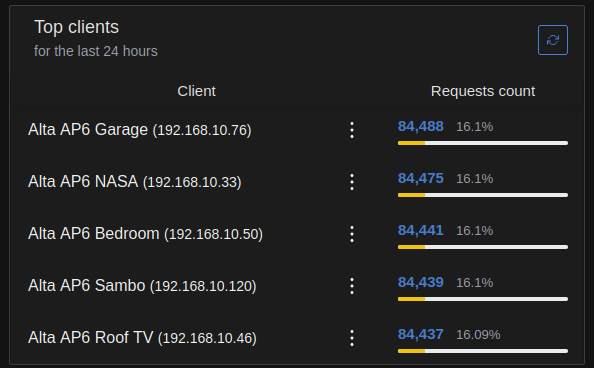
That sounds way to much. The stated and experienced frequency earlier in this thread is once every 30 s (at least for the ping towards Alta). Checking myself and getting those pings/requests for ping.alta.inc once every 30 seconds per network device.
Edit: The requests actually come in pairs every 30 seconds.
i can not understand why i should ssh into the AP and disable or even change the dns-proxy.In secure environments you can not have rogue DNS request to unreliable DNS servers (yes google is unreliable and yes it logs your requests).Why there is no option to change that in the GUI (it is not a big change to implement something like that).If it is a backup solution why it does not execute the DNS request in case there is no actual response.In any case an End User should be able to change on demand that and be free of any software restrictions.
I wonder if the Alta Team ever figured out whats really going on with those excessive DNS Requests. In my case, I still have 1 request to ping.alta.inc per second per AP, in my case, with 6 APs thats nearly half a million DNS requests per Day. Thats in my opinion unacceptable and holds me back recommending Alta - Although I really like those AP’s otherwise.
We’ve still never been invited to a site or actually seen this in any of our own sites. If you have a site that you’re willing to invite us to, please do so, and we will take a look.
I was playing around with /cfg/rc.local yesterday, trying to override DNS Settings, disable the DNS Proxy etc.
Didnt really get anything to work reliably (in fact the AP’s all disappear from my local controller when I stop the dns proxy for example).
I then reverted all changes to original and restarted all AP’s.
Since then, the 1s DNS queries stopped and I see now the 30s requests only.
The issue somehow fixed itself? Quite unclear why?
Neverthless, I definitely dont like the hardcoded way of quering Google/Cloudflare/openDNS in the /etc/config/https* config file. Definitely should be up to the user to decide which (local or public) DNS he wants to use!
That’s good to hear, but let us know if you see anything else interesting. The pre-configured Google/Cloudflare/openDNS settings are only for backup, in case the network’s default DNS is not functional. If you want to manually override them you can use uci commands to modify the settings and restart the https-dns-proxy service (and save the script in /cfg/post-cfg.sh)