I’m new to Alta and so far I’m liking what I see. Simple question - I want to incorporate Alta devices with existing equipment. So will I have an issue connecting an AP6 to a 3rd party managed switch and manage it from the cloud? I need a Poe injector I’m sure. Will a 802.3at 48v work?
Shouldn’t be a problem! I have a number of sites where Alta APs are deployed with a third party switches. Of course, having everything in the Alta Controller is nice, but can’t always replace it all 
Sounds like that injector will work since the data sheet calls for PoE+
Although I think Alta Labs has an injfector you can get as well if you don’t already have one.
Thanks! It would be nice to replace everything at once but the budget doesn’t allow that - especially since some of the equipment is fairly new. Too bad I didn’t find Alta before purchasing them.
Do I need to trunk the port for the AP6 and add the vlans that the AP will use? How about the default vlan - from what I understand the cloud management uses it to control the AP?
You’re welcome!
No, I totally get it. Most people, very much including myself, don’t exactly have unlimited funds to drop on network gear 
On the VLANs yes, that’s how I usually operate it. Make sure the VLANs are tagged on the switch port and tagged on the SSIDs you create for the AP. The default VLAN is 1, although you can specify a management VLAN if you’re setup for it
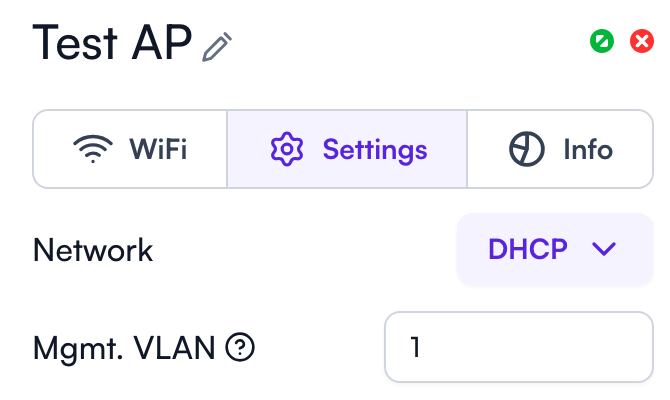
Basically as long as it can reach the Internet then you should be able to manage it from the cloud controller.
I am using some AP6-PROs with MikroTik switches with PoE ports, works as expected 
Thanks for the info! I don’t have any switches with active poe so I ordered an injector. I think running the AP from the switch will make it easier to manage this network.
Ok, I need a little help here. Since the AP6 that I am moving to a managed switch was connected to a Route10 on the border, I’m confused. I don’t know exactly how the default vlan that is auto created works with existing structure. Do I trunk vlan 1 to the AP6 (it will pass through 2 L3 switches), or do I just connect it to an existing vlan on the switch and let whatever magic happen?
I can’t afford to have it down for very long, hence the question!
Are there any additional vlans setup on the managed switches? Most switches just default to vlan 1 so I would think that would carry all the way back to the Route10 unless certain ports untagged on different vlans.
There are 8-10 vlans on the switches but only 3 of them will be trunked to the AP. The management vlan of the system is 99, but I guess I am willing to change that to 1.
In that case I would think that if the management vlan on the AP was set to 99 ahead of moving it then it should be OK once it’s moved. Basically as long as it can make it back to the router and Internet then I would think it would be fine. Although I have gotten myself flipped around when configuring vlans before
I understand! I guess the Alta’s are a blend of home networking with a little bit of business thrown in. This system has fiber gigabit and public IP so we generally don’t use 1 as management for security.
Anyway, I will give it a shot!