I’ve been using the Route10 with the cloud controller since late last year and it has been working fine for my needs. However I need to change ISPs in the next week or so and am wondering how I would re-configure the Route10 without an internet connection? Is this something that would require a full reset like this post suggests?
In the past I’ve used a basic ISP supplied router and was able to login via the local gateway e.g. 192.168.0.1, to change ISP login details and such during the changeover. But I can’t seem to find how to do the same through the cloud controller. I could learn what to do via SSH but I’d rather a simpler solution. Would setting up a local controller be useful in this case?
What I’ve generally done is entered in the new ISP settings into the cloud controller right before switching over. That’s assuming the new ISP is making their service available while you still have connectivity with the old ISP.
So for example, if there was a static IP being assigned by the ISP and that was changing with the new ISP, I’d enter in the new IP just before the switch. This would allow the new setting to propagate to the router and be ready for connecting to the new ISP. This, of course, would prevent the router from working with the old ISP but that hopefully shouldn’t be a big deal assuming the new ISP’s equipment is setup and ready to go while you’re still getting service from the old ISP.
Otherwise that is a case where the local controller should be handy. The other option is resetting the Route10 and adding it back to the same site with the new settings. After a reset there’s a web interface available on the Route10 for entering in ISP settings for initial setup or it can be done through the mobile app. You’d want to make sure the new ISP settings are already set in the cloud controller in that second scenario as you would run the risk of getting the router online and then it dropping back offline because it pulled in the old ISP settings again from the cloud controller.
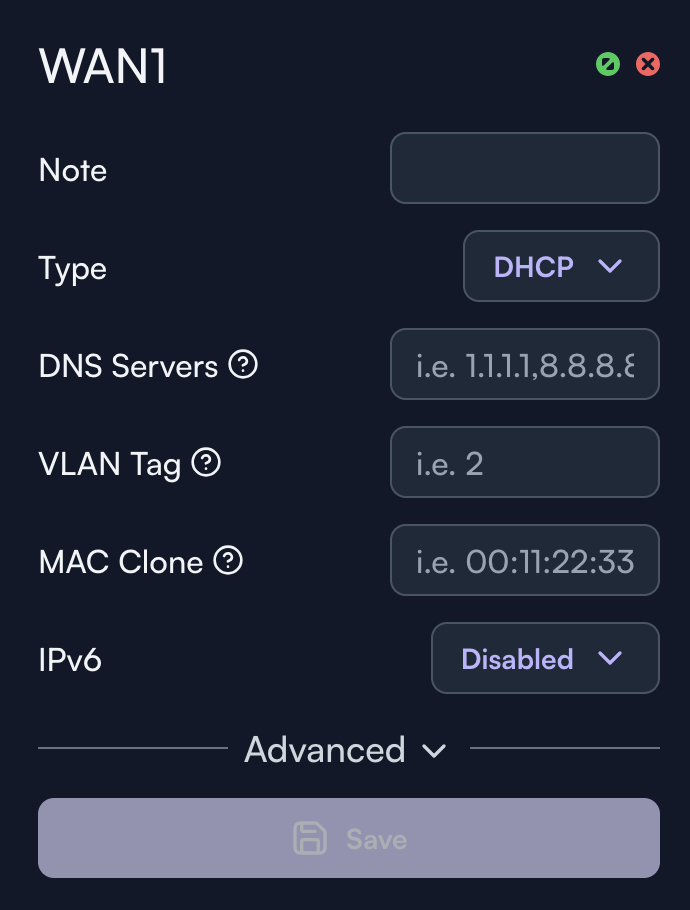
In my case it’ll likely be the second scenario, not having a concurrent connection with the two ISPs. I’ve managed to locate the WANs section in the cloud controller. It appears my current ISP connection is via DHCP which doesn’t seem to require a username and password? Does this mean if my next ISP also uses DHCP I should be ok with not changing anything and it’ll automatically switch over?
I think in the past I have had ISPs who have given me PPPoE username and passwords which I’ve had to enter manually. I presume I’ll have to use reset method if that is the case this time around.
W.r.t. a local controller I could try to get one up and running but I’ve read that the Docker container is not persistent and the migration process isn’t easy? I have some VLAN, firewall rules, and static IPs set-up that I’d rather not do again manually. Does anyone have experience they could share? Or an update on the transfer process?
On top of what @Beaker said as a just in case, I’d recommend reaching out to your new ISP to confirm what they’re looking for. If it’s DHCP then it should just be as simple and connecting the Route10 to their equipment and it obtaining an IP address.
In the end my new ISP was using DHCP after all. So I did not have to break out the SSH / change config. Changeover went very smoothly. Didn’t notice it at all. Thanks for the help everyone.