I usually work from home on my laptop, which connects to my AP6 Pro via Wi-Fi. I often change locations. Sometimes I work in the garden, living room, kitchen, and so on.
Throughout the day, I have many Microsoft Teams video calls with customers, so excellent video and audio quality are essential. Meanwhile, my wife and children stream 4K videos.
I upgraded my entire configuration to WPA3 (2.4 GHz and 5 GHz).
Optimization is always difficult because your Wi-Fi environment and use case may differ greatly from mine. I optimized it for my use case:
- Low-density environment (few neighboring WLANs).
- Mixed clients (802.11ac and 802.11ax).
- VoIP/video stability (WiFi calling, Microsoft Teams).
- A 250 Mbit/s fiber internet connection
- Compatible with Nightly ACS (Automatic Channel Selection).
- DTIM=3 (set in GUI).
Below, you can find my optimized power user settings, which have worked great for me for a long time. I would be happy to receive some feedback. Did I do something wrong? Or did I mess it up? Or did I do something right?
WARNING: Do not copy my script “as is”. I am not an Alta Labs team member nor a Wi-Fi professional. I created the script based on my personal research for my use case. Specifically, choosing the GCMP-256 cipher in the My Cipher section can lead to incompatibilities if you have older clients in your environment. My script is intended to inspire discussion. And maybe you may find some of it useful, too!
Thank you all and the great community!
I have added the script here:
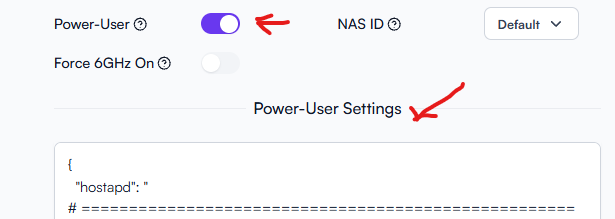
Here is the complete script:
{
  "hostapd": "
# ====================================================
# Alta Labs AP6 Pro - WiFi 6 (802.11ax) Configuration
# ====================================================
# Optimized for:
#   - Low-density environment (few neighboring WLANs)
#   - Mixed clients (802.11ac + 802.11ax)
#   - VoIP/Video stability (WiFi Calling, Microsoft Teams)
#   - 250 Mbit/s fiber internet connection
#   - Channels 36-48 (Non-DFS, Germany)
#   - Compatible with nightly ACS (Automatic Channel Selection)
#   - DTIM=3 (set in GUI)
#
# IMPORTANT NOTES:
#   - OFDMA is automatically enabled with ieee80211ax=1
#   - Spatial Reuse (he_spr_*) not supported or managed by firmware
# ====================================================

# ==================================================
# WPA3-Specific Configuration for Cosmos-Secure SSID
# ==================================================

# Offers CCMP (standard, compatible) + GCMP-256 (stronger, optional)
# Clients automatically select the strongest supported cipher
rsn_pairwise=GCMP-256 CCMP
# rsn_pairwise=GCMP-256

# Group Cipher for Broadcast/Multicast
# CCMP for maximum compatibility, GCMP-256 for more security
# group_cipher=CCMP
# group_cipher=GCMP-256

# Dragonblood-Schutz via Hash-to-Element (H2E)
sae_pwe=1

# SAE Anti-Clogging (Optional)
# Protection against DoS attacks on SAE handshake
# Threshold: At >5 simultaneous SAE handshakes -> Anti-Clogging active
sae_anti_clogging_threshold=5

# Erzwingt MFP für SAE (Defense-in-Depth zu GUI 'Required')
sae_require_mfp=1

# Accelerates SAE handshake. Reduces handshake latency by ~20ms
sae_confirm_immediate=1

# === SAE Groups (Optional) ===
# Elliptic Curve Groups - Priority: 19 (fastest) first
# Fallback to 20, 21 if client only supports these
sae_groups=19 20 21

# ====================================================
# WiFi 6 (802.11ax) Core Activation
# ====================================================

# Enable 802.11ax (WiFi 6) with ALL core features:
# - OFDMA (Orthogonal Frequency Division Multiple Access) - auto-enabled
# - 1024-QAM for higher data rates
# - Longer OFDM symbols for improved efficiency
# - Enhanced MU-MIMO support
# Backward compatible: 802.11ac/n/a clients continue to work
# NOTE: OFDMA requires NO additional parameters - it's automatically active
# MANDATORY Hierarchie: n (Basis) -> ac (WiFi 5) -> ax (WiFi 6)
# ieee80211n=1
# ieee80211ac=1
# ieee80211ax=1

# ====================================================
# Beamforming (Directional Signal Transmission)
# ====================================================

# HE Core Settings (WiFi 6 - 802.11ax)
# Enable Single-User Beamforming
# Improves range and signal quality to individual clients
# Especially important in larger apartments/houses
he_su_beamformer=1

# SU-Beamforming receiver side
# Enables bidirectional beamforming
he_su_beamformee=1

# Enable Multi-User Beamforming
# Highly recommended with predominantly modern clients (2020+)
# Enables parallel beamforming to multiple devices simultaneously
# IDEAL for: WiFi Calling + Teams calls at the same time (your main use case!)
# Older clients automatically fall back to SU-Beamforming
# If issues occur: Set back to =0
he_mu_beamformer=1

# ====================================================
# BSS Coloring (Interference Reduction)
# ====================================================

# BSS Color to distinguish from neighboring WLANs (value 1-63)
# Reduces unnecessary wait times when neighbor APs are present
# In low-density environments: minimal effect, but doesn't hurt
# Recommendation: Keep enabled for future-proofing
he_bss_color=7

# Partial BSS Color usage disabled
# =0: Simpler handling, sufficient for low-density environment
# =1: Only useful with many neighboring WLANs
he_bss_color_partial=0

# ====================================================
# Target Wake Time (Energy Efficiency)
# ====================================================

# Enable TWT responder
# Clients (especially smartphones, IoT) can schedule sleep/wake cycles
# COMPATIBLE with DTIM=3: TWT schedules between DTIM beacons
# Reduces battery consumption by up to 30% on compatible devices
he_twt_responder=1

# Do NOT enforce TWT
# Allows connection of older clients without TWT support
# Modern clients use TWT automatically when available
he_twt_required=0

# ====================================================
# RTS/CTS (Collision Avoidance Mechanism)
# ====================================================

# RTS/CTS effectively disabled (2347 bytes = maximum = off)
# Hidden node problem unlikely in low-density environment
# RTS/CTS would only create overhead
# VoIP packets (<200 bytes) would never trigger RTS
# If problems occur: Lower to 1023 (protects packets >1023 bytes)
he_rts_threshold=2347

# ====================================================
# WMM / U-APSD (VoIP Essential)
# ====================================================

# Enable Wi-Fi Multimedia (WMM)
# PREREQUISITE for all QoS features (EDCA)
# Without WMM, no traffic prioritization works
wmm_enabled=1

# Unscheduled Automatic Power Save Delivery
# Essential for WiFi Calling: Reduces latency + saves energy
# iPhone/Android use U-APSD automatically for VoIP
# Enables spontaneous sending without explicit poll request
uapsd_advertisement_enabled=1

# ====================================================
# QoS Info Fields (MU-EDCA Extension)
# ====================================================
# Parameter Set Count (0-15)
# Increment this value whenever you modify MU-EDCA parameters
# Signals to clients that QoS parameters have changed
# Value: 1 = first configuration set
he_mu_edca_qos_info_param_count=1

# Queue Acknowledgment (0 or 1)
# Controls whether clients must acknowledge queue status updates
# 0 = No acknowledgment required (reduces overhead)
# Recommended: 0 for low-density environments
he_mu_edca_qos_info_q_ack=0

# Queue Size Reporting (0 or 1) - CRITICAL FOR VOIP/VIDEO
# Allows clients to report their uplink queue depth to the AP
# Enables the AP to optimize trigger frame timing for MU-OFDMA uplink
# ESSENTIAL for Microsoft Teams/VoIP: Stabilizes video upload streams
# Recommended: 1 (enable) - no downside in any environment
he_mu_edca_qos_info_queue_request=1

# TXOP Duration Request (0 or 1)
# Allows clients to request transmission opportunity duration
# 0 = Clients use standard TXOP allocation
# Recommended: 0 for VoIP (keeps latency predictable)
he_mu_edca_qos_info_txop_request=0

# ====================================================
# QoS: Voice over WiFi (AC_VO) - Optimized for Low Density
# ====================================================
# Arbitration Inter-Frame Space Number (AIFSN)
# Minimum wait time before attempting channel access
# Range: 2-15 (lower = higher priority)
# Value: 2 = absolute minimum = highest possible priority
# Use case: WiFi Calling, VoIP, WhatsApp/Teams voice calls
he_mu_edca_ac_vo_aifsn=2

# Exponential Contention Window Minimum (ECWmin)
# Defines minimum backoff range on first transmission attempt
# Formula: CW = 2^ECWmin - 1
# Value: 2 → CW = 3 (extremely aggressive for voice)
# Changed from 3 (CW=7) to 2 (CW=3) for low-density environments
# CAUTION: Only use in environments with <3 competing WLANs
# Effect: Reduces average wait time from ~5 TUs to ~2.5 TUs
he_mu_edca_ac_vo_ecwmin=2

# Exponential Contention Window Maximum (ECWmax)
# Defines maximum backoff range after collision
# Formula: CW = 2^ECWmax - 1
# Value: 3 → CW = 7 (small window = fast retry)
# Changed from 4 (CW=15) to 3 (CW=7) for minimal retry delay
# Ensures voice packets retry quickly after rare collisions
# Critical for maintaining low jitter in Teams/WiFi calling
he_mu_edca_ac_vo_ecwmax=3

# MU EDCA Timer
# Duration (in units of 8 TU = ~8ms) that these QoS settings remain valid
# Range: 1-255 (255 = maximum = ~2 seconds)
# Value: 255 = maintain priority throughout entire call duration
# Essential for extended VoIP/video calls
he_mu_edca_ac_vo_timer=255

# ====================================================
# QoS: Video (Second Highest Priority)
# ====================================================

# AIFS = 3 for video (Microsoft Teams Video)
# Slightly higher than voice for prioritization
he_mu_edca_ac_vi_aifsn=3

# CWmin = 4 (CW = 15) for video
# Fast access for video streams
he_mu_edca_ac_vi_ecwmin=4

# CWmax = 6 (CW = 63)
# Moderate maximum for balance between throughput and fairness
he_mu_edca_ac_vi_ecwmax=6

# Timer at maximum for stable video streams
he_mu_edca_ac_vi_timer=255

# ====================================================
# QoS: Best Effort (Standard Traffic)
# ====================================================

# AIFS = 3 for normal data traffic (browsing, downloads)
# Standard wait time
he_mu_edca_ac_be_aifsn=3

# CWmin = 4 for Best Effort
# Standard Contention Window
he_mu_edca_ac_be_ecwmin=4

# CWmax = 10 (CW = 1023)
# Larger maximum for more fairness under high load
he_mu_edca_ac_be_ecwmax=10

# Timer at maximum
he_mu_edca_ac_be_timer=255

# ====================================================
# QoS: Background (Lowest Priority)
# ====================================================

# AIFS = 7 for background traffic (cloud backup, updates)
# Highest wait time = deferred
# Doesn't interfere with Voice/Video/Best-Effort
he_mu_edca_ac_bk_aifsn=7

# CWmin = 4 for background
he_mu_edca_ac_bk_ecwmin=4

# CWmax = 10
# Large range = many retries needed on collision
he_mu_edca_ac_bk_ecwmax=10

# Timer at maximum
he_mu_edca_ac_bk_timer=255

# ====================================================
# Stability Optimizations
# ====================================================

# Packet Extension Duration = 4 (in 4µs units = 16µs)
# Additional buffer at end of each packet
# Protects against timing inaccuracies and interference
# Increases robustness against packet errors in VoIP
he_default_pe_duration=4

# Allow all MCS/NSS combinations (all 16 bits set)
# AP and client negotiate best available rate
# Maximum flexibility for mixed client generations
he_basic_mcs_nss_set=65535
"
}