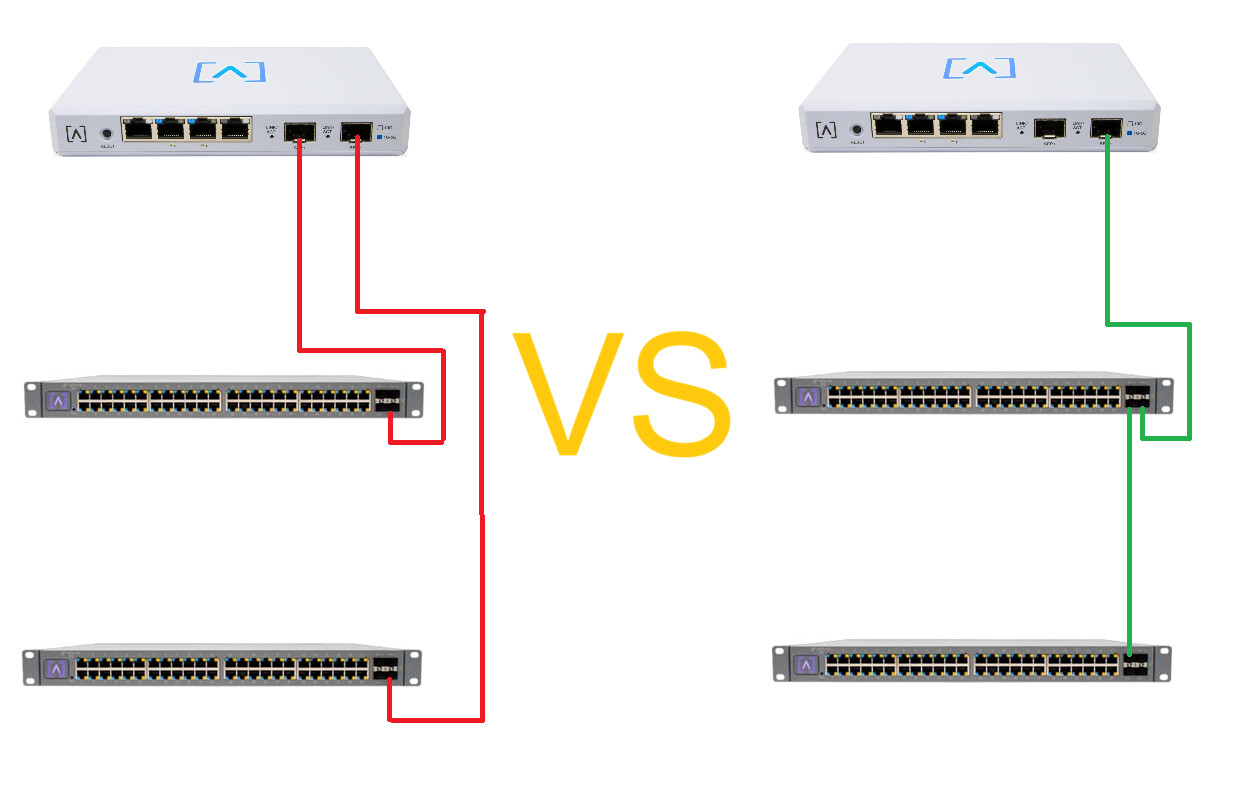
I have a 2-story home, and I ran fiber from a router location to feed a network switch on the second floor, and and another switch for the main/lower level. My question is; The fibers currently head end at the router location. I could extend one, and feed it from a core switch location, or distribute from the route10. Is there a performance/reliability advantage one way or the other? See picture..
Generally (and I will say generally, there can be exceptions!), you do not want your core router performing switching functions unless it is absolutely necessary.
The Alta Route10 does not have a built-in switch, so any switching happens in CPU. This is excellent for routed performance, and bad for switched performance - but that’s a good tradeoff to make in a small router like the Route10.
Switching in the Route10 will therefore give you a performance penalty - how much of a performance penalty depends on what else you’re doing on your router, what your traffic looks like, etc, but it’s generally inadvisable.
I would treat one port on your Route10 as a downstream LAN port, and daisy-chain your switches.
This does mean that one of your access switches is a single point of failure for your whole network. Whether this risk is appropriate for you is a decision you take yourself - in our network we have one S48 acting as a “core/access” switch hooked up to the Route10, and a few S16s hanging off the other 10G ports on the S48. This means the S48 is a SPOF for our entire network, but I consider that acceptable given it’s a SPOF for almost the copper ports anyway!
If you are using optical fibre and not DACs (and I always advise using transceivers + fibre over DACs), you can use a fibre coupler to bypass a failed switch - finding the appropriate one for your fibre is left as an exercise to the reader.
The one exception to this is if your switches don’t share VLANs - subnets: In this case, the traffic has to pass through the Route10 anyway, and you will get theoretically better performance by plugging each switch into a separate interface on the Route10.
TL;DR: Daisy-chain if you have the same VLANs on both switches - otherwise use two ports on the Route10.
This would be a perfect setup for a S12 use 