That’s exactly my point, though. You don’t need an Internet connection if you have a local controller that you can access, and you don’t need SSH in that case, either.
@Beaker “On-The-Fly Changes and Scanning” works perfectly as long as you have access to the controller, regardless of it being our cloud controller or a local one. As with any network controller, you won’t be able to use it if the connection has been severed, which is why some users opt for a local one.
Can you clarify this further for me Jeff. Does that mean that something has changed to where you can now access the controller by typing in the IP address to a browser?
I can’t speak for Jeff, but how I do it is a local caching dns server, and have an Nginx proxy in front of my controller, so for example I can hit alta-controller.domain.com , and Nginx handles the resolution of the local controller dns on the backend using the ddns name, or the IP address if static. I’d be happy to provide the Nginx configs either here or another thread if desired.
You still need to access the controller using the hostname, but as long as you have that DNS host configured in your site/Route10, then you can use the controller locally. We’ve mentioned that previously in various release notes (it can be done with a hosts files, but it’s definitely easier if it’s on the Route10 itself, network-wide), but we are still working on a full guide for this for those who are interested.
I understand, and that totally works. But the general home user that wants a local controller for security sake is not going to have all of that set up. That is the point we are all trying to emphasize.
Honestly then a static IP and hosts file would be the way I’d go, does the same thing, just not as dynamically. I do not use the route10 for DNS, so I haven’t experimented with the way Jeff is suggesting above.
In that scenario wouldn’t it be up to the client to decide which DNS server to use? For instance, I believe Windows just uses whichever DNS server it receives a response from first and then prioritises using that server from then on.
I’ve run into that with Windows Domain Controllers when an internal and external DNS server is being handed out via DHCP. If the external DNS server replies faster for whatever reason, then internal DNS resolution and directory authentication is broken until a restart of the client or the external DNS server address is removed from the client.
Am I correct in understanding that this would basically be setting the hostname and IP address for the controller in the host file on the Route10 and then using the Route10 for DNS resolution on the network? So if you typed the hostname into a browser the Route10 would resolve it for the client?
I don’t use the local controller myself and I know you mentioned working on a guide, but I just wanted to make sure I was envisioning the setup correctly!
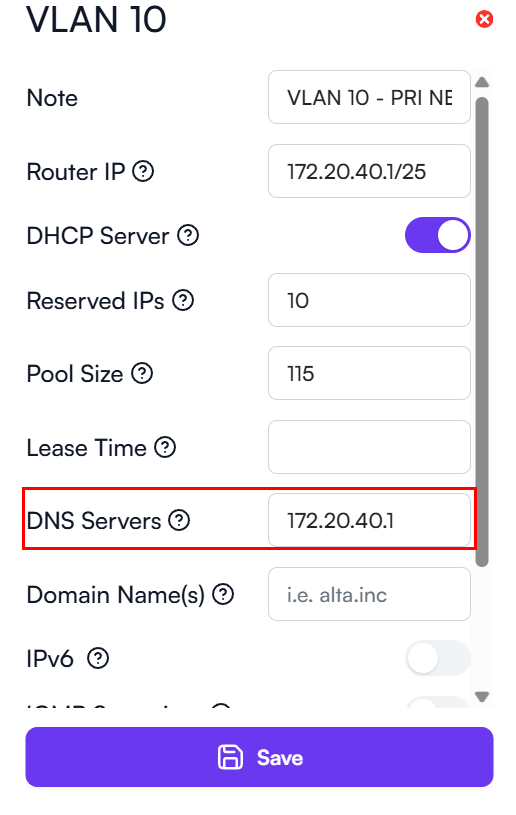
Yes, I’m quite aware. Now enter a second entry and pull your WAN connection on an R10 interface in a locally controlled environment and see if you can access your Alta Control/Controller. In that case, there should be an alert raised cautioning against secondary entries if it breaks local access.
With a static set only to the default gateway, you retain local Control access without an active ISP connection. But if you set a secondary, it will time out. Clearly there is some form of a metric based mechanism in place that senses a severed connection over the static gateway and reverts to the next DNS for resolution if computed, but in a locally controlled environment, this needs to be considered.
Yes, as long as the hostnames actually resolve, you can at least reach the controller. You also need to have a local NTP server available that you can point all of the Alta devices to, since they rely on accurate time.
@Alta-Jeff RE: your NTP statement. It sounds like Route10 does not include an NTP server. If that is correct, is that a feature that will be implemented in the near future?
Can we confirm this behavior can be replicated in your lab?
“With a static set only to the default gateway, you retain local Control access without an active ISP connection. But if you set a secondary, it will time out.”
This thread has been automatically closed due to inactivity. If you believe you have the same issue, please create a new post describing your issue. Feel free to link to this post for context if desired.