Here are the relevant sections of my ASA config
crypto ipsec ikev2 ipsec-proposal AES256
protocol esp encryption aes-256
protocol esp integrity sha-256
crypto map outside_map 10 match address [Crypto access list]
crypto map outside_map 10 set peer [Alta labs Route10 IP]
crypto map outside_map 10 set ikev2 ipsec-proposal AES256
crypto map outside_map 10 set ikev2 pre-shared-key [PSK]
crypto map outside_map 65535 ipsec-isakmp dynamic SYSTEM_DEFAULT_CRYPTO_MAP
crypto map outside_map interface outside
crypto ikev2 policy 80
encryption aes-256
integrity sha256
group 14
prf sha256
lifetime seconds 86400
crypto ikev2 enable outside client-services port XXXX
crypto ikev1 enable outside
Here are the sections from my Route 10 config
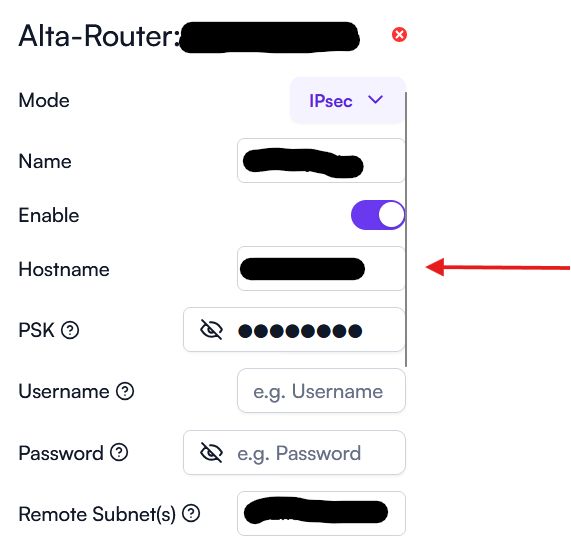
The name is just a description of the VPN.
For Hostname I used the public IP address of my ASA
PSK is self explanatory. Same one on ASA.
Remote subnet. I only need to reach one subnet so I define it here in the format xx.xx.xx.0/24
Here is my IKEv2 config
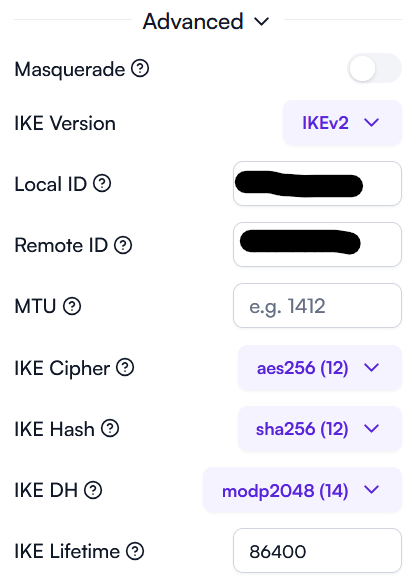
For local ID I used the gateway address of the Route 10 subnet.
For remote ID I used the public IP of my ASA
Not sure the IDs I used are what I should use but they work.
Here’s the ESP config on my Route 10
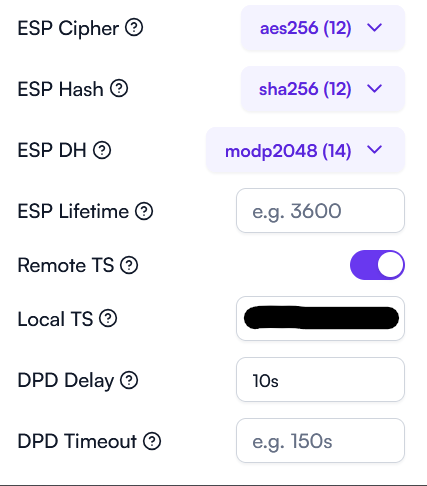
For local TS I used the local Route 10 subnet I wanted to encrypt in the format xx.xx.xx.0/24
So, on the ASA end in my crypto ACL I need to define the remote subnet and local TS as an entry with the source being the Remote ID on the Route 10 and the destination being the local TS on the route 10.
Also, on the ASA you have to make sure traffic between the encryptoed subnets is NOT NAT’d. I believe that needs explicitly defined, I believe turning off masquerade on the Route 10 ensures the traffic is not NAT’d at that end.